Quick Summary
I downloaded Replay Music (Applian) to record streaming music on my Windows 11 PC. Almost every step of the first run hit a problem.
The old audio driver was blocked by Windows. Before I'd recorded anything, the app made me fill in a tag form. Then it asked Yes or No about every open app, one prompt after another. My first recording ended in a "missing component" error, and no track was saved.
If you're on Windows 11, I'd go with something simpler, like Cinch Audio Recorder. Audacity works as the free fallback.
Tested on Windows 11 Home (26H2, OS build 26300.9974) · Replay Music 2026 installer build 2026.8.16.36 · Default MP3 128 kbps · Cinch Audio Recorder Ultimate v1.5.6.0, same machine
What Replay Music Is
Replay Music is Applian's desktop music recorder. It captures whatever plays on your computer and saves it as MP3, then tries to name and tag the song.
Applian's product page lists a solid set of features: recognize about 30 million songs, add album art and lyrics, split one long recording into tracks, filter out system sounds, burn CDs, and upload to Dropbox, Google Drive, or OneDrive.
It runs on Windows XP through 11 and macOS 10 through 11. I only tested Windows, so I can't speak to the Mac version.
On paper the feature list is broad, and Applian has been making capture tools for years. On an older Windows version where the driver loads, it may still be a workable option. I'll flag below where I never got to verify any of this myself.
Windows pricing on the order page is a subscription: $2.95 a month or $29.95 a year. The demo saves and tags 25 tracks before it asks for a license.
What I Tested, and What I Didn't
I ran the installer and tried my first recording on my own Windows 11 Home machine (26H2, build 26300.9974), installer build 2026.8.16.36, MP3 128 kbps.
The app stopped at first run. No track was produced.
So I didn't get to check recording quality, track splitting, song recognition, tag correctness, long sessions, or cloud uploads. Anything about those comes from Applian's docs, not my own test.
Hands-On: Installer and First Run
1. The driver notice

The installer first asks whether to install Replay Music's own audio capture driver, the DVR component.
The notice itself says this is an old driver, first built for Windows 8 and 10. It warns that Windows 11 may say the driver wasn't made for this version.
2. Component selection

The screen listed the required prerequisites and the app itself, plus Start Menu and Desktop shortcuts. One option was already checked: Optimize performance for your system.
That one made me uneasy. Why does a recording app need to optimize my system? I don't know what it changes, and it was on before I chose anything. The installer could make system-level changes that have nothing to do with recording, so if you don't know what it does, leave it unchecked.
Space required: 41.9 MB.
3. Windows blocked the driver

After I chose to install it, Windows' Program Compatibility Assistant popped up: "A driver cannot load on this device. A security setting is detecting this as a vulnerable driver and blocking it from loading."
Applian's own support page ties the notice to the driver's age and Windows 11's driver rules. Skip the driver, and some recording features may not work right without it.
4. The demo gate

Once the app opened, a dialog said demo mode saves and tags up to 25 tracks, with Buy Now and Continue in Demo Mode buttons. The free demo cuts you off after 25 saved and tagged tracks.
5. A tag form before I'd recorded anything

When I hit Record, the first thing I saw wasn't a recording window. It was an Override Tags form.
It asked for Album Artist, Performer/Contributing Artist, Composer, Album, Publisher, and Genre. I hadn't captured one song yet. What was I supposed to write in those fields? I had to cancel the form just to move forward.
Applian's guide says this override prompt is meant for recording a whole album when you already know the artist and album, and it can be turned off in Settings. On a first run, though, it gets in the way before any music plays.
6. Then it asks about every open app, one by one

After I canceled the form, the app went through whatever was running on my PC, one question at a time: "Record Weixin? Do you wish to record audio from Weixin?" Yes or No. Weixin (also called WeChat) is a Chinese messaging app, similar to WhatsApp.
Each open program brings its own question. With many apps open, you get a long chain of yes/no dialogs. It should let me pick the source once. Instead, it checks every window on the machine.
7. The main window

The main screen looks plain and bare — an empty track table under a Recording/Format header. It's simple enough, but the Record button isn't front and center; I had to look around to find where to start. On first open, an empty list with no obvious action doesn't tell you what to do next.
8. The Guides tab: just a logo wall

The Guides tab sounded like it would walk you through the app. Instead it's a grid of logos: music services on the left, radio stations on the right. Clicking one just opens the site in your browser.
There's no setup advice, no tips, no walkthrough of anything. For me it didn't help with what I was trying to do. The lineup also looks dated — several of these services shut down years ago.
9. The Settings page: deep options, but easy to get lost

Settings split into five tabs: Personalization, Output Folder, Recording Settings, Naming Rules, and Override Tags. There are a lot of toggles — recycle bin, proxy, player association, sleep prevention, tray behavior, imports, and more.
For someone who likes to fine-tune, that depth is there. For a first-time user, though, it's too much all at once. I didn't know where to start, and finding the one setting I wanted meant hunting across tabs. The controls are powerful, but the page doesn't guide you to the basics first.
10. Get Support

There's a Get Support tab in the left nav, which is good when something breaks. On the page itself, though, I didn't see a plain, obvious Contact Support button. The top row is small unlabeled icons, and most of the page is license details, debug toggles, and analytics options. When the missing-component error hit, I still wasn't sure which icon actually reaches a person.
The page also notes the app is powered by Jaksta under license to Applian.
11. First recording fails: missing component
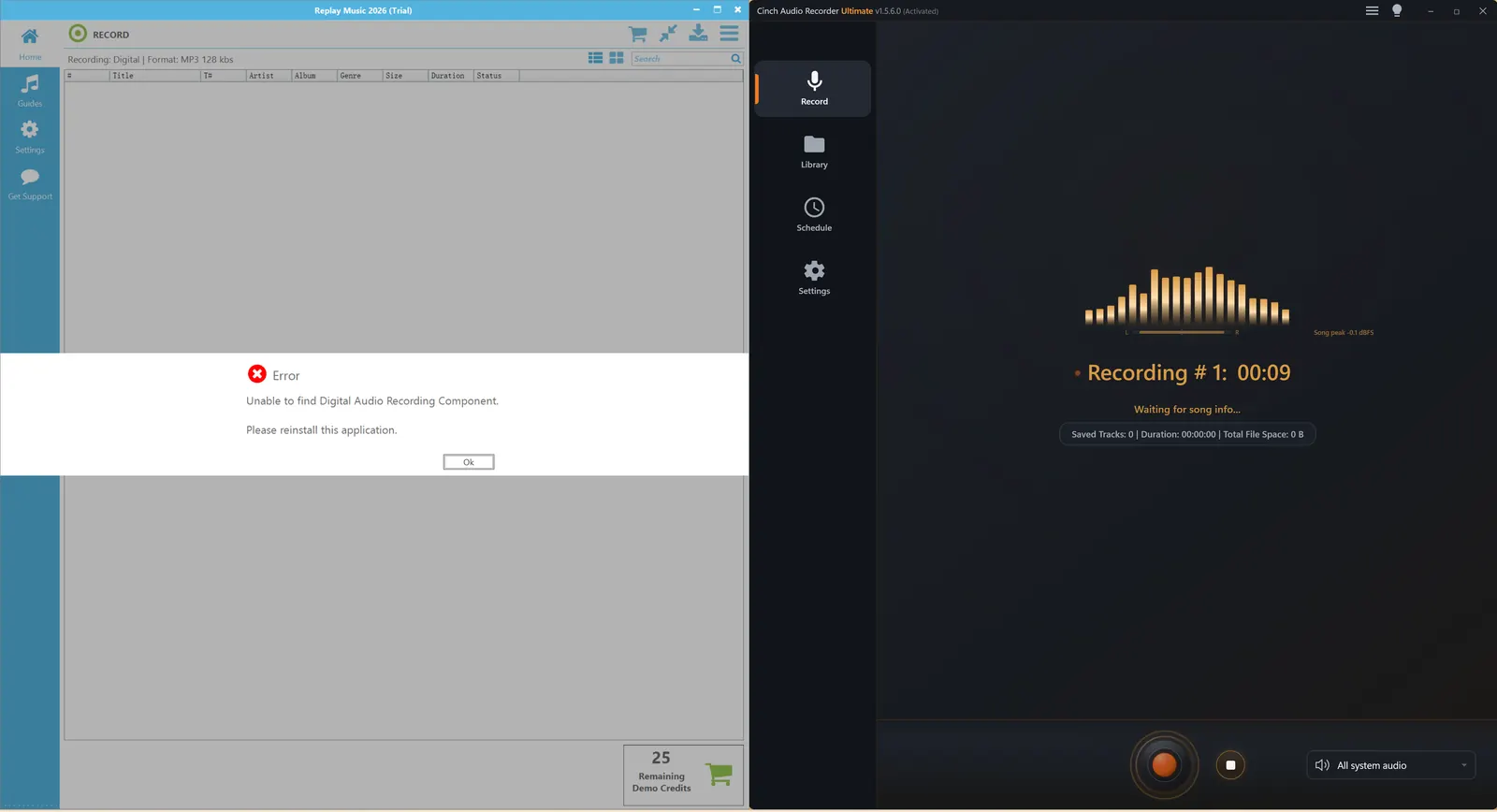
When I actually tried to record, I got: "Error — Unable to find Digital Audio Recording Component. Please reinstall this application."
My first guess was that it traced back to the driver that failed to load earlier. I went through Applian's support pages and forum to check.
The official knowledge base only says some recording features may not work without the driver; it doesn't link this specific error to the driver. The same error also shows up in Applian's forum for another recorder in the same suite, where a clean uninstall and reinstall didn't clear it. So the public docs don't back up my guess, and the only fix the app offers is reinstalling.
That's the moment the side-by-side matters. Right beside Replay Music, I had Cinch Audio Recorder running. It started recording with one click — no driver install, no extra forms. A few seconds after the song began, it had already pulled in the title and artist. Replay Music, on its side, stopped at the error.
What Went Wrong
The capture driver dates to Windows 8/10, and Windows 11 security can block it. When it fails, the app doesn't tell you why.
The first-run flow is roundabout: a tag form before recording, then yes/no questions for every app, with no one clean source choice. The missing-component message only says reinstall; it never connects the driver failure to the recording failure.
Honestly, the whole thing looks and behaves like a Windows 7-era app that hasn't been redone for Windows 11.
The things I couldn't check myself: 30-million-song recognition, album art and lyrics, precise track splitting, system-sound filtering, cloud uploads.
Replay Music vs Cinch vs Audacity at a Glance
| Replay Music | Cinch Audio Recorder Ultimate | Audacity | |
|---|---|---|---|
| Developer | Applian Technologies | Cinch Solutions | Audacity Team (open source) |
| Platform | Windows XP–11; macOS 10–11 (Mac not tested) | Windows 10/11, macOS 13.5+ | Windows / macOS / Linux |
| How it records | Its own DVR capture driver | WASAPI loopback; source selector picks one app or all system audio | WASAPI loopback (Windows) / microphone input |
| First recording | Blocked at first run in my test | One-click Record; system audio captured directly | Select device, record, stop manually |
| Output formats | MP3 (128 kbps default in my build) | MP3 up to 320 kbps, WAV, FLAC, ALAC, M4A | WAV, MP3, FLAC and more via export |
| Auto tagging | Claimed: song ID, art, lyrics (untested) | Automatic ID3, cover art, lyrics; manual tag editor | None; tags edited by hand |
| Ad / short-clip filtering | Claimed: system-sound filtering | Minimum-song-duration short-clip filtering | None |
| Trial / price | Demo: 25 tracks; Windows $2.95/mo or $29.95/yr; Mac price on Applian order page | 9-song free trial; $35.99 (regular $59.95) | Free, open source |
| Windows 11 status | Driver warning; component-missing error in my test | Supported on Windows 10/11 | Supported via WASAPI loopback |
Why Cinch Fit Me Better
- No old driver to install. Cinch records system playback through Windows' WASAPI loopback path, so it doesn't ask you to install a virtual sound device that Windows 11 may block.
- Direct flow. One Record button starts capture. No pre-recording tag form, no per-app Yes/No chain.
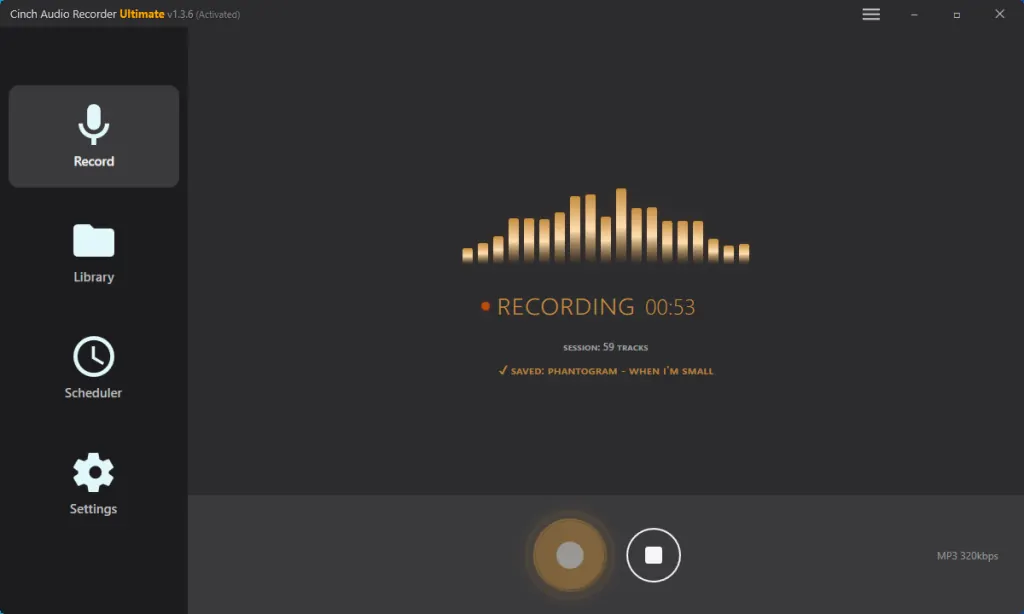
- Choose one app or everything. The source selector defaults to All system audio; open it to capture a single music app or browser only, so pings and alerts from other apps don't land in the track.
- Tags and cleanup after capture. It identifies mainstream songs and adds artist, title, art, and lyrics; a minimum-song-duration setting drops short clips like ads. Existing MP3, WAV, FLAC, M4A files can be imported and tagged again.
- Maintained and supported. Windows 10/11 and macOS builds are updated regularly, with a published user guide.
It's not perfect, though. By default Cinch captures the whole system mix on the chosen output device; the source selector can narrow it to one app or browser, but a few rare tracks, live versions, and remixes may still need manual tag edits, and recording a lossy stream doesn't give you true lossless quality.
The Record tab's source selector defaults to All system audio; open it to pick one music app or one browser instead:

A short walkthrough plays right here:
Who Should Still Try Replay Music — and Who Should Switch
Replay Music may still suit you if: you're on an older Windows version where the driver loads, you only need occasional MP3 capture, and you're comfortable fixing driver and routing issues yourself.
Switch to Cinch if: you're on Windows 11, you want recording, splitting, and tagging to work without driver trouble, and you'd rather try a maintained product with a 9-song trial on your own setup.
Use Audacity if: your budget is zero and you're happy recording and editing audio by hand, without automatic tagging.
Other Options Worth Knowing
Audacity

Audacity is free and open source. It records computer playback through Windows WASAPI loopback, and it's a full audio editor: cut, trim, mix, and export. The trade-off is no automatic tagging, no track splitting, and no ad cleanup — you organize the files by hand. It fits if you're comfortable editing and don't mind manual work.
Online audio recorder (no install)

If you only record a song or two now and then, there's also a browser-based online audio recorder. No software to install, no setup — open the page, pick the source, and record. It's free and simple for light, occasional use, without the tagging and organizing features a desktop recorder offers.
FAQ
Is Replay Music compatible with Windows 11?
The installer lists Windows 11, but its capture driver is an old Windows 8/10-era one. On my machine the driver was blocked by a security setting, and the first recording failed with a missing-component error.
Why does Replay Music say "Unable to find Digital Audio Recording Component"?
The error showed up after the driver didn't load in my test. Applian's support pages don't confirm the blocked driver causes it. The dialog only suggests reinstalling, and the same error has been reported in their forum even after a clean reinstall.
What is the Replay Music audio capture driver?
The app's own DVR virtual capture driver, used to record system audio when a downloadable media file isn't available. Applian notes it was made for Windows 8 and 10 and may trigger a Windows 11 compatibility notice.
Does Replay Music work with Spotify, YouTube Music, or YouTube?
It records whatever audio plays on the PC through its capture path. I never reached a finished recording, so I couldn't check capture quality or tagging from those services.
Is there a free Replay Music alternative?
Audacity is free and open source, and can record computer playback through Windows WASAPI loopback, but tagging, splitting, and ad cleanup are manual. Cinch offers a 9-song free trial.
Does Cinch require a virtual driver or my streaming account login?
No. It records system playback through WASAPI loopback and doesn't ask for your Spotify, Apple Music, or YouTube password.
Check It Yourself
These are Applian's own pages, so you can check the claims yourself:
- Replay Music official product page
- Applian order page
- Applian support: Why am I seeing a Windows 11 driver message?
The fairest test is your own machine: Replay Music's demo saves and tags 25 tracks, Cinch's trial records 9 songs. Try both against your usual streaming source before paying.