
Tunarrange
Turn messy music folders into a clean, searchable library.
Get a music library with cleaner tags, better artwork, organized folders, and files that are easier to browse, search, and keep.
- Fix the missing tags, bad covers, messy filenames, and scattered folders that make your library frustrating to use.
- See exactly how tracks, folders, and export files will look before you apply cleanup changes.
- Keep original files safe while you organize the collection into something cleaner and easier to manage.
Safe by design
Preview-first cleanup
See the repair plan before Tunarrange writes metadata, renames files, or moves folders.
Local scan
Tags, covers, lyrics, names, folders
No original overwrite
Product Focus
When your music library is a mess, this is where you get control back.
Tunarrange is built for the moment when songs are hard to identify, folders are inconsistent, and your collection no longer feels organized enough to trust or enjoy.
Workflow
Clean large libraries without losing control
Use one repeatable cleanup flow to go from scattered files and broken details to a library that feels organized again.
1
Step 1
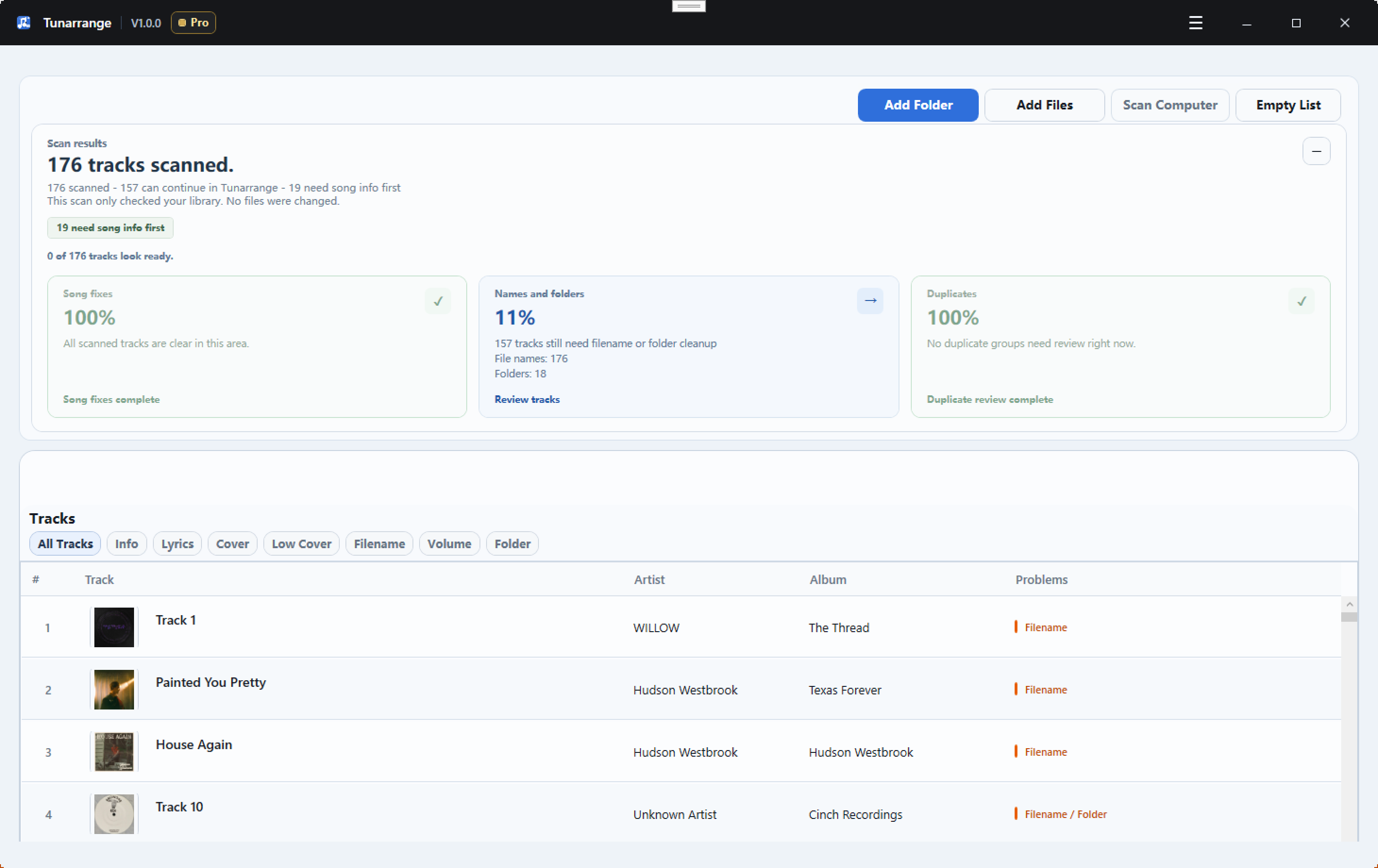
Scan the part of your library that feels out of control
Start with one messy folder or your whole collection and quickly see which songs have broken details, bad organization, or cleanup issues worth fixing first.
- Add a folder, selected files, or scan the computer for music
- Filter issues by Info, Lyrics, Cover, Filename, Volume, and Folder
- See what is still making the library feel incomplete
2
Step 2
Review the fixes before your files are touched
Check metadata updates, rename results, folder moves, duplicate decisions, and export output before you apply anything, so cleanup never feels risky.
- Preview tags, lyrics, artwork, filenames, and folder changes first
- Verify the exact cleanup plan before committing it
- Review duplicates without automatically deleting files
- Use manual edit and batch edit when you want tighter control
3
Step 3
Apply one clean system across the whole library
Once the preview looks right, organize filenames, folders, volume data, and export formats in a repeatable way so the collection stays clean instead of drifting back into chaos.
- Use the same naming and folder rules across future cleanups
- Create CD-ready WAV plus CUE exports for archive and burner workflows
- Avoid overwriting existing files during cleanup output
- Undo the latest repair or organization run if needed
Core Value
The faster way to clean a music library that got out of hand
Instead of living with a library full of broken details, Tunarrange helps you turn it into something cleaner, clearer, and easier to keep organized.
See everything making your library look messy
Find missing tags, bad artwork, broken filenames, wrong folders, duplicates, and uneven volume in one scan so you know exactly what is hurting the library experience.
Fix track details so songs are easier to recognize
Repair titles, artists, albums, lyrics, and cover art so your collection looks complete, reads cleanly, and is easier to search across players and devices.
End up with a library that feels organized again
Rename files, rebuild folder structure, smooth out volume differences, and export cleaner copies so your music is easier to browse, move, back up, and keep long term.
Problem Types
Know exactly why your library feels messy
See the exact problems that make tracks harder to find, identify, sort, and enjoy, without hunting through files manually.
Missing song details stand out right away
Spot songs with incomplete title, artist, album, and other core metadata before they keep spreading confusion across your library.
See which tracks still feel unfinished
Find songs without embedded lyrics and review fixes visually instead of guessing which files still need attention.
Artwork problems become easy to notice
Catch missing, blurry, or undersized cover art so albums look cleaner and more consistent in your players.
Broken naming patterns are obvious at a glance
Preview filenames that are inconsistent, noisy, or hard to scan so you can standardize them before applying changes.
Wrong folder placement stops hiding in the background
See when music files sit in the wrong folder structure for your rules, albums, or artist organization.
Volume issues show up as part of the cleanup plan
Identify tracks missing loudness data so playback feels smoother from song to song after library cleanup.
Turn half-finished files into a library that looks complete
Fix the details that make a music collection feel sloppy so songs are easier to identify, browse, and enjoy without manual cleanup in multiple apps.
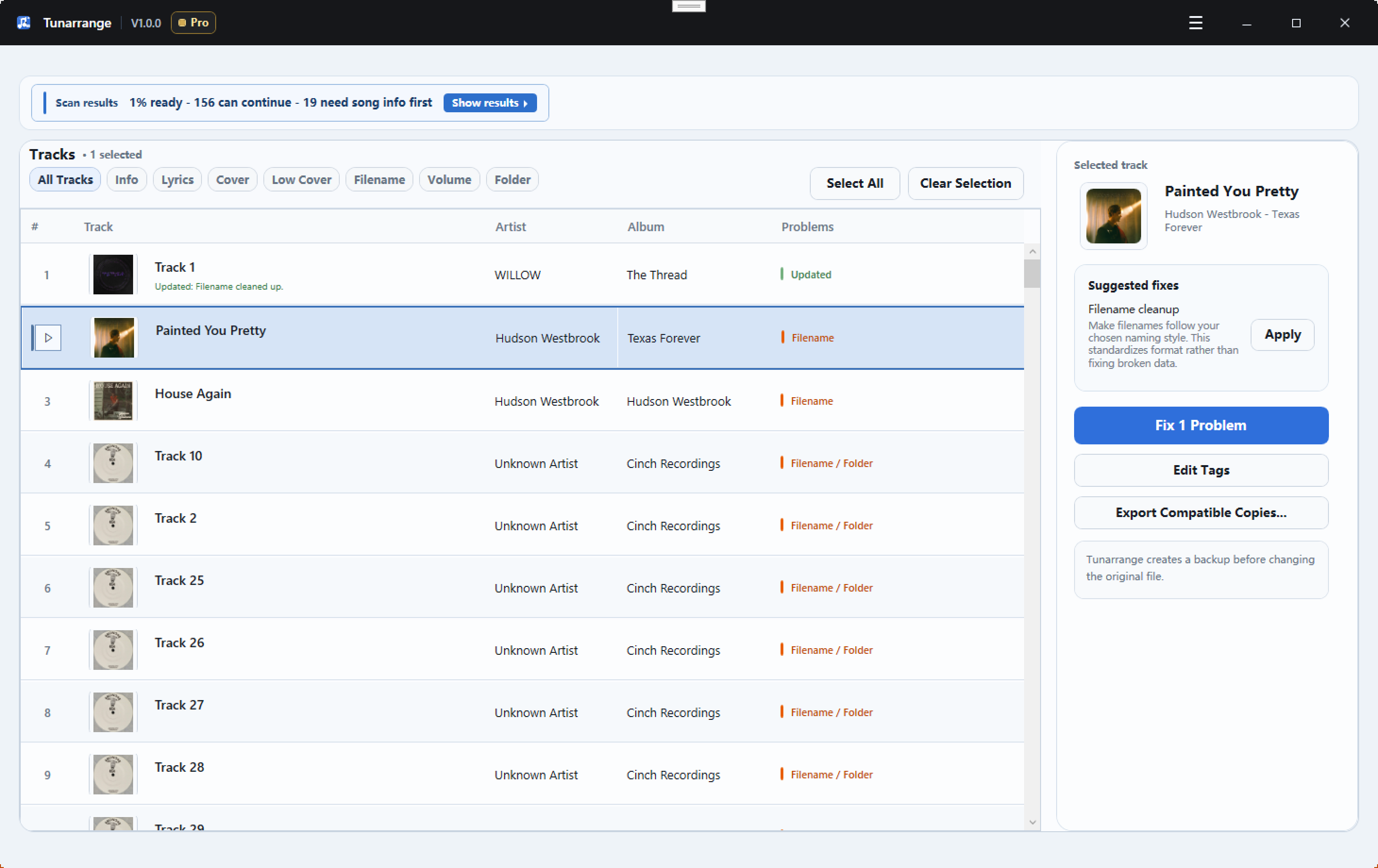
- Fill missing title, artist, album, and other song details
- Upgrade weak or missing cover art with better matches
- Write lyrics into supported files so tracks feel more complete
- Make local files look cleaner across your music players
Organize your library without feeling afraid to press go
Clean up filenames, folders, duplicates, and export copies without blind overwrites, so you can improve the collection without risking the originals.
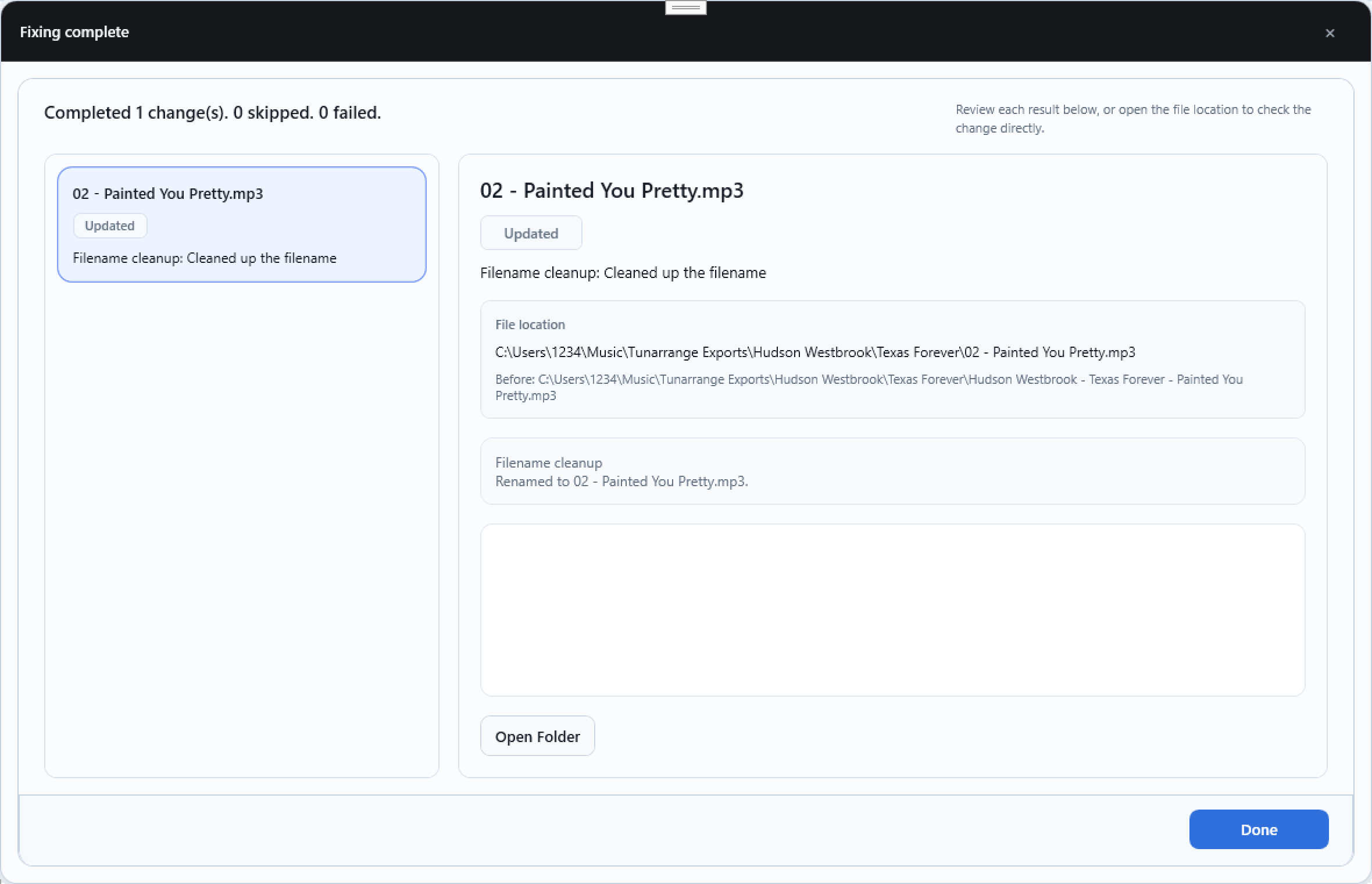
- Preview filename and folder changes before they happen
- Skip risky or unclear fixes instead of forcing them
- Review duplicates separately before removing anything
- Create compatible copies without replacing original music files
- Generate ordered WAV files and CUE output for Audio CD prep
Why Upgrade
Upgrade when cleanup becomes a library project
Use Pro when you want to stop babysitting cleanup one folder at a time and start bringing your whole collection under one organized system.
Organize your whole libraryStop fixing one folder at a time
Move from testing a few files to cleaning albums, artist folders, and full collections with one workflow.
Clean large libraries without second-guessing every step
Preview the plan first, then apply metadata, artwork, filename, folder, volume, and export fixes across many tracks in one pass.
Keep your collection organized going forward
Use the same cleanup rules for new downloads, ripped CDs, backups, and copied files so the library stays consistent.
FAQ
What to know before you clean your first folder
These are the quick answers people need before trusting a cleanup tool with a music library they actually care about.
What does Tunarrange actually fix?
Tunarrange helps turn a messy local music library into one that is easier to search, browse, and manage by fixing song details, artwork, filenames, folders, duplicates, and volume issues.
Will Tunarrange change my files immediately?
No. You get to review the cleanup results first, so you can improve the library without wondering what the software is changing behind your back.
Can I try it on one folder first?
Yes. Start with one messy folder, see how much cleaner and easier to manage it becomes, then scale the same workflow across the rest of your library.
Can Tunarrange prepare files for an audio CD?
Yes. Export Compatible Copies now includes Audio CD and CD-ready WAV plus CUE presets that generate ordered WAV files, an album.cue file, and a README.txt without modifying your original music files.
Is Tunarrange a music player?
No. Tunarrange is designed to clean, fix, and organize local music files rather than serve as a playback app.
Ready to try it?
Start with one messy folder and see how clean your library can feel
Try Tunarrange on a small part of your collection first, then use the same cleanup flow to make the rest easier to search, browse, and keep organized.