Quick Summary
Considering Sidify? This review reveals 4 truths the marketing won't tell: Mac speed limits, account ban risks, lossless myths, and refund friction before you commit.
What Sidify Actually Does (And How It Actually Works)

Brutal Truth #1: The Mac 10X Story Is Messier Than the Sales Page Suggests
Bottom line: Most Mac users on modern macOS will not get 10X speed.
Sidify’s own version history from 2017-2018 hows multiple releases stuck at 1X speed under macOS High Sierra and iTunes 12.7. Sidify also still has a public support page about using SIP changes to reach 5X on macOS 10.13, while a newer FAQ says WebPlayer Download mode can reach 10X on macOS 10.14 and above.
What this means for you:
Brutal Truth #2: Spotify Is Watching, and They’re Not Okay With This
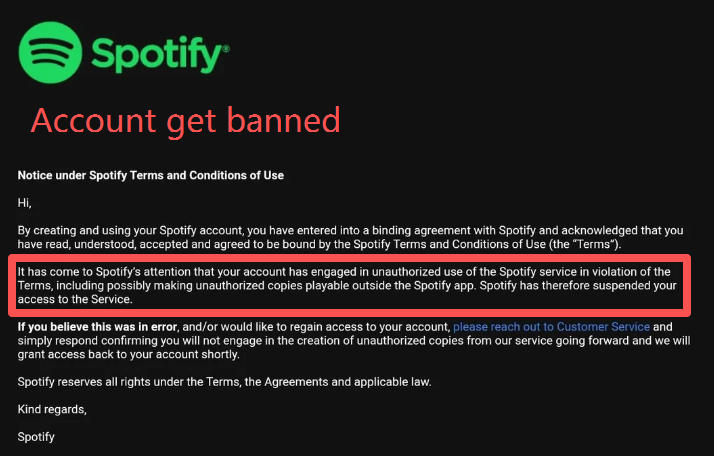
Bottom line: The account-risk issue is real enough that I would not use Sidify with a Spotify account I cannot afford to lose. Sidify requires you to log into your Spotify account or use the web player through their interface. That creates a more visible access pattern than plain local audio capture.
Multiple Reddit threads document users receiving warning emails from Spotify about “unauthorized content downloads” after using Sidify or similar tools. Trustpilot reviews include verbatim accounts. One reviewer wrote: “Apart from getting your Spotify account BANNED in short order, Sidify LIES about its ability to stream Lossless audio.”
Audials’ 2026 documentation explicitly warns users about this risk: Spotify has increased detection of third-party tools that access streams through login automation. German Trustpilot reviews from 2025 report accounts permanently suspended—Spotify’s standard suspension message cited—after months of Sidify use.
What this means for you: If your Spotify account has 10 years of playlists and saved albums, the risk calculus changes. Sidify’s official buy page currently lists $44.95 for a yearly plan and $89.90 for a lifetime plan, but the more important cost is account exposure. No one publishes exact ban statistics—Spotify does not share that data—but the pattern of community reports from 2021-2026 shows this is not an isolated complaint.
Brutal Truth #3: “Lossless” Is Marketing Language, Not Audio Engineering
Bottom line: You’re not getting a true lossless source from Spotify. Sidify claims “lossless” output in FLAC and WAV formats. The marketing sounds like you’re getting CD-quality audio. The reality is that: Spotify’s source stream is lossy, and changing the output format does not put the missing audio data back.
Audio engineering communities and technical analysis confirm what matters here: you are starting with a lossy source. Think of it like making a photocopy of a photocopy—each copy cannot restore detail that was already removed. Re-encoding a lossy Spotify stream to FLAC does not recover missing data. Re-encoding that same stream to MP3 adds another lossy step on top.
The FLAC container can be lossless in its own encoding, but the source was still lossy. That is why “FLAC output” and “true lossless source” are not the same thing. At best, you are getting a lossless wrapper around audio that already lost information upstream.
One Trustpilot reviewer explicitly called this out as “false advertising.” Whether that wording is legally accurate depends on jurisdiction. But from an audio quality standpoint, the key point is simpler: Sidify can change the file format, but it cannot turn Spotify into a true lossless archive. The limitation exists before Sidify touches the file.
What this means for you: Sidify’s output works for listening through phone speakers or Bluetooth headphones. But if you bought it expecting to archive “lossless” versions of your Spotify library for use on a high-end DAC, you’re paying for marketing terminology that doesn’t match audio reality.
Brutal Truth #4: That 30-Day Guarantee Has Fine Print That Matters
Bottom line: The 30-day guarantee has exclusions that can block your refund. Sidify’s refund policy says “30-day money-back guarantee” for lifetime licenses. The official policy page also lists what it won’t cover:
- “You change your mind after purchasing”
- “Products fail to meet customer’s needs due to lack of understanding of the products functions”
That second clause is the one that shows up in Trustpilot 1-star reviews. Users report receiving refund denials with the explanation that they “didn’t understand the product functions properly.”
Beyond that specific exclusion, community feedback points to other friction points:
- Email support responses can take days to weeks
- Refund requests require extensive log files and screenshots
- Auto-renewal cancellation is reported as difficult—users who thought they cancelled still got charged
The policy text exists. Refunds are theoretically available. But the gap between “policy allows” and “actually getting your money back” is where multiple users report getting stuck.
What this means for you: If you’re budget-sensitive, document your issues thoroughly from day one. Screenshots, error logs, timestamps. If you need a refund, you’ll likely need to prove the product failed—not just that you changed your mind.
Real Users: What Trustpilot and Reddit Actually Say
At the time of review, Sidify shows 4.1 stars on Trustpilot across 813 reviews. That’s not terrible. But the distribution tells a different story than the average.
Common positive themes from user feedback:
- “Easy to use, intuitive interface”
- “Good for small playlist conversions”
- “Output quality works for everyday listening—phone speakers, Bluetooth headphones”
Common negative themes from 1-star reviews:
- “Account warning/ban risk”
- “Poor customer support response times”
- “Refund difficulties and auto-renewal issues”
- “Speed claims don’t match real experience on Mac”
The pattern is clear. Users who converted 10-20 songs tend to be satisfied. Windows users generally report fewer headaches. Those willing to accept risk for convenience rate Sidify higher. But the negative reviews cluster around three specific situations: large playlist conversions (50+ songs), Mac users who hit the speed wall, and anyone who needed to contact support for a refund.
When Sidify Might Still Work for You
Despite the brutal truths, Sidify is not universally worthless. It works for specific users: those on Windows, users with small playlists (10-30 songs where performance drop is less noticeable), buyers who accept the account-risk trade-off, users who do not need a true lossless source, and people who either will not need a refund or are prepared to fight for one.
The satisfied-user profile lines up with that: Windows-based or carefully pre-checked on Mac, light usage, risk-accepting, and quality-flexible.
When Free Methods Get Hard: What Cinch Audio Recorder Actually Offers
If the brutal truths above describe your situation—Mac user, account safety matters, large library, skeptical of marketing claims—there’s an alternative approach worth knowing about.
Cinch Audio Recorder ($35.95 lifetime) works differently from Sidify. It records system audio output directly—what you hear through your speakers—and it does not require Spotify login or web player automation.
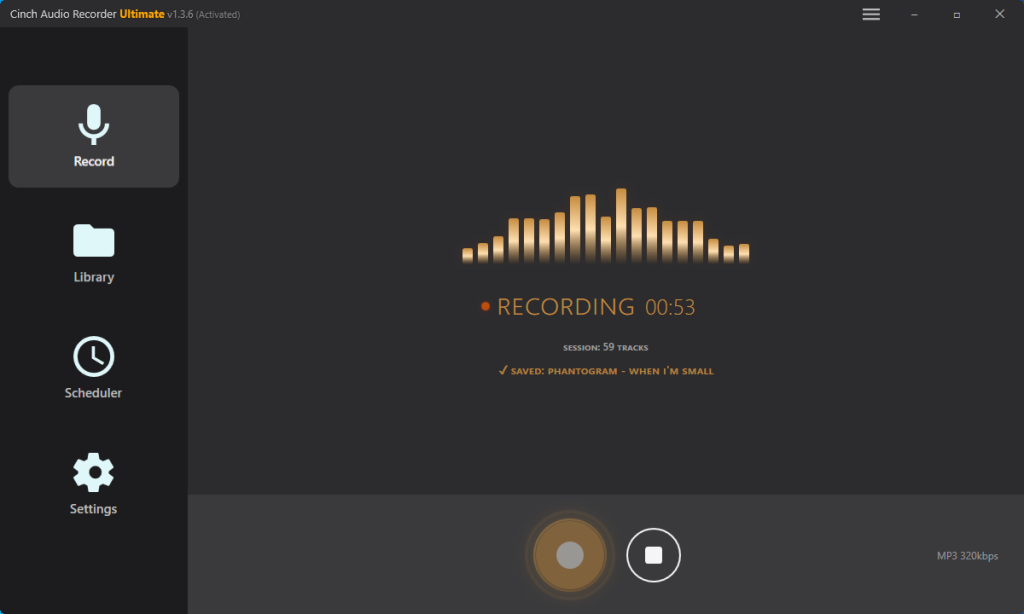
That architectural difference is what matters. Cinch avoids the Spotify-login and web-player automation path that creates more server-side visibility in tools like Sidify. During this review, I did not find public ban reports tied specifically to Cinch’s system-audio approach. That is not the same as a universal safety guarantee, but it is a materially lower-exposure setup than converters that ask you to sign into Spotify inside the tool.
Cinch supports Windows 10/11 and macOS 13.5+ without SIP modification. It auto-tags recordings with ID3 metadata (artist, album, artwork) and offers a 9-song free trial before purchase. The speed claim is honest: 1X real-time recording, no 10X marketing asterisks.
The trade-off is clear: Cinch is slower. 100 songs = 100 minutes. But Cinch is honest about that trade-off. The lower-risk profile comes from the architecture itself: no Spotify login required inside the recorder and no need to automate Spotify access through a separate converter interface.
Cinch makes sense when your Spotify account history matters (10+ years of playlists, saved albums, social features), when you’re on Mac and don’t want to disable SIP, when you’re archiving a large library and prioritize long-term safety over speed claims, or when you value transparency in product claims over marketing convenience.
Cinch costs money—$35.95 lifetime compared to Sidify’s current $44.95 yearly or $89.90 lifetime pricing. The price difference is real. But the more useful comparison is exposure and workflow risk: what you’re paying for is a different approach, not a magical speed advantage.
Sidify vs Cinch Audio Recorder: Quick Comparison
| Sidify Music Converter | Cinch Audio Recorder | |
|---|---|---|
| Ban Risk | Higher exposure – Spotify login or automated access path involved | Lower exposure – no Spotify login required |
| Mac Speed | Mode-dependent; official docs say up to 10X in some Mac setups | 1X (real-time), no SIP modification required |
| Capture Method | Mode-dependent Spotify app/web player conversion workflow | Records system audio output directly |
| Price | $44.95/year or $89.90 lifetime | $35.95 lifetime |
| Free Trial | Trial converts only the first minute of each track | 9 songs free trial |
| Auto-Tagging | Yes | Yes (ID3 metadata, album art, lyrics) |
| Best For | Windows users, small playlists, risk-tolerant | Mac users, large libraries, account-safety-first |
Which Option Fits You
Sidify works for a narrow but real user profile: Windows users with small playlists (10-30 songs), or Mac users who have already verified their exact mode and setup, who accept the account risk and do not need true lossless source audio. If you fit that window and will not need to contact support for a refund, the current $89.90 lifetime license may be usable.
But if you’re on Mac and unwilling to bet on a mode-sensitive speed claim—or if your Spotify account holds years of playlists you cannot afford to lose—the risk math does not favor Sidify. The same applies if you’re building a serious archive (50+ songs) or if you’re budget-sensitive enough that a denied refund would matter.
Cinch Audio Recorder ($35.95 lifetime) is worth considering when account safety outweighs speed convenience. It won’t pretend to be faster than it is, won’t ask for your Spotify login, and lets you test the workflow with a free 9-song trial before paying.
If you’re in the Mac/large-library/account-history camp, the next step is concrete: download Cinch’s free trial, test whether system-level recording fits your workflow, then decide. If you’re the Windows/light-usage/risk-tolerant type, Sidify remains an option—but read the refund exclusions first and start documenting issues from day one. That 30-day window exists, but getting through it isn’t guaranteed.
Frequently Asked Questions
Is Sidify safe to use with my main Spotify account?
I would not use it with a main account that matters to you. Sidify relies on Spotify login or web-player automation, and community reports do include warning emails and suspension claims. That is not the same as a published official ban rate, but it is enough risk to treat your main account carefully.
Does Sidify actually download lossless FLAC audio?
Not in the sense most people mean by true lossless audio. A Spotify playlist link can be the input, but that does not prove you are getting an untouched original source file from Spotify. If the source starts lossy, exporting to FLAC does not put the missing data back.
How hard is it to get a refund from Sidify?
The policy allows refunds within 30 days for lifetime licenses. In practice, users report friction: slow support responses, demands for log files and screenshots, and denials citing “lack of understanding of product functions.” Document everything from day one if you think you might need a refund.
What’s the safest alternative to Sidify?
Cinch Audio Recorder ($35.95 lifetime) records system audio without requiring Spotify login. That lowers the exposure compared with tools that automate Spotify access inside the converter. During this review, I did not find public ban reports tied specifically to that approach. You give up speed (1X real-time), but you gain a simpler, lower-risk workflow. The 9-song free trial lets you test it before committing.