Quick Summary
Stop risking your Qobuz account with broken API downloaders. Discover the 3 real ways to get Qobuz MP3s, from Store purchases to 100% safe analog recording.
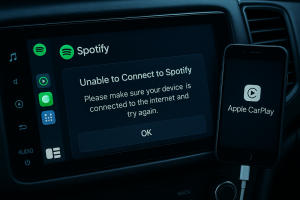
Qobuz subscription downloads stay locked inside the app. Offline mode is DRM-protected cache, not MP3 files you can use on USB drives, old car stereos, DAPs, or DJ laptops.
You have 3 real paths: buy from Qobuz Store for permanent ownership, use API downloaders like qobuz-dl (fast but Terms-of-Service violating), or record system audio for slower but safer local copies.
This guide compares cost, risk, and workflow for each method—then shows which one matches your budget, risk tolerance, and technical skill level.
Quick Answer: 3 Ways to Get Qobuz Music as MP3
Yes, you can get Qobuz music as MP3, but not by exporting subscription cache. Your real choices: buy the files, use an API downloader, or record your own playback.
Before you choose: Understand what Qobuz actually sells: two different things. On one side, the streaming subscription whose offline mode is just DRM-protected cache. On the other side, the Qobuz Store, where purchased albums and tracks are sold as DRM-free files you actually keep. The official Qobuz Downloader app is for Store purchases, not for subscription streaming.
| Path | What you get | Best for | Main cost | Main risk |
|---|---|---|---|---|
| Buy from Qobuz Store | Permanent DRM-free files you own | 1-2 favorite albums, collectors, long-term library building | High cash cost per album | No real workflow risk |
| API downloaders like qobuz-dl / streamrip | Fast local files from subscription access | Technical users who accept breakage and ToS risk | Time, setup, maintenance | Theoretical account risk + tool breakage |
| System-audio recording | Local MP3s or other output formats made from your own playback | DJs, car stereo users, people who want the safer category | Real-time recording + some quality ceiling | Slower workflow, not true Store ownership |
If you subscribed for months and now want to keep your playlists permanently: You likely have dozens or hundreds of tracks. Buying each album from the Store becomes expensive fast. The realistic path is system-audio recording—it’s slower (real-time speed), but avoids API-based account risk and gives you local files that keep working after your subscription ends. Start with a recorder trial, test one track to confirm quality is acceptable for your use, then decide whether the workflow works for you.
If you want free and simple, there is no great option. Free usually means either risky and technical (API tools) or fiddly and manual (Audacity).
A recorder is the safer class of tool because it captures your computer’s audio output instead of logging into Qobuz’s private API. That removes the obvious detection vector—even though it is still not honest to call anything “100% safe.”
Why Most Qobuz Downloaders Put Your Account at Risk
API downloaders violate Qobuz’s Terms of Service and carry theoretical account risk. Recording tools do not—they never touch Qobuz’s API.
Most “Qobuz to MP3 converters” are not doing magic. They act as an unofficial client for Qobuz’s service. In practice: browser token extraction, API calls, subscription authentication, and a workflow that depends on Qobuz not changing anything important. If you care about keeping a paid Qobuz account clean, this is the wrong category to normalize.
Store purchases are meant to become files. Streaming subscriptions stay inside the app ecosystem, even offline. When an API downloader turns subscription access into normal files, it steps outside the intended use model and into Terms-of-Service trouble.
While we haven’t seen Qobuz hand out mass account bans yet, logging into third-party GitHub scripts is a game of Russian roulette with your paid subscription. Recording tools are different—they do not need your Qobuz token or private API access.
The “analog loophole” captures audio your machine is already playing, which is generally treated as more defensible for personal use than breaking DRM directly. That is not universal legal clearance, and not a blank check to redistribute music. It is simply a different mechanism with a different risk shape.
Method 2: API Downloaders (qobuz-dl, streamrip) — Free, Fast, and Fragile
Best for: Technical users who accept breakage and ToS risk for speed.
Not for: Anyone who wants a dependable library without maintenance.
If you’re building a permanent library from your subscription: This path is likely wrong for you. It requires ongoing maintenance (scripts break when Qobuz updates APIs), and carries account risk you probably don’t want if you’ve already paid for months of service.
If you want a whole playlist fast without spending money, this path looks best on paper—and wastes your evening in practice. Tools such as qobuz-dl on GitHub and similar projects can work, but they ask you to pay with technical effort, maintenance, and risk instead of cash.
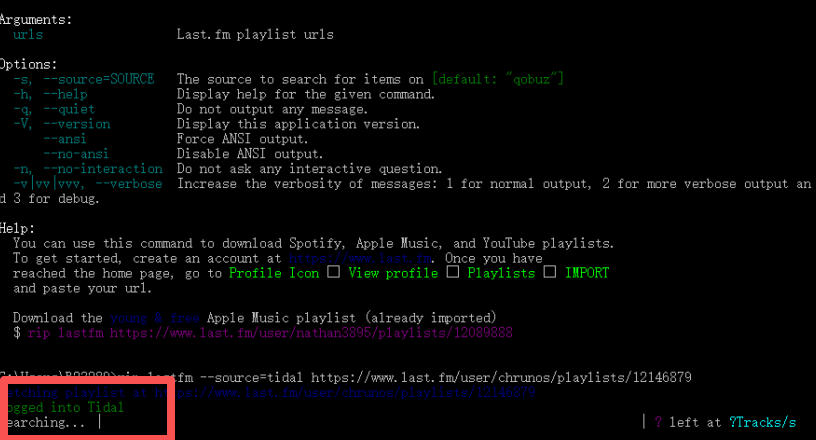
At a high level: install Python and FFmpeg, extract a valid Qobuz auth token from your browser, connect the tool to your account, test a track, then batch-download. Not hard for a developer. Annoying for everyone else.
Where this path usually breaks
The most common failure pattern is not “you forgot one checkbox.” It is upstream instability. GitHub and community evidence point to the same real mechanism: Qobuz changes something in the API or auth flow, and users start reporting HTTP 403 errors, DRM-key problems, or fresh token requirements until the tool catches up.
Many troubleshooting tips do not address the real failure. Reinstalling Python does not fix an API-side change. Rewatching the same YouTube tutorial does not help if the token flow changed last week. If qobuz-dl already throws 403 or DRM errors, skip the “maybe I typed it wrong” spiral after one clean retest and move to a different path.
When this method is still worth it
Use an API downloader only if all three are true:
- You are comfortable with Python, FFmpeg, and command-line setup.
- You accept that the tool may break after Qobuz updates.
- You are knowingly trading account cleanliness for speed.
If that is you, this path can still be the fastest way to build local files from a subscription. But it is not the right path for someone who just wants a dependable local library on an old stereo, a USB drive, or a gig laptop.
When to stop and switch
Stop here and change methods if:
- you cannot get a valid auth token without guesswork,
- the repo or issue tracker is full of fresh breakage reports,
- you do not want third-party tools touching your Qobuz login flow,
- or you need something stable enough for repeated use, not a one-week workaround.
API downloaders are good at speed when they work. They are bad at long-term stability.
Method 1: Buy from Qobuz Store (Legit, Clean, and Often the Smartest Move)
Store purchase sounds expensive—until you compare with the time and fragility of alternatives. If you only need one or two albums a year, and you know exactly which ones you want to keep forever, stop trying to force a subscription product into permanent ownership. Just buy the music.
This is the cleanest path because it gives you the thing you actually want: DRM-free files from the Qobuz Store. No token extraction, no real-time recording, no metadata rescue mission later. Qobuz is very clear about this on their official pricing page: Store purchases are available as real downloadable formats including FLAC, WAV, ALAC, AIFF, and MP3, and Qobuz Sublime can reduce some Store pricing by up to 60%.
When Store purchase wins immediately
Buy from the Store if any of these are true:
- you only need a few favorite albums,
- you want permanent ownership instead of a workaround,
- you care about maximum source quality,
- or you are building a library, not just covering a short-term offline gap.
If you have dozens of tracks from your subscription: Buying each album individually becomes expensive. For large playlists, this is not the economical path.
Subscription access does not automatically become owned files. Qobuz already has a product for ownership: the Store. The downside: cash.
Audacity vs Dedicated Recorders: Why Free Isn’t Always Better
Audacity works, but requires WASAPI loopback setup on Windows 11—which many users get wrong. Dedicated recorders remove this configuration friction and handle track splitting and metadata automatically.
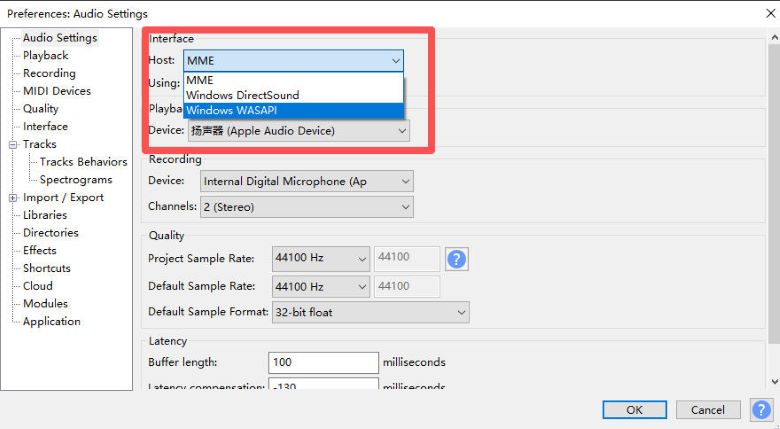
Audacity can record Qobuz playback. The friction starts before recording begins.
The recurring complaint pattern in the Audacity Windows 11 forum thread is specific: people pick the wrong host, use MME instead of WASAPI, choose the wrong input device, hit record, and get silence or very low levels. That is advice that sounds easy in a five-minute tutorial and turns into forty-five minutes of menu hunting in real life.
Audacity is fine if you only need a one-off recording
If you are patient, willing to learn loopback recording, and only need a few songs, Audacity is still a valid free fallback. On Windows 11, the critical path is selecting WASAPI as the host and the correct speaker loopback device as the recording source. If you miss either one, you often get silence.
Why dedicated recorders earn their keep
A dedicated recorder saves you from three kinds of manual work that free tools push back onto you:
- Track splitting: you do not have to cut a long recording into songs by hand.
- Metadata cleanup: you do not have to tag every file from scratch.
- Repeatability: you do not have to remember the exact Windows audio routing every time.
A dedicated recorder removes the annoying parts around recording, not just the recording itself.
What free still does not solve
Free recording tools also do not solve the biggest downside of recording: speed. A 60-minute album still takes 60 minutes to capture. The real comparison is “free with more setup and cleanup” vs “paid with less setup and cleanup.”
Method 3: System Audio Recording (Cinch Audio Recorder)
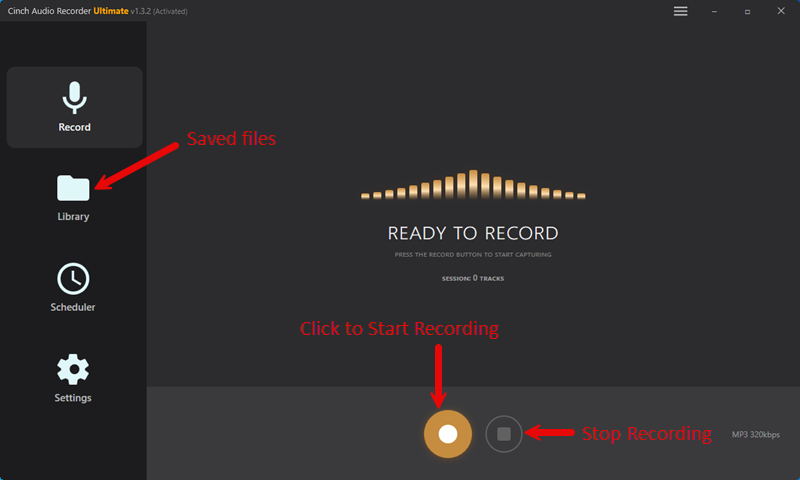
If you’re a subscriber who wants to keep playlists after your subscription ends: This is the most realistic path. It takes longer than API tools (real-time speed), but avoids the account-risk category entirely.
If you do not want to babysit Python or hand your Qobuz login flow to a third-party downloader, a recorder is the most sensible middle path. It is slower, but avoids the API-risk category entirely. This is the best fallback once free routes become too technical or too brittle.
For Qobuz specifically, the logic is straightforward: a recorder captures what your computer is already playing. It does not need to impersonate Qobuz’s app. That makes it the closest thing to a physically insulated workaround for building a local MP3 fortress from subscription playback without stepping into the downloader-auth arms race.
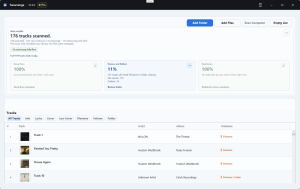
One option in that category is Cinch Audio Recorder Ultimate. Based on its product documentation, it supports Windows 10/11 and macOS 13.5+, records up to 24-bit/48kHz, offers a 9-song free trial, auto-identifies tracks by audio fingerprint, and includes extras like lyrics, cover art, and batch metadata editing. The tradeoff: recording is 1X real time.
Why this is easier than free recording for many people
If your real pain point is “I do not want to fight setup, split files, and retag everything later,” Cinch solves the annoying labor around recording:
- it watches system audio instead of asking you to build a download pipeline,
- it tries to identify the song after capture,
- and it gives you a cleaner library workflow than a raw waveform editor.
The main reason to pay: less manual cleanup in the safer category.
The limits you should know before using it
Product pages often get slippery here. The blunt version:
- Not bit-perfect Qobuz export. The documented ceiling is up to 24-bit/48kHz, not Qobuz’s highest possible hi-res stream formats.
- Not instant. Recording runs in real time.
- Metadata can miss. Rare tracks, live versions, and remixes may not auto-identify correctly.
- Not the same as buying from the Store. You are creating a personal-use local copy, not obtaining a Store license.
Friction you are most likely to hit
Two friction points matter more than generic “restart your PC” advice.
1. Low recording level or flat sound on Windows
If the recording sounds too quiet or strangely processed, the usual culprit is Windows audio enhancement or the wrong recording gain path. The practical fix: disable Windows or driver audio enhancements and make sure the recording device volume is sane before you start.
2. Wrong song title, or no title at all
Audio fingerprinting is convenient, not magical. Rare catalog tracks, live takes, and odd remixes can miss the database. In that case, manual editing is part of the deal. Cinch at least gives you an in-app library and batch editing workflow, which is a much better place to do cleanup than renaming files one by one in Explorer.
A simple Qobuz recording workflow
Step 1: Test first with one track Before recording a whole playlist, test with one track you don’t mind deleting. This confirms quality is acceptable for your use and helps you catch any setup issues early.
Step 2: Set up your recording environment
- Install Cinch and verify it recognizes your system audio
- Turn off Windows audio enhancements: Windows Settings → Sound → Device properties → Disable “Audio Enhancements” (this is where 80% of Windows users get stuck)
- Set output quality to your preferred format (MP3 for compatibility, FLAC/AAC for higher quality)
- Check that your speakers/headphones are working normally—you’ll hear the music while it records
Step 3: Record your playlist
- Start recording in Cinch (click the Record button)
- Play your Qobuz playlist normally—the tool captures what you hear
- Let it run; Cinch will auto-split tracks and identify songs
- You should see: Track names appearing in Cinch’s library as recording progresses, with estimated metadata populated automatically
Step 4: Check results
- Open Cinch’s Library view—you should see your recorded tracks with titles, artist names, and cover art where fingerprinting worked
- Play back one recorded track to verify quality matches your expectation
- For tracks that show “Unknown” or wrong metadata, right-click → Edit Info to fix manually
Step 5: Export for your use
- Use Cinch’s export function to save files to a folder
- Copy to USB drive (for car stereo), load into DJ software (Rekordbox/Serato), or organize for offline playback
- You now have: Local MP3 files that keep working after your Qobuz subscription ends
If you are comparing cost models, this is also where a lifetime recorder starts making more sense than yet another monthly converter subscription. The moment your use case becomes “I need a stable backup path every so often,” one-time ownership beats renting another tool that can still break.
Cost Comparison: Subscription Downloaders vs One-Time Purchase
A tool can look cheaper only because it hides the cost somewhere else. Sometimes that hidden cost is your time. Sometimes it is future breakage. Sometimes it is paying monthly for a converter when you only need local copies a few times of a year.
| Option | Money cost | Time cost | Maintenance cost | What you actually own |
|---|---|---|---|---|
| Qobuz Store purchase | Usually highest per album; discounts vary by region and Sublime status | Very low | None | Real purchased files |
| Open-source API tool | Often free in cash | High upfront | High ongoing if Qobuz changes APIs | Local files, but generated through a risky workflow |
| Commercial API-style converter | Often sold as monthly or lifetime software | Lower setup than open source | Still depends on service changes | Local files, but still in the risky category |
| Recorder like Cinch | 9-song trial, then lifetime license model | High only in recording time | Lower day-to-day maintenance | Local copies made from your playback |
Let’s do the math. At $12.99/month for Qobuz Studio, adding another $15-$20 a month for a “DRM unlocker” subscription like ViWizard makes zero financial sense. This is exactly why a lifetime license for a recorder is the smarter play. The referenced ViWizard-style pricing example shows the common software pattern around $19.95/month or $89.95 lifetime, while the Cinch user guide lists a $35.95 lifetime license with a 9-song trial. Exact pricing can move, especially by region or product SKU, but the decision logic does not: if you only record occasionally, renting a converter every month is often the least elegant financial choice of all.
For subscribers with large playlists: A recorder’s lifetime license ($35.95) can make sense if you’ll use it more than a few times across your subscription period. You’re trading time (real-time recording) for account safety and permanent access.
Few albums, long-term value: buy from Store. Lots of music, high risk tolerance, technical comfort: API tools. Lots of music, low risk tolerance, low patience for setup: recorder.
For DJs: Why Recording Beats Caching for Live Performance
DJs need reliability—not abstract debate. It is about not getting embarrassed in a room full of people because a cached streaming track suddenly refuses to cooperate.
DJ users have a different problem from collectors. They do not just want ownership. They want reliability. And reliability in a basement club, wedding venue, or sketchy mobile hotspot environment usually means plain local files sitting on the machine that will actually play the set.
Local MP3 backup is a legitimate professional need. Community reports around DJ use keep pointing to the same failure mode: streaming cache is fine right up until connectivity, validation, or software integration becomes the weak link. A boring local backup library loaded into Rekordbox or similar DJ software is much less exciting, and that is exactly why it wins.
If you are a DJ, the judgment is blunt: do not rely on subscription cache as your only live-performance backbone. Use streaming for discovery and prep if you want, but build a local fortress for the tracks that actually matter in a set.
Recording gives you files that behave like files. That matters more in a live environment than shaving a few minutes off the prep process.
FAQ: Qobuz MP3 Download Questions
Can I keep Qobuz downloads after canceling my subscription?
Not the subscription downloads. Those are DRM-protected cache tied to the service. Only music you bought from the Qobuz Store is meant to stay yours as a normal downloaded file.
Does Qobuz ban accounts for using qobuz-dl or similar tools?
While we haven’t seen a massive wave of permanent bans reported on Reddit or GitHub yet, API downloaders explicitly violate Qobuz’s Terms of Service and carry real account risk.
Is qobuz-dl still working in 2026?
Sometimes, yes. Reliably, no. The better way to think about it: “works until Qobuz changes something important.” As of our latest test in early 2026, repository maintenance has slowed down significantly, and the issue tracker is filled with unpatched breakage reports after recent API changes.
Can Audacity record Qobuz on Windows 11?
Yes, but many users get stuck on WASAPI loopback setup. If you choose the wrong host or input device, you often get silence. It is free, but not friction-free.
Does Cinch work with Qobuz?
Cinch is built to record system audio rather than pull from Qobuz’s API, so it fits the Qobuz use case by method, not by private-API hacking. According to its documentation, it can record playback, auto-identify songs, and save up to 24-bit/48kHz output, but metadata accuracy can still miss on rare tracks.
Can I put Qobuz music on a USB drive for my car?
Not directly from your subscription downloads—they’re locked inside the Qobuz app. Your options: buy DRM-free files from the Qobuz Store (then copy to USB), or record your Qobuz playback to MP3 using a system-audio recorder like Cinch. The recording path takes longer (real-time speed), but gives you files that work on any USB-compatible device: car stereos, DAPs, or offline laptops.
Does Qobuz Sublime allow MP3 downloads?
Qobuz Sublime is a subscription tier that gives you up to 60% discount on Store purchases—it does not unlock MP3 downloads from your streaming subscription. You still have to buy albums from the Store to get DRM-free files. The subscription itself (Studio or Sublime) only provides streaming access and DRM-protected offline cache, not downloadable MP3s you can keep.
Is it legal to record Qobuz for personal use?
Recording audio that plays through your own speakers or headphones falls into a legal gray area often called the “analog loophole.” In most jurisdictions, capturing audio for personal use is treated differently than breaking DRM directly or redistributing copyrighted material. It is generally considered more defensible than using API-hacking tools, but you should not redistribute the files. This is not legal advice—check your local laws if you are unsure.
What To Do First
Pick your path based on one honest question: Are you building a permanent library or covering a short-term offline gap?
For 1-2 albums you’ll keep forever: buy from Qobuz Store. Clean ownership, zero risk.
For dozens of subscription tracks you want after service ends: start with a recorder trial. Test quality on one track before committing to the real-time workflow.
For the full comparison of cost, risk, and technical tradeoffs, revisit the Quick Answer table. Match your actual situation—not just what sounded easy in a tutorial.