Quick Summary
Your Boomplay downloads are locked inside the app. Here's how to record them as MP3 files you can keep, transfer, and play on any device.
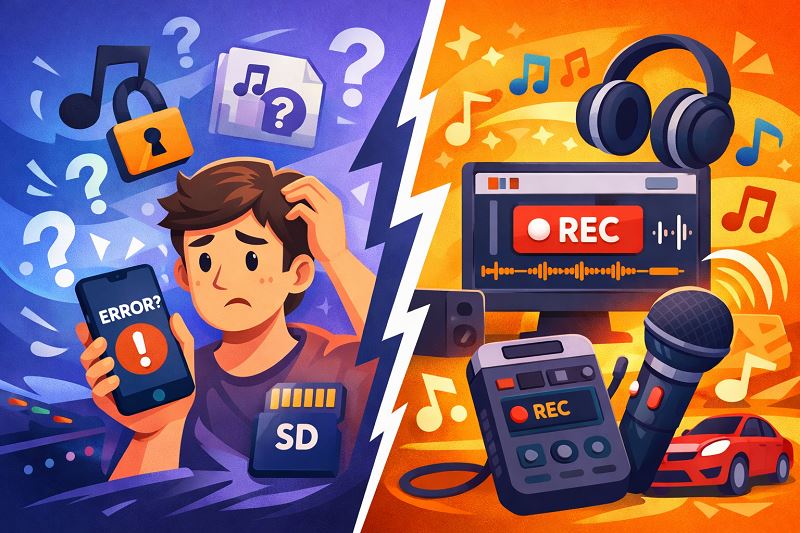
You downloaded songs on Boomplay for offline listening, but when you try to move them to an SD card, play them in your car, or transfer to another phone—the files don’t exist. They’re encrypted inside the app, and disappear when your subscription ends.
This is by design, not a bug. The workaround: record the audio as it plays on your computer. Here’s what works and what to avoid.
Important: This guide covers desktop computer solutions (Windows/Mac). If you only have a phone, you’ll need access to a computer to convert Boomplay music to MP3.
Why Boomplay Downloads Can’t Be Exported as MP3
When you hit the download button in Boomplay, you’re not getting an MP3 file. You’re downloading an encrypted file in Boomplay’s proprietary .bp format. These files are DRM-protected and can only be played inside the Boomplay app.
According to Boomplay’s official benefits page, this is intentional: downloads are meant for offline listening within the app, not for file ownership. The encryption verifies that you have an active subscription or download permission every time you play a song.
The Practical Limits
- No file transfer: You can’t copy
.bpfiles to a USB drive, SD card, or another phone - No other players: Songs won’t work in Poweramp, VLC, or your car’s music system
- No permanence: When your subscription ends, the app can’t verify your license—your downloads stop playing
Users on Quora frequently express frustration after searching their phone storage for .bp files and discovering they’re encrypted and unusable outside the app.
Official Method: Download Within Boomplay App
Before exploring workarounds, let’s cover what the official method actually provides.
How Official Downloads Work
Boomplay allows offline downloads, but with strict limitations:
| User Type | Offline Cache | What You Can Download |
|---|---|---|
| Free users | 256MB | Selected songs only |
| Premium users | 1GB | All songs |
According to Boomplay’s subscription center, premium subscribers can download any song for offline playback. Free users are limited to specific songs marked as downloadable.
What You Get With Official Downloads
- Offline playback in app — songs play without internet, but only inside Boomplay
- App-only playback — No export, no transfer, no other players
- Periodic verification — The app needs to check your license online periodically
- Desktop limitation — Free users can only play 30-second clips on the web player, according to Boomplay’s support documentation
This is why many users search for ways to convert Boomplay to MP3—they want files they truly own.
Convert Boomplay to MP3 Using Audio Recording Software
Here’s the key insight: there’s no such thing as a “Boomplay to MP3 converter” that decrypts files. What actually works is recording the audio as it plays.
This isn’t downloading or converting—it’s capturing the audio stream in real-time. And it’s the only reliable method to get standard MP3 files from Boomplay music.
What You’ll Need
Before starting, make sure you have:
- A Windows PC or Mac
- Boomplay account (free or premium—premium lets you play full songs on desktop)
- One of the recording tools below
Free Option: Audacity
Audacity is a free, open-source audio editor that can record system audio. It works, but requires manual setup.

How to use Audacity on Windows:
- Open Audacity and go to Edit > Preferences > Audio Settings
- Set the recording device to “Windows WASAPI” and select your speakers (loopback)
- Start playing a song on Boomplay web player
- Click Record in Audacity
- Stop when the song ends
- Export as MP3 (File > Export > Export as MP3)
Expected result: You’ll get an MP3 file in your chosen folder, but it will have generic metadata (or none). You’ll need to manually rename it and add artist/title info.
Drawbacks:
- Manual metadata entry—you’ll need to type song titles, artists, and album names yourself
- No automatic cover art
- No lyrics
- Requires technical setup (Stereo Mix or WASAPI configuration)
- Quality depends on your system audio settings
Audacity is a solid free choice if you only need a few songs and don’t mind the manual work.
Recommended: Cinch Audio Recorder Ultimate
For users who want properly organized music libraries without the hassle, Cinch Audio Recorder Ultimate automates what Audacity does manually.
Cost: $35.99 one-time purchase
What Cinch does automatically:
- Records system audio at up to 320kbps MP3 or lossless FLAC
- Identifies songs and fills in metadata (title, artist, album)
- Downloads album cover art
- Adds lyrics when available
- Creates organized folder structure
If you’re building a music collection, manually tagging 50 or 100 songs gets tedious quickly. The ViWizard Boomplay guide notes that auto-identification works well for mainstream tracks, though independent or regional African music—Boomplay’s core catalog—may require manual correction. This is worth knowing if your library leans heavily toward African artists.
Basic workflow:
- Install Cinch Audio Recorder on your Windows PC
- Open the software and click the Record button
- Play songs on Boomplay web player (or any streaming service)
- Cinch records and automatically tags each song
- Find your MP3s in the output folder, ready to transfer
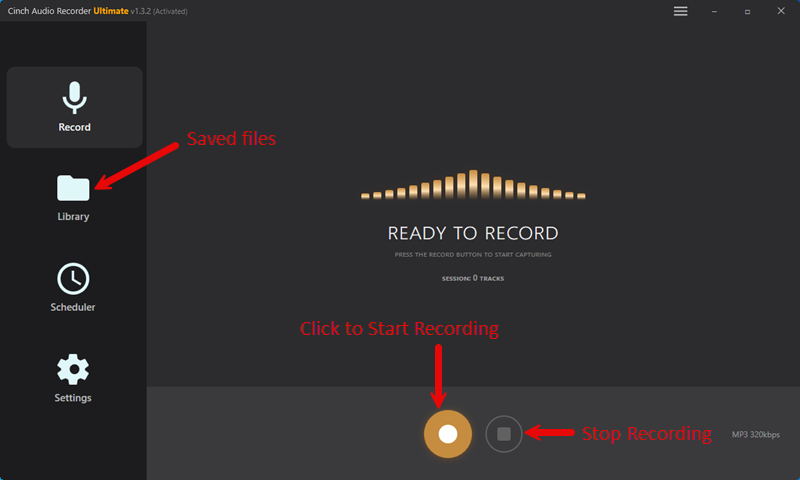
Expected result: MP3 files with complete metadata, album art, and organized filenames—ready to copy to your phone or USB drive.
The advantage over free tools isn’t the recording itself (both Audacity and Cinch record the same audio)—it’s the time saved on organization and the professional-quality output.
Mac Users: Rogue Amoeba Tools
On macOS, system audio recording requires additional software. Audio Hijack and Loopback from Rogue Amoeba are well-regarded options. Audio Hijack can record and apply effects; Loopback creates virtual audio devices for routing sound between applications.
Cost: Audio Hijack is approximately $64; Loopback is approximately $129.
These tools record the audio but don’t auto-identify songs—you’ll still need to tag files manually or use a separate tagging app.
Third-Party Boomplay Converters: What They Actually Do
Search for “Boomplay to MP3 converter” and you’ll find tools from companies like DRmare, ViWizard, TunesKit, and UkeySoft.
Here’s what the DRmare guide and TunesKit guide reveal: these aren’t file decryptors. They’re audio recorders.
They work by:
- Recording your computer’s audio output in real-time
- Saving it as MP3, AAC, FLAC, or other formats
- Some include auto-tagging features
No tool can bypass Boomplay’s DRM encryption directly. Any legitimate solution records what you hear, rather than converting encrypted files.
Setting Realistic Expectations
- Recording takes real time: A 4-minute song takes 4 minutes to capture
- No batch conversion from files: You can’t drag
.bpfiles into these tools - Identification isn’t perfect: Auto-tagging works for popular music but may fail for obscure tracks
How to Get Proper Metadata (Tags, Cover Art, Lyrics)
A raw audio recording has no metadata—it’s just sound. Your music player won’t know the song title, artist, or album. Organizing a library like this is frustrating.
Manual Tagging (Free)
Programs like Mp3tag (Windows) or MusicBrainz Picard (cross-platform) let you edit metadata manually or search databases for information. This works but requires time per song.
Automatic Tagging
Tools like Cinch Audio Recorder use audio fingerprinting to identify songs during recording. When a song is recognized:
- Title, artist, and album are filled in automatically
- Cover art is downloaded
- Lyrics may be retrieved
For Boomplay’s catalog—heavy on African and regional artists—expect to do some manual correction. Mainstream Western tracks identify reliably; independent releases less so.
Risks of MOD APK and Online Downloaders
Some users try to bypass restrictions using modified Android apps (MOD APKs) or websites claiming to “download Boomplay songs directly.” These methods carry significant risks.
MOD APK Risks
Modified Boomplay apps claim to bypass premium restrictions or remove DRM. According to community discussions on Reddit and security forums:
- Malware: Third-party APKs often contain hidden malicious code
- Data theft: These apps may steal your account credentials or personal data
- Account bans: Boomplay can detect unauthorized clients and suspend accounts
- Most don’t work: The majority of MODs fail to actually remove DRM from downloads
Online “Converter” Websites
Sites promising instant Boomplay-to-MP3 conversion typically fall into two categories:
- Scams: They don’t work, or require surveys/payments before delivering nothing
- Recorders in disguise: They play the song and record it—but you have no control over quality, and uploading your song URLs raises privacy concerns
The UkeySoft guide and similar resources recommend desktop recording software over web-based tools for reliability and quality control.
Staying Safe
Download software only from official vendor websites and check reviews on trusted platforms before purchasing. Avoid any tool claiming to “crack” or “decrypt” DRM—these are often malware. Use reputable recording software rather than sketchy APKs or websites.
Legal Considerations
Recording streaming audio for personal use is generally legal in most jurisdictions—similar to recording radio broadcasts or making backup copies of media you’ve accessed. However, sharing or distributing recorded files may violate copyright. Check your local regulations if you’re unsure.
Boomplay’s terms of service likely prohibit bypassing their DRM, but enforcement against personal-use recording is rare.
FAQ: Common Questions About Boomplay Downloads
Can I download Boomplay songs as MP3 for free?
The official app doesn’t export MP3—downloads are encrypted. You can use free audio recording software like Audacity to capture playback, but you’ll need to tag files manually. Here’s how:
- Download and install Audacity (free)
- Configure it to record your computer’s audio output (WASAPI on Windows)
- Play a song on Boomplay web player
- Click Record in Audacity, then Stop when done
- Export as MP3 and manually rename the file
Paid tools like Cinch Audio Recorder ($35.99) automate metadata but have a cost.
Why did my Boomplay downloads stop working?
Downloads require an active subscription to verify your license. When your subscription expires, the app can’t confirm you’re authorized to play those songs. Your options are to renew your subscription or record songs before your subscription ends if you want to keep them.
Are Boomplay to MP3 converter tools safe?
Legitimate audio recorders are generally safe. Avoid tools claiming to “decrypt” or “crack” DRM—these are often malware. Download only from official vendor websites, and check reviews on trusted platforms before purchasing.
Will I lose audio quality when recording?
Quality depends on your system settings and source quality. Recording from high-quality playback with proper configuration can produce near-CD quality. For best results: set system audio to highest quality, disable enhancements, use 320kbps MP3 or lossless output, and test with one song before batch recording.
Can I use Boomplay music on iPhone or Android without the app?
Yes—if you have MP3 files. Record songs using audio recording software, then transfer them via USB (Android) or iTunes/Finder (iPhone). Once copied to your device, any music player can play them.
Bottom line: Boomplay’s encrypted downloads aren’t designed for file ownership—they’re a rental that expires with your subscription. If you need music files you can keep, transfer, and play anywhere, audio recording is the only reliable path.
For a few songs, free tools like Audacity work fine. For building a library, paid recorders with auto-tagging save hours of manual work. Start with one song to test your setup before committing to a batch.