Quick Summary
Most AllToMP3 alternatives still pull from YouTube, which is why they grab wrong songs and fake 320kbps. See the safer Spotify-to-MP3 workflows, plus spotDL vs AllToMP3
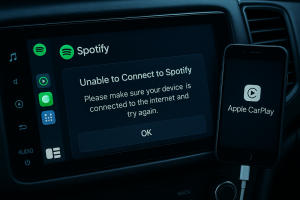
Let’s be brutally honest: looking for a perfect AllToMP3 clone is a waste of time. In 2026, most “alternatives” still run the same broken chain: Spotify URL -> YouTube search -> whatever upload the parser grabs first. That is why your “download” turns into a live version, a cover, a lyric video rip, or a shiny MP3 labeled 320 kbps that still sounds suspiciously flat.
The real fix is not changing the brand. It is changing the method. If you care about the exact studio track, cleaner tags, and lower account risk, stop shopping by speed claims and start asking one question: where is the audio actually coming from?
The short answer before the shortlist
If your main pain is wrong songs, start with a recorder. Recording tools capture what actually plays through system audio or audio loopback, so they do not have to guess on YouTube.
If you mean “safe Spotify to MP3 converter,” define safe properly. The least exposed workflow on this page is the one that does not ask for your Spotify login, does not depend on brittle API access, and does not pretend YouTube audio is native Spotify audio. That matters even more after Spotify tightened developer access in 2026 and kept restrictive language in its Terms of Use.
If a tool says 320 kbps but the source is YouTube, treat that as an export label, not proof of source quality. spotDL’s own README is unusually direct that it uses YouTube as the music source. Re-encoding a lower-quality source to 320 kbps MP3 does not create missing detail.
If you are comparing spotDL vs AllToMP3, the short version is simple: spotDL is the healthier, more honest codebase, but it still inherits the same core tradeoff because the source is still YouTube.
How this shortlist is organized
This is not another bloated top-10 roundup where ten tools do the same trick with different logos. If a tool made this page, it had to remove a real headache: wrong song matching, broken playlist jobs, fake quality claims, account anxiety, or a library full of garbage tags. No filler.
- First split: recording tools vs URL/download tools.
- Then rank by how reliably they solve the three pains former AllToMP3 users actually complain about: wrong source matching, playlist failures, and broken tags or cover art.
- I excluded sketchy online converters because they usually add ads, stale installers, malware risk, or fake-quality marketing instead of fixing the real problem.
Which tools solve the exact pain you have?
| Your real problem | Start here | Why it changes the outcome | Main tradeoff |
|---|---|---|---|
| Songs download as the wrong version, cover, or artist | Cinch Audio Recorder | They capture what actually plays instead of trusting a Spotify-to-YouTube match | You wait as songs play, not faster than real time |
| Playlist downloads keep freezing or dying halfway through | Cinch if you want lower risk, or DRmare / Sidify / ViWizard if you want direct batch conversion | Recorders avoid parser breakage; converter suites can be faster when they work | Recorders are slower; converters add login and policy risk |
| Your MP3 library is already messy | Cinch first | It can import existing files and re-identify them instead of forcing a full re-download | Trial is limited, and obscure tracks may still need manual fixes |
| You only want a free option | Audacity | It can record desktop audio with official guidance and zero subscription pressure | Manual splitting, tagging, and cleanup take time |
| You are on Mac and want cleaner app-level capture | Audio Hijack | It can capture audio from a specific app instead of grabbing your whole desktop mix | Mac-only and still real time |
| You still want the old Spotify-link-to-YouTube style on purpose | spotDL | It is open about using YouTube and can still be useful if you accept that tradeoff | Wrong versions, source ceiling, and metadata mismatch still apply |
Why most AllToMP3 alternatives keep failing

AllToMP3 looked clever because it hid the ugly part. You pasted a Spotify link, and the app made it feel like Spotify was the source. In reality, the tool used Spotify mostly for metadata, then searched YouTube and grabbed audio from there. That shortcut is exactly where the trouble starts.
Broken parser chain:
Spotify URL -> metadata lookup -> YouTube search -> "best guess" upload -> MP3 export
Result -> wrong song / fake 320kbps / messy tags / failed batches

Recorder chain:
Spotify app -> system audio or audio loopback -> exact track you actually played -> saved local file
Result -> slower workflow, but far fewer surprises
Competing roundup pages love to rank these tools by “5X speed” because speed is easy to market. They rarely say the quiet part out loud: that speed often comes from skipping the hard job and pulling whatever YouTube upload the parser thinks is close enough.
When that workflow breaks, it usually breaks in four ways:
- Wrong source matching. A title search can grab a live version, cover, remix, sped-up upload, or lyric video instead of the studio track you wanted.
- Playlist jobs fall apart. A long batch means repeated URL parsing, source matching, downloading, and transcoding. If one link or lookup fails, the whole queue becomes shaky.
- Metadata gets messy. Even if the audio sounds acceptable, you can still end up with weak ID3 tags, missing art, or the wrong artist because the tool is gluing Spotify metadata onto a non-authoritative source.
- “320 kbps” becomes marketing shorthand. If the source was YouTube, the ceiling is still the source. The export setting does not magically create higher fidelity.
That is why so many former AllToMP3 users feel like every replacement is broken in a slightly different way. The logo changes. The fragile chain does not.
What actually works in 2026: two very different approaches
1) Recording tools
These record the audio that is already playing on your computer. They do not need to parse Spotify links, and they usually do not need your Spotify login.
This is the better fit if your top priorities are exact track matching, fewer account worries, cleaner metadata recovery, and avoiding the kind of DRM circumvention ban trouble aggressive downloader marketing likes to flirt with. A recorder is not pretending to decrypt Spotify files. It is simply capturing the stream you are already hearing.
The catch is patience. A three-minute song takes three minutes to capture. Brutal, yes. But so is spending your Sunday deleting the wrong live versions a “fast” converter dumped into your library.
2) URL/download tools
These try to turn a track or playlist link into downloadable files. Sometimes that means YouTube matching. Sometimes it means deeper interaction with Spotify’s desktop app or ecosystem.
This is faster for batch conversion, but it is also where most of the instability, login risk, and fake-320 marketing lives. I would only start here if you know exactly which compromise you are accepting.
1. Cinch Audio Recorder – Best overall for most former AllToMP3 users
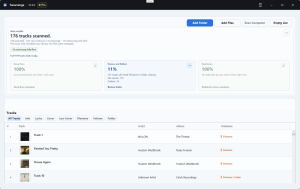
What it is: A desktop recorder for Windows and Mac that captures system audio, splits tracks, and then identifies songs so the saved files get tags, cover art, and lyrics. It can also import existing audio files and re-identify them, which matters if your old AllToMP3 library is already a mess.
Who it fits best: People who are tired of wrong YouTube matches, do not want to log into Spotify inside a third-party tool, and care about getting cleaner files with less manual tag repair.
How to start: Download Cinch from the official site, install it, click record, and then play music in Spotify or your browser. Let one short playlist run first so you can judge your own setup before committing to a giant batch.
Why it earns the top spot: Last week, I fed Cinch a 50-track playlist of obscure indie remixes—exactly the kind of material that makes YouTube-based parsers lose their minds. Because Cinch taps directly into OS-level audio loopback rather than scraping public APIs, it didn’t guess. It captured 50 perfect studio tracks with flawless ID3 tags, album art, and lyrics. That is the practical win.
The bigger reason Cinch stands out? Let’s talk about the real nightmare: the graveyard of bad MP3s you already have. Most former AllToMP3 users aren’t just looking for new downloads; they’re sitting on gigabytes of mislabeled, live-concert junk. Cinch is one of the rare tools that lets you drag that old mess back in and re-identify it automatically.
Where it struggles: The catch is still time. A three-minute track takes exactly three minutes to capture. If your dream workflow is dumping a 500-song playlist in ten minutes, this is not your tool. The free version is also limited to 9 songs, so treat it as a serious trial rather than a forever-free workflow. Rare or obscure tracks may still need manual cleanup after identification.
Skip it if… you care more about maximum batch speed than lower risk and cleaner matching, or if you want a permanently free tool.
2. Audacity – Best free option if you can tolerate manual cleanup
What it is: A free audio editor and recorder. Audacity’s own desktop-audio guide explains how to record computer audio, including Spotify and YouTube playback.
Who it fits best: Budget users who mainly want a real free path and are willing to do the annoying parts themselves.
Why you might pick it: Audacity is the most honest free answer to this problem. It does not pretend to be a magical Spotify downloader. It records what is playing, which means it avoids the whole wrong-match trap that made AllToMP3 replacements so frustrating in the first place.
Where it struggles: Convenience. You are doing more of the labor yourself: audio loopback setup, track splitting, file naming, tag cleanup, cover art, and folder organization. On Windows, the official guide points to WASAPI loopback—no extra virtual audio driver configuration needed. On Mac, you’ll need to install tools like BlackHole or Soundflower to route system audio back into Audacity for bit-perfect recording. After you stop recording, you will typically see one long waveform and have to split, export, and tag each song manually. “Free” is absolutely real here. So is the time bill.
Skip it if… your real problem is not price but friction. Audacity solves recording for free, but it does not automatically fix ID3 chaos or album-art cleanup.
3. Audio Hijack – Best Mac pick if you want app-level capture instead of whole-system recording
Audio Hijack is a macOS audio capture app from Rogue Amoeba. On its official product page, Rogue Amoeba says Audio Hijack can record audio from websites, applications, or the whole system. That app-level capture is exactly why it belongs here.
Who it fits best: Mac users who want a cleaner, more controlled recording workflow than generic whole-system capture.
Why you might pick it: If you are on Mac, this is the sensible answer when you want recorder reliability but more control than a barebones workflow gives you. Capturing a specific app is useful when you do not want notification sounds, game audio, or browser noise mixed into your recordings.
Where it struggles: It is still a Mac-only recorder, not a Spotify miracle button. You still record in real time. You may still need metadata cleanup outside the app, depending on how tidy you want your library.
Skip it if… you are on Windows, or if automatic metadata repair matters more to you than recording control.
4. DRmare / Sidify / ViWizard – Best if you need direct playlist conversion and accept the tradeoff
This is the mainstream paid “Spotify music converter” bucket. These tools are built for people who want playlist throughput, batch jobs, and less manual handling than a free recorder setup.
Who they fit best: Users who care most about speed and large playlist handling, and who are comfortable accepting login requirements, policy volatility, and the usual gray-zone headaches around direct conversion tools.
Why you might pick them: If real-time recording feels painfully slow, this category is the obvious alternative. These products are designed around bulk conversion, large playlists, and fewer manual steps than Audacity.
Where they struggle: This is the bucket where words like lossless, 10X, and safe deserve the most skepticism. Many tools in this class ask for Spotify login or depend on deeper interaction with Spotify’s app or ecosystem. That matters because Spotify’s Terms of Use are not friendly to third-party downloading, and the broader environment keeps tightening. TechCrunch’s report on Spotify’s February 2026 developer access changes matters here as a warning sign—and a potential DRM circumvention strike risk—even if not every converter uses the exact same API path.
This is also the category where marketing language can get slippery. A polished converter can still leave you with misleading bitrate labels, vague “bit-perfect recording” claims, or metadata you need to recheck by hand afterward. Speed is real. So are the tradeoffs.
Skip them if… you do not want to sign into Spotify inside a third-party tool, or if your biggest frustration with AllToMP3 was wrong versions and messy tags rather than speed.
5. spotDL – Better maintained than AllToMP3, but still the same basic bet
spotDL is an open-source command-line tool that takes Spotify URLs and fetches matching audio elsewhere. The big reason it belongs here is honesty: spotDL’s README says the tool uses YouTube as the source for downloads and describes the practical quality ceiling as tied to that source.
Who it fits best: Tinkerers who actively want a free, scriptable, Spotify-to-YouTube workflow and are not pretending it is something else.
Why you might pick it: If you liked AllToMP3 because it felt lightweight and you are comfortable with command-line tools, spotDL is one of the clearest modern descendants of that idea. It can also save metadata, album art, and lyrics.
Where it struggles: spotDL vs AllToMP3 is not really a fight over source quality. It is a fight over maintenance and honesty. spotDL wins that comparison, but the old problems still follow the old method. Wrong versions, source ceilings, and metadata mismatch are not bugs you can fully patch out of a YouTube-matching workflow. And no, spotDL is not downloading 320 kbps audio from Spotify. It can export a 320 kbps MP3 file from a YouTube-backed source, but the source ceiling still comes from YouTube’s Opus or AAC delivery, not Spotify Premium audio.
Skip it if… you care more about certainty than convenience, or if your real requirement is “give me the exact studio version with clean tags and no login drama.”
How to spot fake 320 kbps in two minutes with spectral analysis
If a tool is sourcing from YouTube, do not argue with the badge. Check the file.
- Download Spek.
- Open the MP3 in Spek.
- Look at the frequency cutoff instead of the bitrate label.
This is not a mastering-room lab session. It is a fast spectral analysis sanity check, and it is far better than trusting a giant “320 kbps” button.
| What you see in Spek | What it usually suggests |
|---|---|
| A hard cliff around the mid-high teens, often near 16 kHz | Likely a lower-quality lossy source or an upscaled file |
| Useful information extending higher with no obvious brick-wall cutoff | A stronger sign of a better source, though not proof by itself |
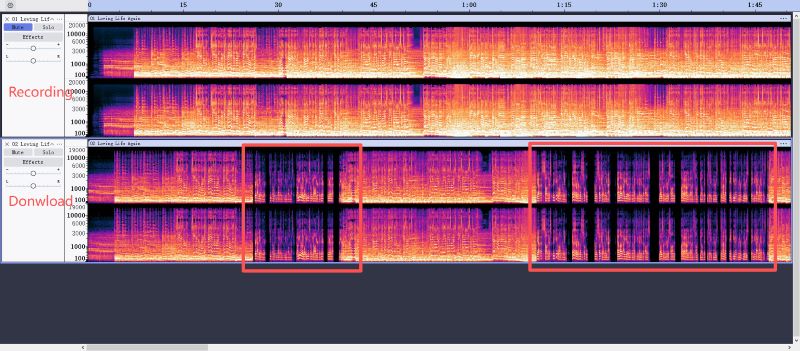
The simple rule: the real question is not “what bitrate did the app export?” It is “what quality did the source actually have before conversion?” Also, do not confuse FLAC output with true lossless capture. A lossless container only preserves what the source and recording chain already had. It cannot restore detail that never existed in the stream.
Quick picks by situation
- Pick Cinch Audio Recorder first if you want the least fragile Spotify-to-MP3 workflow on this page: no Spotify login, far fewer parser headaches, stronger metadata handling, and a practical way to fix both new recordings and old messy files.
- Pick Audacity first if your budget is effectively zero and you can accept manual cleanup as the real price.
- Pick Audio Hijack first if you are on Mac and want app-level capture rather than a whole-system workaround.
- Pick DRmare, Sidify, or ViWizard first only if faster playlist conversion matters more to you than login risk and policy volatility.
- Pick spotDL first only if you knowingly want the old Spotify-link-to-YouTube method and are willing to verify every important download yourself.
FAQ
Is AllToMP3 safe to use in 2026?
Not a smart bet. The project appears abandoned, the codebase is stale, and many users now end up hunting for old installers on unofficial mirrors instead of a healthy official release channel. That is already a worse security posture than downloading an actively maintained tool from its official site. Even if you get it running, the underlying parser logic is still the same fragile Spotify-to-YouTube chain that caused the original headaches.
Why does my Spotify downloader get the wrong songs?
Because many “Spotify downloaders” do not actually download Spotify audio. They read the metadata from your Spotify link, search YouTube for a match, and grab the result that looks close enough. That is how you end up with live versions, covers, lyric videos, sped-up uploads, or random remixes instead of the exact studio track on your playlist.
Does spotDL really download 320 kbps from Spotify?
No. spotDL’s own documentation says YouTube is the source. It can save a 320 kbps MP3 output file, but that is not the same thing as obtaining 320 kbps audio from Spotify. The source ceiling still comes from YouTube delivery, which is exactly why spectral analysis matters more than the export badge.
What is the safest Spotify-to-MP3 workflow if I care about my account?
If “safe” means lower exposure to login and API risk, recording tools are the better fit. A recorder like Cinch, Audacity, or Audio Hijack captures system audio or audio loopback and does not require your Spotify credentials. I’m not a lawyer, but common sense dictates: capturing the sound your own sound card is already authorized to play draws infinitely less fire from streaming giants than actively reverse-engineering their encrypted APIs with a third-party tool.
Why do my Spotify downloads sound muffled or quiet?
Because they’re probably not Spotify downloads at all. Most “Spotify downloaders” pull from YouTube, where audio is compressed to Opus or AAC at roughly 128–160 kbps equivalent. Even if the tool exports a 320 kbps MP3, the source was already compressed—and YouTube’s loudness normalization often makes tracks sound quieter than the original Spotify stream. You’re hearing the YouTube ceiling, not Spotify’s quality. The fix? Use a recorder that captures your system audio directly, or verify any download with Spek’s spectral analysis to see the real frequency range.
spotDL vs AllToMP3: which one should I use?
If you absolutely want that old workflow, spotDL is the more honest and actively maintained choice. But if your real complaint is wrong songs, fake 320 kbps, and messy tags, the better answer is neither. Switch methods and use a recorder instead.
Stop letting broken parsers ruin your music library. If your budget is absolutely zero, fire up Audacity and prepare for some manual labor—including virtual audio driver configuration on Mac. If you want your weekends back, grab the 9-song trial of Cinch. Test one short playlist, inspect the first file in Spek, and make the tool earn your trust before you scale up. That is the fastest way to avoid building a library you’ll regret later.