Cinch Audio Recorder Ultimate

Turn Streaming into Owning

Imagine having a personal recorder that listens to your favorite streaming music and saves every song as a high-quality MP3 file. That’s Cinch Audio Recorder.

You don’t need to be a tech wizard. Just press the big round “Record” button, play your music, and Cinch does the rest. It silently records in the background, automatically splits songs, identifies the artist and album, and even adds the cover art and lyrics. It’s like magic for your music library.

Mirror download for Win and Mac

What is it for?

Capture music from Spotify, Apple Music, and Amazon Music. Studio-Grade Sound Quality Upgrade your offline listening experience. Cinch Ultimate records at a high-fidelity 24bit / 48kHz sample rate. Save your music in standard MP3 (up to 320kbps) or Lossless WAV for perfect audio preservation.

download-streaming-music-to-mp3
Cinch-Streaming-Audio-Recorder-in-action

How it works

Cinch Streaming Audio Recorder isn't just a music recorder; it's a versatile tool for capturing any audio playing on your computer. It achieves this by directly tapping into your computer's sound card, ensuring you receive the exact audio quality as the original source.

Supported sites

Works With All Your Favorite Services Whether you use the web player or desktop app, Cinch works seamlessly in the background. Spotify Apple Music Amazon Music YouTube Music Tidal And any sound playing on your PC!

Silent Recorder

If you are recording music in a quiet environment, you can mute the sound on your computer. It uses CAC Technology, which records music directly from the raw audio data delivered by the sound cards.

Spotify AD Filter

For free accounts, Spotify plays audio ads between songs. As a result, these ads will also be recorded when you record a Spotify playlist. You can, however, eliminate these annoying ads with just one click by using the built-in AD filter.

Ringtone Maker

Do you ever find yourself wishing your ringtone reflected your unique style and preferences? With Cinch's Ring Maker feature, you can easily cut your favorite part of a song to create a custom ringtone.

ID3 information editor

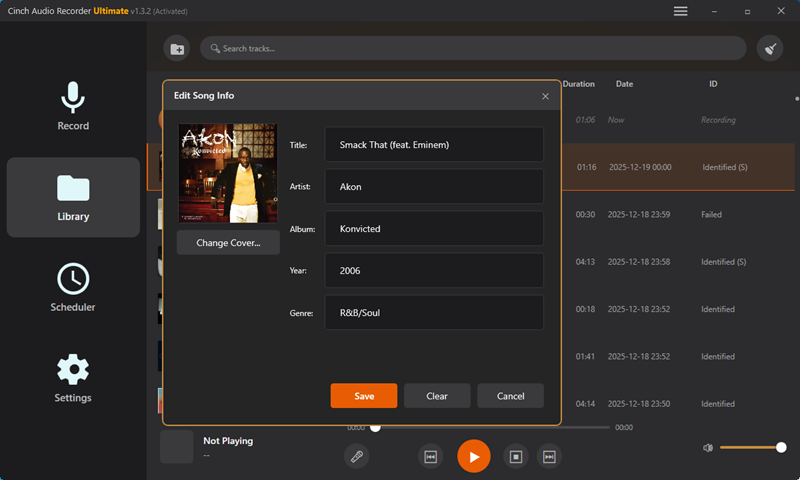
When recording music from online streaming sites, the Cinch Streaming Audio Recorder captures ID3 information. The ID3 information includes the song's title, artist, album, and cover. With the built-in ID3 editor, you can also manually edit the ID3 information.

Cinch Audio Recorder Tips