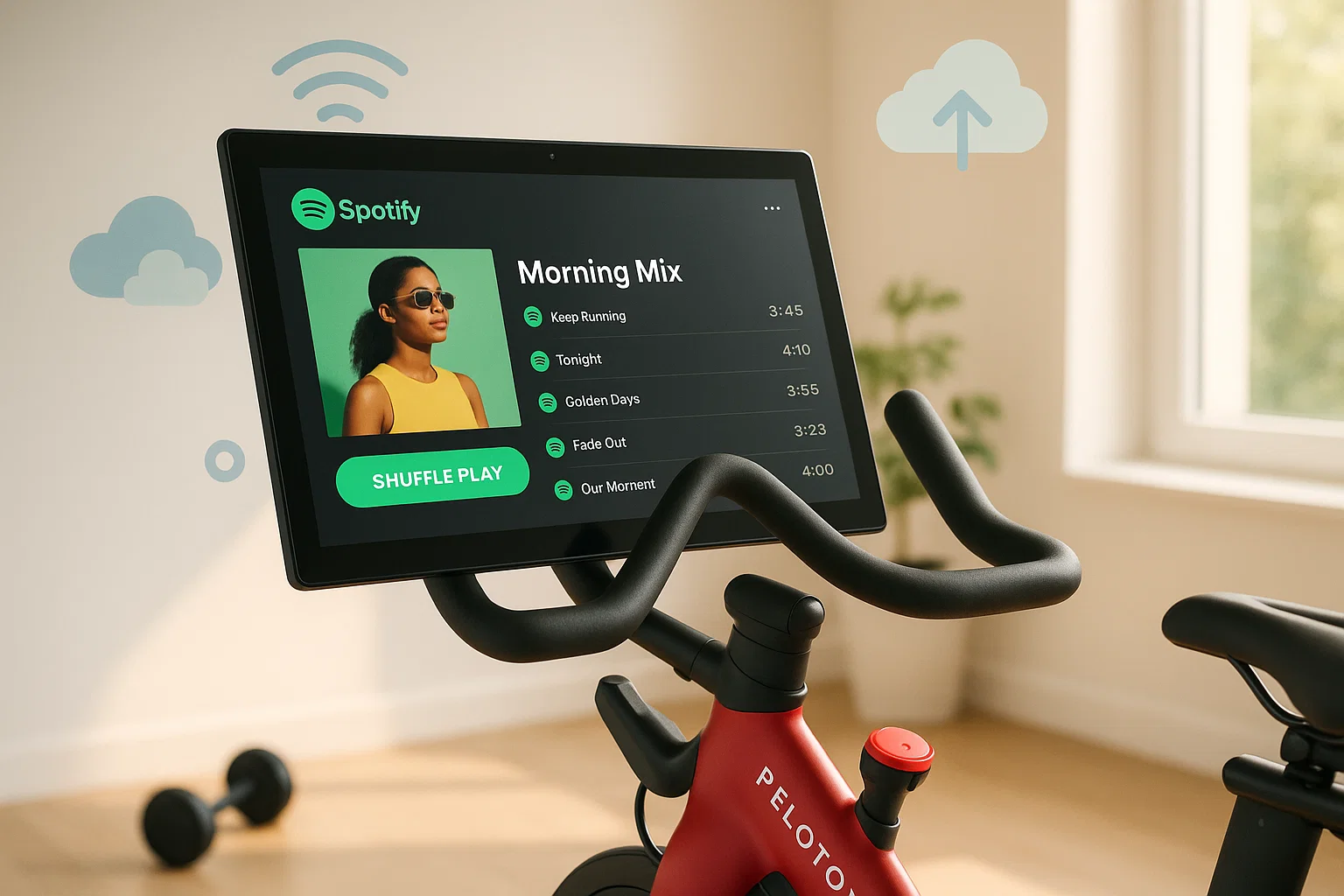
I connected my Spotify to Peloton. Logged in. Saw the confirmation screen. Then… nothing.
Where’s my playlist? Where’s the play button? I spent 10 minutes tapping around the screen like an idiot before I finally Googled it.
Here’s the truth that most articles won’t tell you upfront: Peloton’s Spotify integration doesn’t let you play your own music. It only saves songs you “heart” during Peloton classes to a Spotify playlist. That’s it. One-way sync. Peloton to Spotify, not the other way around.
Frustrating?
Absolutely. But there are workarounds.
I’ve tested five different methods to actually play Spotify on Peloton, from dead-simple Bluetooth setups to more advanced WebView tricks. Here’s what actually works in December 2025.
In This Article:
Quick Answer: What Actually Works?
The short version:
- Simplest: Bluetooth speaker or headphones + your phone. Mute Peloton, play Spotify on your phone.
- For classes: Mute Peloton music, use subtitles, play your own music.
- Integrated: Use Peloton’s hidden WebView browser to access YouTube Music or Google Drive with your uploaded tracks.
- Best quality: Use Cinch Audio Recorder to download Spotify to MP3, upload to cloud, play via WebView.
Here’s how each method compares:
| Method | Best For | Complexity | Audio Quality | Works Offline |
|---|---|---|---|---|
| Bluetooth Speaker + Phone | Simplest setup | ⭐ Easy | Good | ❌ |
| Bluetooth Headphones | Private listening | ⭐ Easy | Good | ❌ |
| Mute + Phone + Subtitles | Classes with own music | ⭐⭐ Medium | Good | ❌ |
| WebView + YouTube Music | Integrated experience | ⭐⭐⭐ Complex | Good | ❌ |
| Cinch + Offline Files | Best quality, offline | ⭐⭐ Medium | 320kbps | ✅ |
Part 1: What Peloton’s Spotify Integration Actually Does
Let’s clear up the confusion first.
When you “connect” Spotify to Peloton, you’re not enabling music streaming. You’re enabling a one-way sync that does exactly one thing: when you tap the heart icon on a song during a Peloton class, that song gets added to a Spotify playlist called “My Peloton Music by [your username].”
That’s useful for discovering new music during workouts. But it’s not what most people expect when they see “Connect Spotify.”
As one Reddit user put it: “I bought the Peloton under the assumption that Spotify integration meant I could stream my playlists on the bike. Had I known that wasn’t possible, I might have picked a different bike.”
Why doesn’t Peloton allow Spotify streaming?
I tested this on my Peloton Bike in December 2025. The limitation is still there. No native Spotify playback.
Part 2: How to Connect Spotify to Peloton (The Official Way)

Even though you can’t play your own music, connecting Spotify is still useful for saving songs you discover during classes. Here’s how:
- On your Peloton screen, tap your profile picture (bottom left).

- Select Music from the sidebar.
- Tap Connect on the right panel.
- Choose Spotify and tap Connect.

- Log into your Spotify account when prompted.
- Tap Agree to authorize.


Done. Now when you heart a song during any Peloton class, it automatically appears in your “My Peloton Music” playlist on Spotify.
What you get: A growing playlist of songs you’ve discovered during workouts.
What you don’t get: The ability to play your own Spotify playlists on the Peloton screen.
Part 3: Method 1 – Bluetooth Speaker + Phone (Simplest)
This is what most Peloton owners actually do. No hacks, no workarounds, just common sense.
Setup:
- Pair a Bluetooth speaker with your phone.
- Position the speaker near your Peloton.
- On Peloton, lower the volume or mute it entirely.
- Open Spotify on your phone and play your playlist.
Best for: “Just Ride” sessions, Scenic Rides, or any time you want to zone out with your own music.
Pros:
- Takes 30 seconds to set up
- No technical knowledge required
- Works with any music app, not just Spotify
Cons:
- Two separate audio sources if you’re doing a class
- Speaker placement can be awkward
This is my go-to for Just Ride sessions. I mute the Peloton, put on a podcast or my own playlist, and just pedal. Simple.
Part 4: Method 2 – Bluetooth Headphones + Phone (Private)
Same concept, but with headphones instead of a speaker. Better for apartments, late-night rides, or when you don’t want to disturb anyone.
Setup:
- Pair Bluetooth headphones with your phone (not the Peloton).
- Mute the Peloton screen.
- Play Spotify on your phone.
Pro tip: If you use AirPods or similar earbuds with quick device switching, you can easily swap between Peloton audio (for classes) and phone audio (for your own music) mid-workout.
Best for: Apartment dwellers, late-night riders, anyone who wants privacy.
Part 5: Method 3 – Mute Peloton + Phone + Subtitles (For Classes)
Want to do a Peloton class but with your own music? This Reddit-approved hack works surprisingly well.
Setup:
- Start a Peloton class.
- Tap the screen and enable Subtitles (closed captions).
- Mute the Peloton audio or turn it way down.
- Play your own music on your phone (Bluetooth speaker or headphones).
- Follow the instructor’s cues via subtitles.
One Reddit user shared: “I always mute the music and play my own and use subtitles. References to whatever music they’re playing doesn’t seem to matter that much.”
Limitation: You’ll miss some verbal cues and the energy of the instructor’s voice. The instructor often references the music (“push on the chorus!”), which won’t make sense with your own tracks. But for steady-state rides, it works fine.
Best for: Riders who want instructor guidance but hate the playlist.
Part 6: Method 4 – WebView Browser + YouTube Music (Integrated)
This is the “official” workaround that lets you play music directly on the Peloton screen. It’s more complex, but it gives you an integrated experience.
Peloton’s tablet runs Android, and there’s a hidden WebView browser you can access. Through it, you can load YouTube Music, Google Drive, or any web-based music player.
How to access WebView:
- Tap your profile picture on Peloton.
- Go to Settings → Device Settings → System → About tablet.
- Tap Legal information → Webview license.
- A list of licenses appears. Tap Homepage to open the WebView browser.
Option A: YouTube Music
- On your computer, go to music.youtube.com and log in.
- Click your profile → Upload Music.
- Upload your Spotify tracks (you’ll need to download them first—see Method 5).
- On Peloton, open WebView and navigate to music.youtube.com.
- Log in and play your uploaded music.
Option B: Google Drive
- Upload your music files to Google Drive on your computer.
- On Peloton, open WebView and go to drive.google.com.
- Navigate to your music folder and click a file to play.
Pros:
- Music plays directly on the Peloton screen
- No need for external speakers or phone
Cons:
- Complex setup
- Requires uploading music files (Spotify streams won’t work directly)
- WebView browser is clunky
Part 7: Method 5 – Cinch Audio Recorder (Best Quality + Offline)
Here’s the thing about Methods 1-4: they all have limitations. Bluetooth requires your phone nearby. WebView requires uploading files. And none of them give you true offline playback.
If you want the best audio quality and the most flexibility, you need to actually own your music files. That’s where Cinch Audio Recorder comes in.
Why Cinch works:
Cinch records audio directly from your system sound. Play any Spotify track, and Cinch captures it at up to 320kbps—the same quality as the original stream. It automatically detects songs, splits tracks, and adds ID3 tags (artist, title, album art).
Once you have the MP3 files, you can upload them anywhere: YouTube Music, Google Drive, a USB drive—whatever works for your setup.
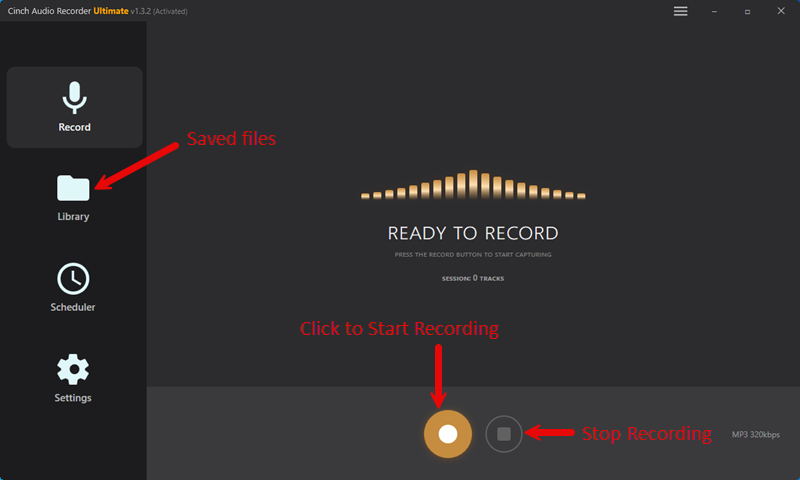
How to use Cinch for Peloton:
- Download and install Cinch Audio Recorder on your computer.
- Open Cinch and click Record.
- Play your Spotify playlist. Cinch captures everything automatically.
- When done, check the Library tab. Your tracks are saved with proper metadata.
- Upload the MP3 files to YouTube Music or Google Drive.
- On Peloton, access them via WebView.
Why this is the best method:
- 320kbps quality – No compression artifacts
- Offline playback – Once uploaded, no internet needed during playback
- Works with any streaming service – Spotify, Apple Music, Tidal, whatever
- Automatic organization – ID3 tags keep your library clean
Is it legal?
Cinch records system audio, similar to recording from radio. For personal use, this is generally fine. Just don’t redistribute copyrighted content.
The catch: Cinch is paid software and requires a Windows or Mac computer—it won’t work on your phone. Recording also happens in real-time, so a 3-hour playlist takes 3 hours to capture. It only makes sense if you care about audio quality or need true offline playback.


Troubleshooting: Common Issues
“My Peloton Music” playlist not showing in Spotify
First, make sure your accounts are actually connected. Go to Peloton → Profile → Music → check if Spotify shows as connected. If it does, force close the Spotify app on your phone and reopen it. The playlist should appear under Your Library → Playlists.
Songs I liked on Peloton aren’t syncing to Spotify
Some songs have regional restrictions on Spotify. Go to Spotify Settings → Playback → turn off “Hide Unplayable Songs.” Then search for the missing track. If it’s greyed out, it’s not available in your region—nothing you can do about that one.
Can’t find the Spotify option in Peloton Music settings
Update your Peloton software. Go to Settings → Device Settings → System → System Updates. Also check your internet connection—Peloton needs a stable connection to show streaming service options.
WebView browser won’t load or crashes
Clear the cache. Go to Settings → Device Settings → Apps → WebView → Clear Cache. Then restart your Peloton. If it still doesn’t work, try a different website first (like Google) to confirm WebView is functioning.
Bluetooth audio keeps cutting out
Move your phone closer to the speaker or headphones. Bluetooth range is typically 30 feet, but walls and interference can reduce it. Also check if other Bluetooth devices are connected to your phone—disconnect them to reduce interference.
FAQ
Can I play my own Spotify playlists on Peloton?
No. Peloton’s Spotify integration only saves songs from classes to Spotify. To play your own music, use Bluetooth with your phone, or upload music files to YouTube Music/Google Drive and access them via Peloton’s WebView browser.
Do I need Spotify Premium for Peloton?
No. Both free and Premium Spotify accounts can connect to Peloton for saving liked songs. However, if you want to play music on your phone while riding (Method 1-3), Premium gives you ad-free playback.
Why doesn’t Peloton support Spotify streaming?
Music licensing. Peloton would need separate agreements to stream user playlists, which is expensive and legally complex. Their current licensing only covers music used in official Peloton classes.
What’s the best way to listen to my own music on Peloton?
For simplicity: Bluetooth speaker + phone. For integration: WebView + YouTube Music. For best quality and offline playback: Cinch Audio Recorder + uploaded files.
Can I use Apple Music on Peloton instead of Spotify?
Same limitation. Peloton only syncs liked songs to Apple Music, not the other way around. The workarounds in this guide work for Apple Music too—just use Cinch to record your Apple Music tracks instead.
Conclusion
Peloton’s Spotify “integration” is misleading. It’s a one-way sync for saving songs, not a way to play your own music. But that doesn’t mean you’re stuck with Peloton’s playlists.
Your options:
- Quick and easy: Bluetooth speaker or headphones + phone. Works in 30 seconds.
- For classes: Mute Peloton, enable subtitles, play your own music.
- Integrated: WebView browser + YouTube Music or Google Drive.
- Best quality: Cinch Audio Recorder → download your Spotify library → upload to cloud → play via WebView.
I’ve been using the Bluetooth method for Just Ride sessions and Cinch + YouTube Music for longer playlists. Both work great. Pick the method that fits your workflow.
Tested in December 2025 on Peloton Bike. Methods verified on both Bike and Tread.