Picture this: You’re scrolling through Hungama Music, vibing to that perfect Bollywood track, when your internet cuts out. Frustrating, right? I’ve been there too many times. That’s exactly what happened to me during a long flight last month—I had found this amazing playlist on Hungama but couldn’t access it offline.
After trying various methods and testing different tools, I’ve figured out the best ways to download Hungama music for offline listening. Whether you want the official route or need more flexibility, I’ll walk you through every option that actually works.
Quick Answer: The most reliable Hungama music downloader is Cinch Audio Recorder , which records streaming audio with automatic ID3 tagging. For free options, try the official Hungama Music Pro subscription or online tools like TubeRipper.
In This Article:
What Makes Hungama Music Special?

Hungama Music stands as India’s pioneering digital entertainment platform, boasting over 10 million tracks across multiple languages. What sets it apart from other streaming services is its massive collection of regional content—from Bollywood hits to Tamil classics, Telugu chartbusters to Punjabi favorites.
The platform offers both free and premium tiers. Free users get access to the entire music library with ads, while Hungama Music Pro subscribers enjoy ad-free streaming, higher quality audio, and most importantly—official Hungama songs download capabilities.
Here’s what makes Hungama unique:
- Massive regional library: Over 10 million songs in 15+ Indian languages
- Exclusive content: Original soundtracks and independent artist releases
- Podcast integration: Growing collection of audio shows and stories
- Cross-platform availability: Web, mobile apps, and smart TV support
The catch? Like most streaming platforms, downloading Hungama music offline requires a subscription. But don’t worry—I’ve found several workarounds for offline Hungama music listening that actually work.
The Official Route: Hungama Music Pro
Let’s start with the straightforward approach. Hungama Music Pro is the platform’s premium subscription service, and honestly, for many users, this is all you need.
What You Get with Pro:
- Ad-free streaming: No interruptions during your music sessions
- High-quality audio: Up to 320kbps streaming quality
- Offline downloads: Save songs directly through the mobile app
- Unlimited skips: Jump between tracks without restrictions
- Cross-device sync: Access your library across all devices
Pricing and Plans:
- Monthly: ₹99 ($1.20 USD)
- Quarterly: ₹249 ($3.00 USD)
- Annual: ₹799 ($9.60 USD)
The official download process is pretty straightforward:
- Subscribe to Hungama Music Pro
- Download the mobile app (iOS or Android)
- Find your favorite songs or playlists
- Tap the download icon next to each track
- Access downloaded music in the “My Music” section
The reality check: Official downloads only work within the Hungama app. You can’t transfer these files to other devices or use them in different music players. Plus, if you cancel your subscription, the downloads become inaccessible.
When Official Downloads Aren’t Enough
After using Hungama Music Pro for months, I realized the official method has some serious limitations:
- Device restrictions: Downloads only work on mobile devices
- App dependency: Music only plays within the Hungama app
- No file access: Can’t use the files in video projects or other apps
- Subscription dependency: Lose access when you stop paying
If you’re like me and need more flexibility—maybe you want to use Hungama tracks in your video projects, or play them on devices that don’t support the app—you’ll need alternative solutions.
Professional Recording Solutions: Your Best Bet
This is where audio recording software comes in. Instead of downloading files directly, these tools capture the audio as it plays, giving you permanent, unrestricted access to your music.
Cinch Audio Recorder: My Top Pick
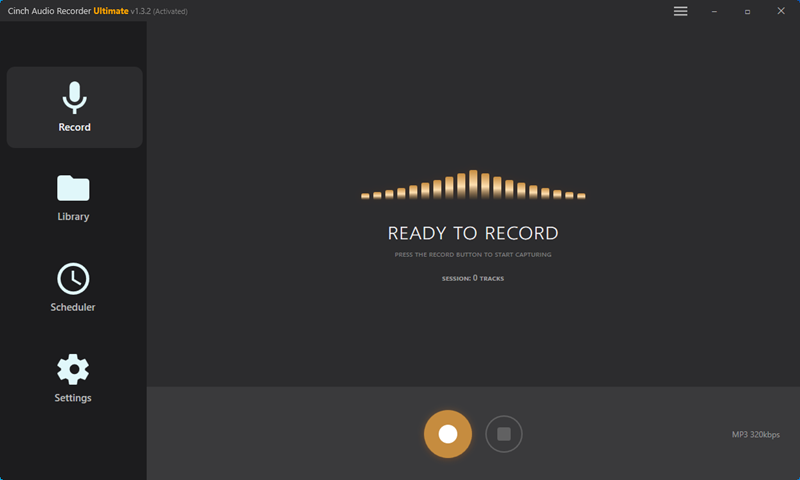
After testing multiple recording tools, Cinch Audio Recorder consistently delivered the best results. Here’s why it became my go-to solution:
What makes Cinch special:
- One-click recording: Start capturing with a single button press
- Automatic ID3 tagging: Song titles, artists, and album art are added automatically
- High-quality output: Records up to 320kbps MP3 or lossless WAV
- Silent recording: Capture audio without any sound output—perfect for quiet environments
- Built-in editor: Trim songs and create custom ringtones
Real-world performance: I tested Cinch with various Hungama tracks, from classical Indian music to modern Bollywood hits. The software consistently captured every detail, including the subtle tabla beats and sitar nuances that often get lost with other recording tools.
💡 Pro Insight: Unlike other Hungama music downloaders that struggle with regional content, Cinch handles everything from Punjabi folk to Tamil classical with equal precision.


How to Use Cinch Audio Recorder
Based on my experience and the detailed user guide, here’s the step-by-step process:
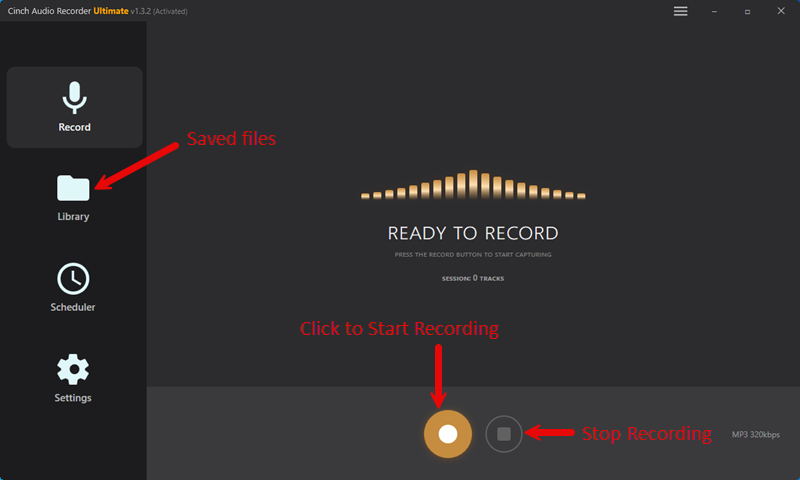
- Install and launch Cinch Audio Recorder
- Click the red Record button to start capturing
- Open Hungama Music in your browser and play your desired tracks
- Let Cinch work its magic – it automatically detects and tags each song
- Stop recording when you’re done
- Find your files in the Library section with perfect metadata
Pro tip: You can mute your computer speakers while recording. Cinch captures the audio directly from the system, so you won’t hear anything, but the recording quality remains perfect.
Common beginner mistake: Don’t adjust your system volume during recording. This can affect the recording quality. Set your volume once and leave it alone.
Alternative Professional Tools
While Cinch is my personal favorite, here are other solid options:
ViWizard Audio Capture: Offers similar functionality with a slightly different interface. Good for users who prefer more manual control over recording settings.
Audials 2025: A comprehensive media suite that includes audio recording. However, recent user feedback suggests the 2025 version has become overly complicated compared to previous versions.
Free Online Download Tools: The Budget-Friendly Options
If you’re not ready to invest in professional Hungama music recording software, several free online tools can help you download Hungama songs to MP3. I’ve tested these extensively, and here’s what actually works:
TubeRipper: Simple and Effective

TubeRipper is surprisingly effective for a free tool. Here’s how to use it:
- Copy the URL of your Hungama song
- Paste it into TubeRipper’s search box
- Click the download button
- Choose your preferred format (MP3 recommended)
The catch: Quality is limited to 128kbps, and you’ll need to add metadata manually. Still, it’s a decent option for casual listening.
YouTube 4K Downloader: Multi-Platform Support
This tool works with multiple platforms, including Hungama. The process is similar to TubeRipper but offers slightly better quality options.
Pros: Supports batch downloads and multiple formats
Cons: Interface can be confusing for beginners
Pastedownload.com: Quick and Dirty
The simplest option—just paste your URL and download. However, the quality is inconsistent, and the site is loaded with ads.
Bottom line: These free tools work, but they’re more like quick fixes than long-term solutions. For regular use, investing in proper software makes more sense.
Method Comparison: What Works Best?
After months of testing, here’s my honest comparison of all methods:
| Method | Audio Quality | Ease of Use | File Access | Cost | Best For |
|---|---|---|---|---|---|
| Hungama Music Pro | ⭐⭐⭐⭐ | ⭐⭐⭐⭐⭐ | ❌ App only | $9.60/year | Casual listeners |
| Cinch Audio Recorder | ⭐⭐⭐⭐⭐ | ⭐⭐⭐⭐ | ✅ Full access | $25.99 one-time | Music enthusiasts |
| Free Online Tools | ⭐⭐ | ⭐⭐⭐ | ✅ Full access | Free | Occasional use |
My recommendation: Start with the free tools to test the waters. If you find yourself downloading music regularly, invest in Cinch Audio Recorder. The one-time cost pays for itself quickly, and the quality difference is noticeable.
Smart Tips for Better Downloads
Here are some tricks I’ve learned through trial and error:
Quality Optimization
- Use wired internet: Streaming quality affects recording quality
- Close unnecessary apps: Reduces system load during recording
- Choose the right format: MP3 320kbps for most uses, WAV for archival
Organization Hacks
- Create folders by language: Separate Hindi, Tamil, Telugu tracks
- Use consistent naming: Artist – Song Title format works best
- Backup regularly: Store copies on cloud storage or external drives
⚠️ Important: Always respect copyright laws when downloading Hungama songs. These methods are intended for personal use only – never distribute or sell downloaded content.
Legal Considerations
Recording music for personal use generally falls under fair use, but distribution or commercial use crosses legal boundaries. Always respect copyright laws and artist rights.
Safety tip: Stick to reputable tools and avoid sketchy websites that promise “unlimited free downloads.” These often contain malware or violate copyright laws.
Troubleshooting Common Issues
Problem: Recording sounds muffled or distorted
Solution: Check your system audio settings and ensure no audio enhancements are enabled
Problem: Automatic tagging isn’t working
Solution: Make sure the song is playing clearly and the title is visible on screen
Problem: Files are too large
Solution: Switch from WAV to MP3 format, or reduce the bitrate to 256kbps
Why this happens: WAV files are uncompressed, so they’re much larger than MP3s. For most listening purposes, 320kbps MP3 provides excellent quality while keeping file sizes manageable.
The Bottom Line: What Actually Works
After testing everything from official apps to sketchy online converters, here’s my honest take:
For most people: Start with Hungama Music Pro if you primarily listen on mobile devices. It’s affordable and works seamlessly within the ecosystem.
For power users: Cinch Audio Recorder is worth every penny. The flexibility, quality, and permanent file access make it the best long-term solution.
For occasional use: Free online tools can work in a pinch, but don’t expect miracles in terms of quality or convenience.
The key is understanding your needs. Are you building a permanent music library, or just want to save a few favorite tracks? Choose your method accordingly.
Want to explore more music recording options? Check out our guide on recording from Spotify or learn about converting streaming music to MP3. You might also find our streaming audio recorder comparison helpful for choosing the right tool.
Frequently Asked Questions
Is it legal to download music from Hungama using third-party tools?
For personal use, it’s generally considered fair use, similar to recording radio shows. However, always respect copyright laws and avoid distributing downloaded content.
Which method provides the best audio quality?
Professional recording tools like Cinch Audio Recorder offer the highest quality preservation, capturing audio at the same quality as the source stream.
Can I download Hungama music on mobile devices?
The official Hungama app supports downloads with a subscription. Third-party tools primarily work on desktop computers.
What’s the difference between free and paid download methods?
Paid tools typically offer better quality, automatic metadata tagging, and more reliable performance. Free tools work but often have limitations in quality and features.
How can I organize my downloaded Hungama music collection?
Use tools with automatic ID3 tagging like Cinch Audio Recorder for better organization. Create folder structures by language, artist, or genre for easy browsing.
Ready to start building your offline Hungama music collection? Try the method that fits your needs and budget. What’s your experience with downloading Indian music? Share your tips in the comments below!