Here’s a number that caught me off guard: 270 million people listen to audiobooks monthly worldwide, with the U.S. market hitting $2.22 billion in 2024. That’s a 13% jump from last year alone.
As someone who’s been using Scribd and Everand for years, I get why they call it the “Netflix for Books.” Unlimited audiobooks for a monthly fee? Sounds perfect.
But here’s where it gets tricky. You want your audiobooks offline, on any device, without those annoying platform restrictions. Maybe you’re planning a road trip, your internet’s acting up, or you just want your collection in a format that actually works everywhere.
I’ve tested pretty much every method out there – from official app downloads to recording tools that actually work. This guide breaks down what I’ve learned, so you can pick the approach that fits your needs and tech comfort level.
What’s the Deal with Scribd and Everand?
Before we jump into downloading methods, let’s clear up some confusion about these platforms.
The Platform Split That Changed Everything
In 2023, Scribd did something interesting – they split their content into two separate platforms. Scribd now handles community-uploaded documents, while Everand became the home for premium stuff like audiobooks, ebooks, and magazines.
This means if you’re hunting for audiobooks, you’re probably dealing with Everand now, not the original Scribd.
Why Users Get Frustrated (And I Don’t Blame Them)
Here’s what nobody tells you upfront about Everand’s limitations:
⚠️ Important Reality Check
Despite marketing claims of “unlimited” access, most users hit significant roadblocks that aren’t mentioned in the fine print.
The “Unlimited” Catch: After about 4 audiobooks per month, you might hit restrictions on popular titles. Yeah, I know – “unlimited” doesn’t feel so unlimited anymore. One Reddit user put it perfectly: “I thought unlimited meant unlimited, not unlimited-with-asterisks.”
Audio Quality Issues: Everand streams at 32 kbps. For comparison, Audible gives you 64 kbps. Trust me, you’ll notice the difference if you care about sound quality – especially with classical music or detailed narrations.
Device Lock-In: No MP3 exports, no e-reader support. Your downloads only work in their app. Want to listen on your old iPod? Tough luck.
Subscription Dependency: Cancel your membership? Say goodbye to your entire offline library. It’s like renting books that disappear the moment you stop paying rent.
Method 1: The “Easy Button” (But With Strings Attached)
Let’s start with the obvious choice – Everand’s built-in download feature.
How It Actually Works
The Everand mobile app lets you download audiobooks straight to your phone or tablet. It’s the most straightforward option if you’re okay with staying in their ecosystem.

Quick Download Steps:
- Open the Everand app and sign in
- Find your audiobook and tap the cover
- Hit “Save” to add it to your library
- Tap “Download” for offline access
- Check your downloads in the bookmark section
The Reality Check
This method works fine for casual listening on mobile devices. But if you want flexibility? Not so much. Your downloads stay locked in the app, and that 32 kbps quality might bug you if you’re used to better audio.
Method 2: Recording Tools That Actually Give You Control
Here’s where things get interesting. Recording software gives you way more control over your audiobook collection.
Why I Actually Recommend Cinch Audio Recorder
Look, Everand’s official download feature works for basic needs. But when you hit those device compatibility walls or want better audio quality, that’s where recording tools shine.
Cinch Audio Recorder isn’t trying to replace Everand’s features – it’s filling the gaps. Think of it as your backup plan when the official method doesn’t cut it.
💡 Pro Tip from Experience
I’ve been using Cinch for over a year now, and here’s what I wish someone had told me earlier: it’s not just about downloading – it’s about having control over your audiobook collection.
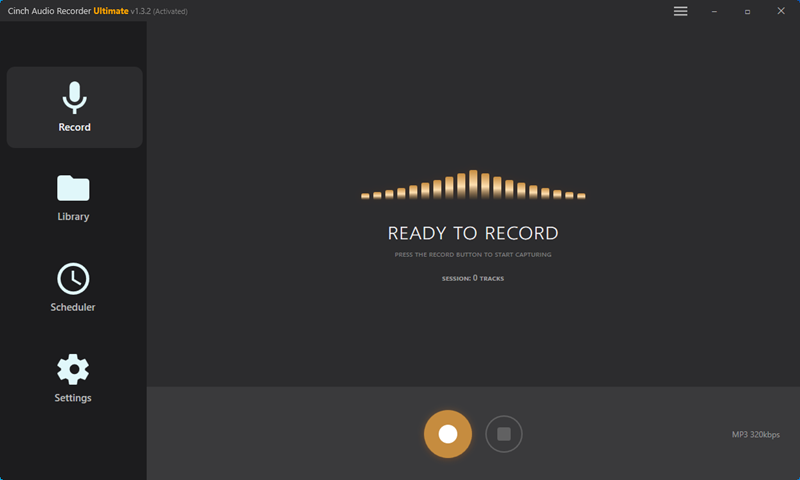
What makes it worth considering:
| Feature | Everand App | Cinch Audio Recorder |
|---|---|---|
| Audio Quality | 32 kbps | Up to 320 kbps |
| Device Compatibility | App only | Any device |
| Offline Access | Subscription dependent | Permanent files |
| File Format | Proprietary | MP3, WAV, AAC |
| Metadata | Basic | Automatic ID3 tagging |
Key advantages I’ve discovered:
- One-click recording – seriously, hit record, play your audiobook, done
- Better quality – capture at 320 kbps instead of Everand’s measly 32 kbps
- Any device compatibility – your recordings work on everything from smartphones to vintage MP3 players
- Automatic tagging – gets title, author, and cover art automatically (this saved me hours of manual work)
- Silent recording – won’t mess with your computer’s audio while you’re working
Step-by-Step Recording Process
Here’s how I typically use Cinch Audio Recorder:
Getting Started:
- Download and install the software
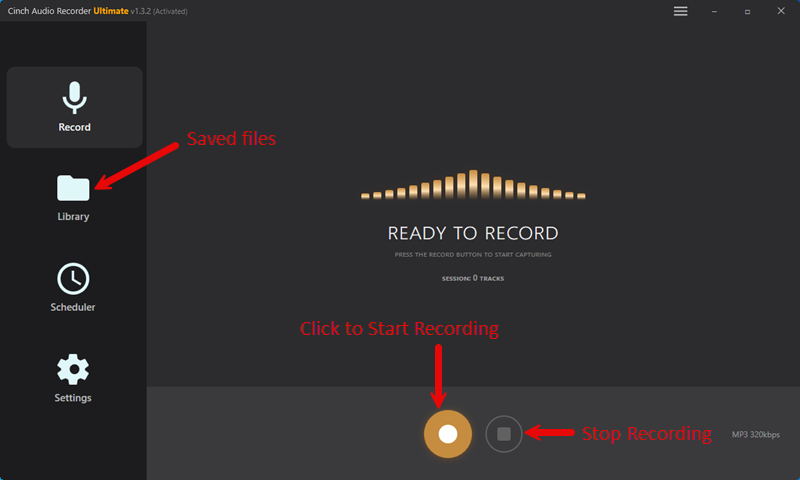
- Open it up – the interface is pretty straightforward
- Click “Settings” and choose MP3 as your output format


The Recording Part:
- Open your browser and log into Everand
- Find your audiobook and get ready to play it
- Hit the red Record button in Cinch
- Start playing your audiobook
- Let it run – Cinch captures everything automatically
- Stop recording when you’re done
After Recording:
- Review your recording with the built-in player
- Trim any unwanted parts using the editing tools
- Export to your preferred folder with proper naming
Bonus Features That Actually Matter
Ringtone Creation: Turn your favorite audiobook quotes into ringtones. Sounds silly, but it’s actually pretty cool. I’ve got Morgan Freeman’s voice from an audiobook as my alarm – beats any default tone.

Ad Filtering: If you’re using a free account with ads, Cinch can automatically filter out those interruptions. No more jarring car commercials in the middle of your mystery novel.
🎯 Real User Case Study
Sarah, a daily commuter, used Cinch to record her entire 40-hour audiobook series. Result? She saved $120 compared to buying individual titles and can now listen on her old car stereo that doesn’t support apps.
Advanced Editing Tools: Trim silence, adjust volume, split long recordings into chapters. It’s like having a mini audio studio built-in.
Method 3: The Budget-Friendly Route (Free But Not Easy)
Not everyone wants to spend money on recording software. I get it.
Audacity: The Free Option
Audacity is the go-to free recording tool. It’s not as user-friendly as Cinch, but it gets the job done.
The Timer Record Trick: Audacity has this neat “Timer Record” feature that’s perfect for audiobooks. You can set it to start and stop recording automatically.
- Open Audacity
- Go to Transport > Recording > Timer Record
- Set your start time and duration
- Hit OK and start your audiobook
- Export as MP3 when done
Pros and cons:
- ✅ Completely free
- ✅ Works on Windows, Mac, and Linux
- ❌ Steeper learning curve
- ❌ No automatic metadata
- ❌ More manual work required
Other Tools Worth Mentioning
ViWizard Audio Capture: Middle-ground option between free and premium. Does the job but lacks some of Cinch’s polish.
OBS Studio: Overkill for most people, but if you’re already familiar with it, it can capture audio too. For more recording options, check out our guide on how to record from Spotify which covers similar techniques.
Method 4: Advanced Solutions (For the Tech-Savvy)
For those comfortable with complex setups, there are additional methods like Android emulators or browser-based recording with OBS Studio. However, these require significant technical knowledge and setup time that makes them impractical for most users.
Comparison: Which Method Actually Works for You?
Let me break this down based on what I’ve learned from testing all these methods:
| Method | Ease of Use | Audio Quality | Device Freedom | Cost |
|---|---|---|---|---|
| Everand App | Super easy | Poor (32 kbps) | App only | Subscription |
| Cinch Audio Recorder | Easy | Excellent (320 kbps+) | Any device | $25.99 |
| Audacity | Learning curve | Good | Any device | Free |
| ViWizard | Moderate | Good | Any device | $39.95 |
My honest recommendations:
- Just want mobile listening? Stick with the Everand app
- Want quality and simplicity? Go with Cinch Audio Recorder
- Tight budget but tech-savvy? Try Audacity
- Need professional features? Consider ViWizard or Cinch
Common Issues and How I Fixed Them
After months of testing different methods, I’ve run into pretty much every problem you can imagine. Here are the solutions that actually worked:
Quick Fixes for Common Problems
Recording sounds weird? Check your system’s audio settings. Make sure the input is set to “Stereo Mix” or “What U Hear.”
Volume too low? Turn up your audiobook volume before recording, but don’t push it into distortion territory.
Files won’t play on your device? MP3 is your safest bet for compatibility. Most recording tools can convert other formats if needed.
Missing metadata? Tools like Cinch Audio Recorder automatically grab title, author, and cover art info.
Best Practices I’ve Learned
Quality Settings: 320 kbps MP3 hits the sweet spot between quality and file size. WAV is overkill unless you’re an audiophile.
File Organization: Use a consistent naming system. I go with “Author_Name – Book_Title – Chapter_01.mp3” – makes everything easier to find.
Backup Strategy: Don’t put all your audiobooks in one place. Cloud storage, external drives, whatever works for you.
Legal Stuff: Recording for personal backup is generally fine, but don’t share your recordings. Keep your subscription active while using the content.
The Bottom Line
Here’s what I’ve figured out after trying all these methods: if you just want basic offline listening on your phone, the Everand app does the job. But if you want real flexibility – better quality, any device, actual ownership of your files – recording tools like Cinch Audio Recorder are worth the investment.
The $25.99 for Cinch pays for itself pretty quickly when you consider the freedom it gives you. No more worrying about subscription cancellations or device compatibility issues.
Whatever method you choose, the key is picking something that fits your actual needs, not just what sounds good on paper.
Ready to take control of your audiobook collection? Give Cinch Audio Recorder a try and see the difference for yourself.
FAQ
Can I download Scribd audiobooks for free? The Everand app allows downloads with a subscription. Free recording tools like Audacity work too, but require more setup.
What’s the difference between Scribd and Everand? Everand is Scribd’s rebranded service for audiobooks and ebooks. Scribd now focuses on documents.
Is recording audiobooks legal? Generally yes for personal backup, but laws vary by location. Keep your subscription active and don’t share recordings.
Which method gives the best audio quality? Recording tools like Cinch Audio Recorder can capture at 320 kbps, much better than Everand’s 32 kbps streaming.
How do I organize my downloaded audiobooks? Use consistent file naming and proper metadata tags. Cinch Audio Recorder handles this automatically. For more organization tips, see our guide on adding ID3 tags to MP3 files.