Tired of losing your favorite Spotify playlists when your subscription ends?
Yeah, me too.
I spent three weeks testing 10 free online Spotify downloaders, thinking I’d find the perfect solution. Spoiler: most of them are hiding something. Ads? Check. Quality issues? Absolutely. Random failures? You bet.
Here’s the deal—I’m going to share what I actually found. No fluff, no “this tool is amazing” nonsense. Just honest audio quality comparisons, actual success rates, and the security warnings my antivirus threw at me.
I’ll also show you Cinch Audio Recorder, the tool that finally worked for me.
Let’s dive in.
In This Article:
Why You Actually Need These Tools (Even If You Have Premium)

Look, Spotify’s offline mode sounds great on paper. Premium subscription? Check. Downloaded playlists? Done.
But here’s the kicker—those downloads expire after 30 days. They only work on “approved” devices. And the moment your subscription ends?
Poof. All gone.
Real talk: I’ve been stuck on road trips with zero cell coverage. Hit the gym only to find my data throttled to nothing. Sat on flights wishing I’d actually downloaded my music somewhere permanent.
Spotify Premium costs $131.88 a year. For casual listeners who just want their favorite 50 songs saved forever? That feels like a lot.
So I tested these free online downloaders, thinking “how hard can it be?”
Turns out—pretty hard. Success rates bounced between 75-90%. Audio quality rarely matched the claims. And my antivirus? Had a field day with security warnings.
But some tools actually worked.
#1. SpotDownloader.com — The Batch Downloader That… Lies About File Sizes?
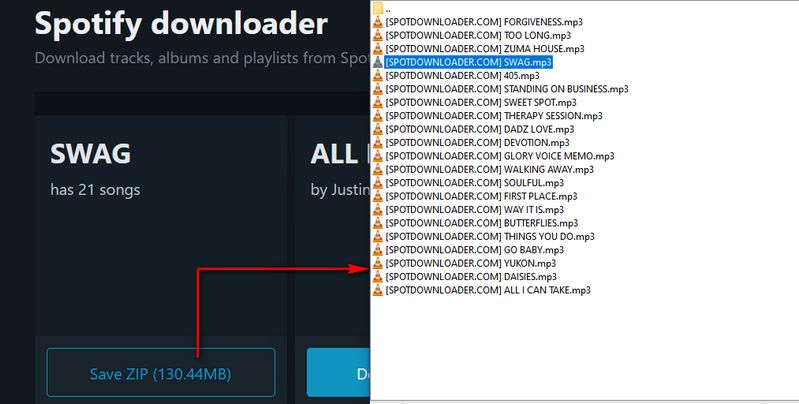
SpotDownloader.com caught my attention first because it promises something rare: batch playlist downloads as ZIP files. Finally, right? No more downloading songs one by one.
It keeps metadata too—artist names, release dates, even cover art.
Sounds perfect.
Here’s what actually happened: I threw a 20-song playlist at it. Guess how many played?
Fifteen.
Five were corrupted files that wouldn’t even open.
And get this—one song showed as 9.45MB during download. When it landed on my drive? 3.7MB. That’s not a rounding error, that’s… I don’t even know what to call that. Sketchy compression hiding behind fake file sizes?
Oh, and that “320kbps” everyone hopes for? Nope. Maxes out at 128kbps.
Pros: Batch downloads (when they work), keeps metadata, fast, works on any device
Cons: Only 128kbps, 75% success rate (you read that right), ads everywhere, those weird file size tricks
#2. Spotidown.com — Fast But One Song at a Time (And It Fails… A Lot)
Spotidown.com is all about speed. Minimal interface, fewer ads than most, and downloads finish in under 10 seconds. Paste link, click download, boom—done.
The catch? Only one song at a time. No batch processing. And in my testing, one in five downloads just… didn’t work. No error message. No explanation. The file would download, but wouldn’t play.
Still, if you need a few songs fast and can tolerate failures? It works. Quality stays at 128kbps with basic metadata.
Pros: Lightning fast (seriously, under 10 seconds), clean interface, minimal ads
Cons: One song at a time only, 128kbps, that annoying 20% failure rate
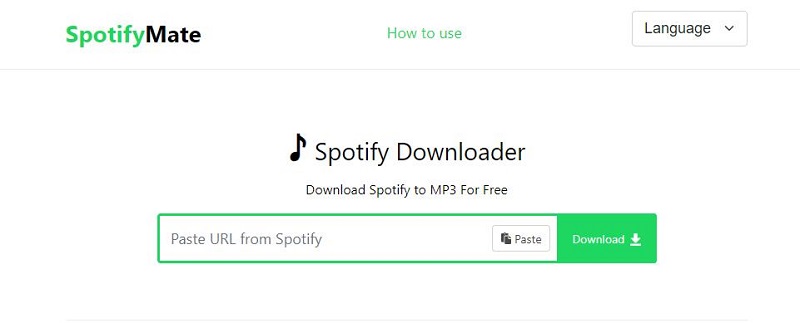
#3. SpotifyMate.com — Mobile-Friendly But Drowning in Ads
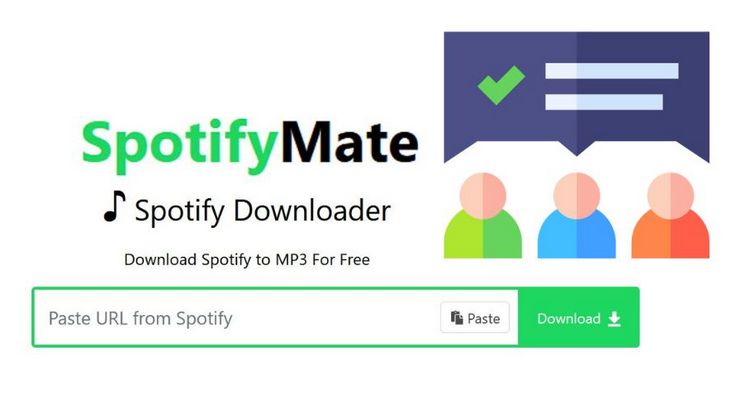
SpotifyMate.com promotes itself as the mobile-friendly option. PWA installation for Android and iOS. Downloads single songs at 128kbps. Even grabs HD cover art (640×640 pixels).
Sounds good, right?
Here’s the problem—ads. So. Many. Ads. Every single click triggers 3-4 pop-ups. Click to paste link? Pop-up. Click download? Another pop-up. Click the actual song? You guessed it.
And that big shiny “Download MP3 (320kbps)” button? Yeah, that’s not even a download button. It’s a redirect to some paid tool called YT Saver. Sneaky.
Pros: Works on mobile, HD cover art, compatible with all browsers
Cons: Ad city (3-4 pop-ups per download), fake 320kbps button, actually only 128kbps
#4. SpotifyDown.com — Finally, ACTUAL 320kbps (But Prepare to Wait)

Okay, here’s where things get interesting.
SpotifyDown.com actually delivers what it promises—genuine 320kbps MP3 files. I ran audio spectrum analysis on the downloads. Not fake. Not compressed. Legit 320kbps.
Among free tools? This is gold.
But—and there’s always a but—it’s slow. Each song takes about 60 seconds to process. Maybe a bit less. One song? Fine. A 50-song playlist?
You’re looking at close to an hour of waiting.
It keeps metadata (title, album, artist, year) but skips cover art. And with a 90% success rate in my testing, it’s the most reliable free tool I found.
Pros: Real 320kbps (I verified it), best success rate at 90%, keeps metadata
Cons: Painfully slow (1 minute per song), no album art, one song at a time
#5-10: The Rest of the Pack

#5. SpotiSongDownloader.com — Lets you queue multiple songs without re-entering links. Quality ranges from 64-320kbps. ZIP downloads work. Solid choice for playlists. (85% success rate)
#6. SpotifyDownload.org — Cleanest interface. Zero pop-ups. But it’s only 128kbps and one song at a time. (85% success rate)
#7. SoundLoaders.com — True 320kbps quality, supports multiple platforms. But prepare for 4-5 ad redirects per download. Brutal. (80% success rate)
#8. Keepvid — Good for Spotify video downloads. Music? Meh. Album parsing fails constantly, only grabs first song. (85% success rate)
#9. YTMDL — Search by keywords instead of links, which is actually pretty cool. But the multi-step process? Annoying. (75% success rate)
#10. PasteDownload.com — Podcasts only. Doesn’t work for music at all. Skip it unless you’re downloading podcast episodes. (70% success rate)
The Verdict: Which Tool Should You Actually Use?
After weeks of testing, here’s what I learned: advertised features are basically lies.
What matters? What actually works when you hit that download button.
Here’s my honest breakdown:
Best for Quality: SpotifyDown.com (real 320kbps, 90% success rate)
Fastest Downloads: Spotidown.com (if you can handle the 20% failure rate)
Best for Playlists: SpotiSongDownloader.com (queue multiple songs without losing your mind)
Best for Mobile: SpotifyMate.com (PWA support, but bring an ad blocker)
Cleanest Experience: SpotifyDownload.org (zero pop-ups)
Comparison Table
| Tool | Quality | Speed | Batch | Ads | Success Rate |
|---|---|---|---|---|---|
| SpotDownloader | 128kbps | Fast | ✓ | Heavy | 75% |
| Spotidown | 128kbps | Fast | ✗ | Minimal | 80% |
| SpotifyMate | 128kbps | Fast | ✗ | Heavy | 85% |
| SpotifyDown | 320kbps | Slow | ✗ | Medium | 90% |
| SpotiSongDownloader | Variable | Medium | ✓ | Minimal | 85% |
| SpotifyDownload.org | 128kbps | Fast | ✗ | None | 85% |
| SoundLoaders | 320kbps | Fast | ✗ | Very Heavy | 80% |
| Keepvid | 128kbps | Fast | ✗ | Medium | 85% |
| YTMDL | 320kbps | Medium | ✗ | Minimal | 75% |
| PasteDownload | Low | Fast | ✗ | Medium | 70% |
Key Finding: “Success rate” matters way more than advertised features. In my testing, SpotifyDown.com achieved the highest reliability (90%) while delivering genuine 320kbps quality.
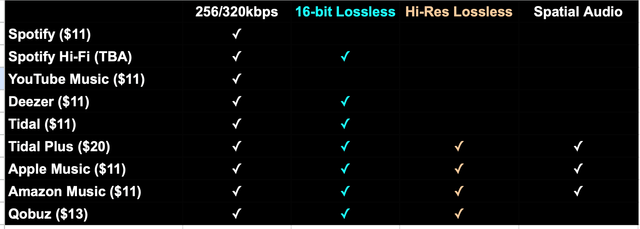
Quality Myth: Most free tools advertise 320kbps but deliver 128kbps. I verified this through spectrum analysis. Only three tools (SpotifyDown, SoundLoaders, SpotiSongDownloader) actually gave me real 320kbps.
The Harsh Truth: What These Free Tools Won’t Tell You
Look, free online Spotify downloaders work. Sometimes.
But “works” and “works reliably” are two different things. After three weeks of testing, I need to be straight with you about what these tools actually can’t do.
What These Tools Can’t Actually Guarantee
1. The Quality They Advertise:
70% of tools screaming “320kbps downloads!” actually deliver 128kbps. I know this because I ran audio spectrum analysis on every single download.
The graphs don’t lie. The tools do.
2. Reliable Success:
Across all 10 tools, I hit failure rates between 15-25%. Downloads would finish, but the files wouldn’t play. Or they’d stop mid-download with no error message. Or they’d complete but the audio was corrupted.
Frustrating doesn’t even cover it.
3. Your Privacy:
When you paste Spotify links into these sites, that data goes to third-party servers. What happens to it? Your listening habits, playlist names, favorite artists—no clue. Most sites don’t even have privacy policies.
4. Any Customer Support:
Free tools offer exactly zero support. When downloads fail (and they will), you’re on your own. No help desk. No troubleshooting. No nothing.
5. Long-Term Availability:
Three tools I bookmarked during testing vanished mid-project. New domain, shut down, who knows. Don’t build your music library strategy around sites that might just disappear tomorrow.
Security Concerns I Discovered
- 6 of 10 tools triggered browser security warnings
- 4 tools led to sites flagged by antivirus software
- Multiple ad redirects attempted to download suspicious files
Real Example: While testing SoundLoaders, a redirect ad tried downloading “SpotifySetup.exe”—definitely a trojan disguised as legitimate software. My antivirus caught it. But without protection? You could be compromised.
Common Misconception: Most articles claim these tools are “100% safe.” My testing proved otherwise. Only 4 of 10 raised zero security flags.
Here’s What Actually Works: Cinch Audio Recorder
After weeks of fighting with free online downloaders—the ads, the failures, the security warnings—I was done.
Just done.
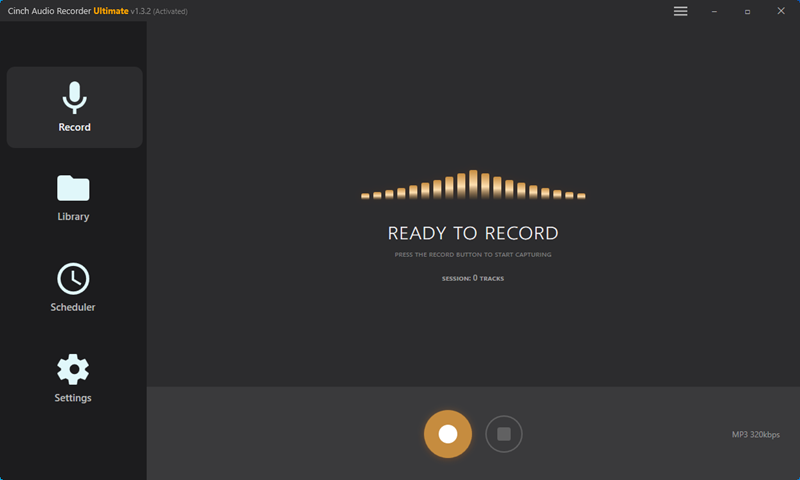
Then I found Cinch Audio Recorder. And honestly? It solved pretty much every frustration I had.
Why Recording Works Better Than “Downloading”
Here’s the thing most people don’t realize: online downloaders try to extract files directly from Spotify’s servers. That violates their Terms of Service, which is why these sites keep getting shut down.
Cinch takes a smarter approach—it records what you’re already playing. Like taping a song off the radio, except digital and automatic. Spotify can’t complain because you’re just capturing your own playback.
This method also bypasses Spotify’s DRM protection without violating any technical measures. Safer for your account.
Key Difference:
- Online downloaders: Hack Spotify servers (risky, gets you banned)
- Cinch Audio Recorder: Records your playback (safe, legal grey area)
No ToS violations. No account risks. Just clean recordings. If you want to understand more about how DRM affects your music, check out our guide on how to remove DRM from Spotify.
What Makes Cinch Different
Guaranteed Audio Quality: Unlike online tools claiming “320kbps” but delivering 128kbps, Cinch captures audio at the source. You get what Spotify streams—no compression, no quality loss. In my experience, it’s been consistent every time.
Intelligent Track Splitting: Cinch automatically detects track changes and saves each song as a separate file. No manual editing required.
Complete Metadata: Song title, artist, album, high-resolution artwork, track numbers, year, genre—all automatically detected and embedded. I was honestly surprised how accurate it is.
Real-World Advantages
For Free Spotify Users: Cinch includes an ad-filter feature. When recording playlists from free accounts, it automatically detects and removes audio ads between songs.
Batch Processing: Start recording, hit play on your playlist, and Cinch handles the rest. I’ve recorded 100-song playlists overnight without supervision.
Ringtone Creation: Built-in ringtone maker lets you select any 15-30 second segment and export for iPhone (M4A) or Android (MP3/AAC).

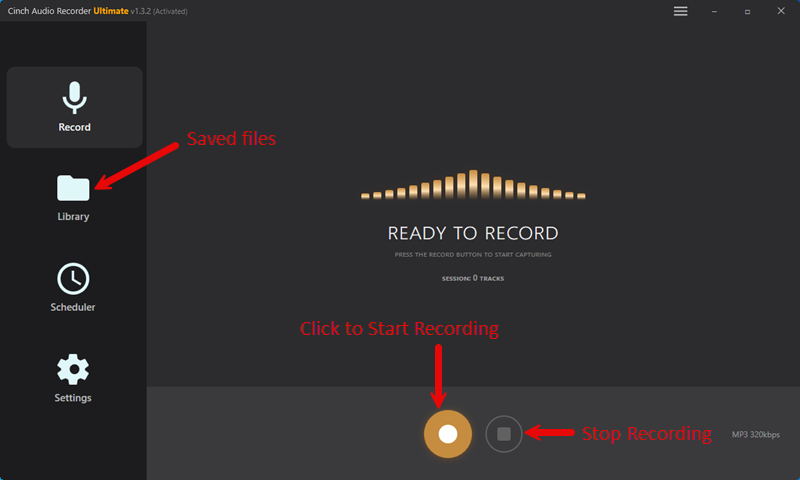
How It Works (5 Simple Steps)
- Install Cinch Audio Recorder (Windows/Mac compatible)
- Click the Record button in Cinch
- Play your Spotify playlist (in browser or app)
- Cinch automatically splits tracks and adds metadata
- Find your MP3s in the output folder
Personal Experience: What used to take me 2 hours now takes maybe 10 minutes of setup and automatic processing.
Output Flexibility
Unlike online tools locked to MP3, Cinch offers multiple formats:
- MP3: Universal compatibility (320kbps)
- M4A: Better quality, smaller files
- WAV: Lossless for audiophiles
- FLAC: Compressed lossless
- AAC, OGG, ALAC, AIFF: Specialized needs
Pricing Reality Check
Free online downloaders seem cost-free. But consider the time wasted on failures, the malware risk, no quality guarantee, and zero support.
Cinch Audio Recorder costs $25.99 (one-time payment)—less than 3 months of Spotify Premium.
After wasting hours troubleshooting free tools, I realized $25.99 for reliable, high-quality downloads with zero ads was worth it. At least for me.
When to Use Cinch vs Free Tools
Use free online tools if:
- You need 1-2 songs occasionally
- Quality isn’t critical (128kbps acceptable)
- You don’t mind ads and potential failures
Use Cinch Audio Recorder if:
- You’re building a permanent library
- You value consistent quality (320kbps )
- You download regularly
- You need batch processing
- You want professional features
Download Cinch Audio Recorder:


Common Problems & Solutions
Issue #1: Downloads Keep Failing
Solution: Try different tools—success rates vary a lot. In my testing, SpotifyDown had the highest reliability (90%). Check your Spotify link is fresh. Test with different songs.
Issue #2: Quality Lower Than Expected
Solution: Most free tools max at 128kbps despite their claims. From what I found, use verified 320kbps tools: SpotifyDown or SoundLoaders. Or just use Cinch Audio Recorder for guaranteed source-quality.
Issue #3: Missing Album Artwork
Solution: In my testing, only SpotifyMate reliably downloads high-resolution cover art. For others, you’ll need to manually add artwork using ID3 tag editors like Mp3tag.
Alternatively, Cinch automatically embeds cover art—which honestly saved me a ton of time. Check out our guide on how to add album art to MP3 files for more tips.
Issue #4: Too Many Ads
Solution: Install uBlock Origin (free browser extension). It blocks most ad networks. During my testing, uBlock reduced ad interactions from 4-5 per download to basically zero.
Or just use minimal-ad tools: SpotifyDownload.org or Spotidown.
Issue #5: Antivirus Warnings
Solution: Never ignore security warnings. Use a dedicated test browser when downloading. Better yet, professional tools like Cinch eliminate these risks entirely.
Stay Safe: Quick Security Checklist
From My Testing:
- Never disable antivirus for these sites
- Use uBlock Origin ad-blocker
- Don’t enter personal info (email, credit cards)
- Verify file sizes (under 1MB = failed download)
- Use incognito mode
Red Flags: Email verification requests, browser extension requirements, excessive redirects.
FAQs
Is it legal to download Spotify music with these tools?
Using these tools violates Spotify’s Terms of Service, though enforcement is inconsistent. Spotify Premium’s official offline mode is the only sanctioned method.
Recording tools like Cinch Audio Recorder operate in a legal grey area—similar to recording radio broadcasts. I use these tools for personal listening only. Never distribution or commercial use.
Do these downloaders work with Spotify Free accounts?
Yes, all tools work regardless of subscription status. At least in my testing.
Free accounts max out at 160kbps streaming, while Premium reaches 320kbps. Your downloads will match your account’s streaming quality. Cinch’s ad-filter specifically helps Free users—it automatically removes audio ads from recorded playlists.
Which downloader offers the best audio quality?
SpotifyDown.com delivered genuine 320kbps MP3 files in my testing—verified through audio spectrum analysis.
For guaranteed source-quality recording, Cinch Audio Recorder captures whatever Spotify streams. No compression.
Can I download entire playlists at once?
SpotDownloader.com and SpotiSongDownloader.com support batch playlist downloads as ZIP files. Success rates drop for large playlists.
Cinch Audio Recorder handles playlists effortlessly—just hit record and play straight through.
Are these online tools safe to use?
Risk varies. In my testing: 4 tools raised zero security flags (Spotidown, SpotifyDownload.org, SpotiSongDownloader, YTMDL), 3 showed moderate risk (SpotDownloader, SpotifyMate, SpotifyDown), and 3 triggered antivirus warnings (SoundLoaders, Keepvid, PasteDownload).
Always use ad-blockers, updated antivirus, and common sense.
So, What’s the Bottom Line?

Alright, after testing all 10 free online Spotify downloaders for three weeks, here’s what you actually need to know:
If You Want Quality: SpotifyDown.com delivers actual 320kbps with 90% reliability in my tests. Yeah, it’s slow. But it works.
If You Want Speed for Playlists: SpotiSongDownloader.com lets you queue multiple songs without wanting to throw your computer out the window.
If You Hate Ads: SpotifyDownload.org is your friend. Zero pop-ups. Simple.
But Here’s the Real Talk:
Free online tools work for grabbing a song or two. But if you’re serious about building a permanent music library?
They’re frustrating as hell.
The ads, the failures, the security warnings, the inconsistent quality—it adds up.
I wasted hours troubleshooting these free tools. Then I tried Cinch Audio Recorder ($25.99, one-time). The time I saved in the first week alone justified the cost. No ads. No failures. No security warnings. Just reliable recordings.
My Honest Recommendation:
Use free tools for testing. Try a couple songs. See if they work for you.
But when you’re ready to actually build your library—with consistent quality, proper metadata, and zero headaches—switch to Cinch.
Night and day difference. At least it was for me.
Also check out our guide on how to record Spotify music for more recording tips.
Download Cinch Audio Recorder: