Last month, I got an email from Tidal about their DJ Extension price increase—nearly doubling the monthly cost. As someone who’s been using Tidal with Virtual DJ for years, I wasn’t thrilled about shelling out an extra $9.
But here’s the thing: there are actually two different ways to use Tidal on Virtual DJ now, and understanding both can save you money and serious headaches at gigs.
This guide shows you the official online integration method and a practical workaround for offline DJing that doesn’t require the expensive DJ Extension. Whether you’re a bedroom DJ practicing transitions or gigging professionally every weekend, you’ll find a solution that fits your needs and budget.
Let’s dig in.
In This Article:
Understanding Tidal and Virtual DJ Integration in 2025
What Changed with Tidal’s DJ Pricing
April 2024 brought major changes. The base Individual plan dropped to $10.99/month, but DJ integration now requires an additional $9/month DJ Extension add-on. That’s $19.99/month total—$240/year.
For professional DJs, that’s a tax write-off. For bedroom DJs and hobbyists? Not exactly pocket change when you’re just mixing for fun.
The frustration hit home on Reddit: “I’m not a professional DJ. I just like to mix for my own pleasure. Paying an extra $9/month just isn’t worth it.”
Family plan subscribers got completely locked out. The DJ Extension only works with Individual plans. On the plus side, it brought back stems separation for real-time vocal/instrumental isolation.
Why This Matters for DJs
Virtual DJ supports pretty much every audio format you can think of—MP3, WAV, FLAC, M4A, AAC, and more. This matters because if you can get Tidal music as regular files, you can import them directly into VDJ as local tracks. No streaming required. No subscription dependency.
That format flexibility is your escape hatch from expensive subscription models.
Method 1 – Direct Integration: Using Tidal on Virtual DJ Online
Alright, let’s start with the official way to connect Tidal to Virtual DJ. It’s straightforward, but it comes with some real limitations you need to know about.
Requirements and Setup
You need:
- Active Tidal subscription + $9/month DJ Extension
- Stable internet connection
- Virtual DJ account (free)
Quick reality check: “Stable internet” is where things get tricky. When venue WiFi is shared with 200 wedding guests uploading Instagram stories, your Tidal stream starts buffering. Not fun mid-mix.
Note: Most Family plans won’t work with the DJ Extension at all.
Step-by-Step Connection Guide
Getting Tidal connected is straightforward:
- Launch Virtual DJ and log into your VDJ account
- Click “Online Music” in the bottom left corner
- Select “TIDAL” from the dropdown
- Enter your Tidal credentials
- Your entire Tidal library loads—playlists, favorites, everything
- Drag tracks from the Tidal browser to either deck
Takes about two minutes the first time. After that, VDJ remembers your login.
What You Can (and Can’t) Do with Online Streaming
Let’s talk about what this method actually gives you.
The Good:
- Access to over 100 million tracks instantly
- HiFi audio quality (16-bit/44.1kHz lossless)
- Real-time stems separation (vocals, drums, bass, melody isolated)
- No need to manage local storage for thousands of tracks
- Always get the latest releases immediately
The Not-So-Good:
- Requires constant internet connection—no offline playback whatsoever
- Cannot export your mixed sets with Tidal tracks included
- Subscription dependency means losing access if you cancel or forget to pay
- Streaming can introduce lag on slower connections
- No way to pre-load tracks before a gig without internet
I learned the offline limitation the hard way at a wedding reception last year. The venue assured me their WiFi was rock-solid. It was great—until 200 guests connected their phones during cocktail hour. My Tidal stream started buffering right in the middle of “Thinking Out Loud.”
Not my finest moment as a DJ.
Since then? I always have a backup plan.
Method 2 – Offline Freedom with Audio Recording
This is where things get interesting. And honestly, this is the method I wish I’d known about from day one.
Why Offline Access Matters for DJs
Look, streaming is convenient until it’s not. Here’s the reality check nobody wants to talk about:
Venues lie about their internet. Or more accurately, they’re overly optimistic. “Oh yeah, we have great WiFi” usually means “we have a consumer-grade router handling maybe 15 devices max.”
Add 100+ guests, the catering staff, and the photographer all hitting the same network, and your 50mbps connection becomes 2mbps real quick.
Then there’s the export problem. Let’s say you put together an absolute fire mix—perfect track selection, smooth transitions, the whole nine yards. You want to upload it to SoundCloud or send it to the bride as a keepsake. Guess what? Virtual DJ won’t let you export that file because the Tidal tracks are DRM-protected. Your mix lives and dies inside VDJ.
And subscription interruptions? They happen. Credit card expires, payment fails, you forget to update billing—suddenly you’re locked out of your entire music library an hour before your gig.
I’m not saying Tidal is unreliable. I’m saying dependency on any single streaming service creates risk. Smart DJs have a Plan B.
Understanding the DRM Problem
Tidal encrypts music with Digital Rights Management (DRM). Even Tidal’s official “offline mode” caches encrypted data that only works inside the Tidal app. Virtual DJ’s offline caching is locked to VDJ—you can’t use files in other software or export mixes with them.
Solution? Record the audio.
Cinch Audio Recorder: The Practical Solution
The $20/month plan works fine if you always have reliable internet and don’t need to export mixed sets. But limitations hit hard:
- No offline playback on desktop
- Can’t export mixed tracks due to DRM
- Family plan subscribers need a separate Individual account
- Lose access the moment you cancel
Last spring I prepped for a festival set and wanted to practice offline during my flight. Tidal stream? Gone above 10,000 feet. That’s when I realized I needed actual file ownership.
That’s when I started using Cinch Audio Recorder—insurance for when streaming isn’t available.
Why it helps DJs:
- Records to MP3, M4A, WAV, or FLAC—all VDJ-compatible formats
- Preserves HiFi/Master quality (16-bit/44.1kHz or better)
- Create true backups you own forever
- Export mixed sets without DRM restrictions
Recording happens at 1X speed (4-minute song = 4 minutes). Queue playlists overnight. Use this for your core 50-100 tracks, stream the rest.
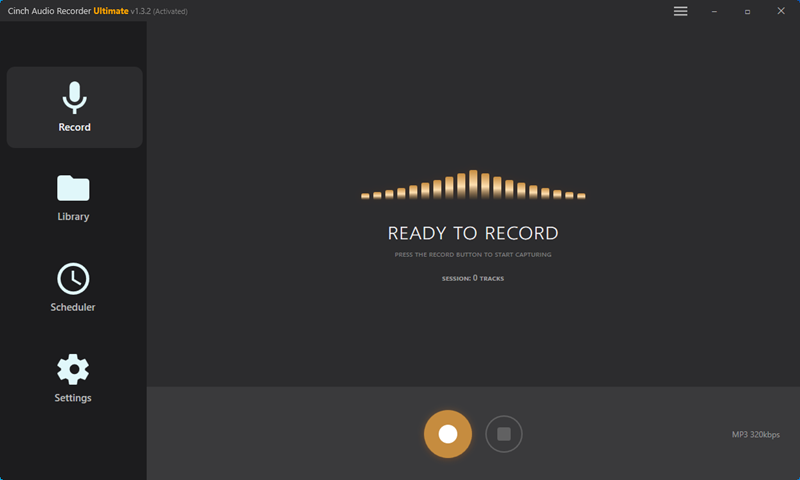
Download Cinch Audio Recorder:
Windows and Mac versions are both available (should be displayed side by side):


One-time purchase, works forever. No subscription on top of your Tidal subscription.
Tidal Offline Mode in Virtual DJ (HiFi Plus Feature)
There’s also a third option: Virtual DJ’s built-in offline caching for Tidal HiFi Plus subscribers ($20/month plan). You can right-click tracks and select “Download to Cache” to save them locally.
The catch? VDJ creates encrypted .vdjcache files that only work inside Virtual DJ and require an active Tidal subscription. Cancel your subscription, and the cache files become useless. You also can’t use them in exported mixes.
Quick comparison:
| Feature | VDJ Cache | Audio Recording |
|---|---|---|
| Speed | Fast download | 1X recording time |
| Works anywhere | No (VDJ only) | Yes (any software) |
| Keep if you cancel Tidal | No | Yes |
| Export mixes | No | Yes |
| Cost | $20/month | $11/month + $26 one-time |
For my workflow, I use Cinch for my core 100-150 gig tracks and stream Tidal for everything else. Best of both worlds.
Comparing Your Options: Which Method is Right for You
Let’s break this down with some real numbers and scenarios.
Cost Breakdown
| Method | Monthly Cost | First Year Total | Offline? | Export Mixes? |
|---|---|---|---|---|
| Online Streaming | $20 (Individual + DJ Ext) | $240 | No | No |
| Audio Recording | $11 (Tidal base) + $26 one-time | $158 Year 1 / $132 Year 2+ | Yes (universal) | Yes |
Recording saves about $250 over two years, $900+ over five years. If you’re a hobbyist DJ mixing a few times a month, that’s real money.
Which Method is Right for You?
Professional DJs: The $20/month DJ Extension is a business expense—take the tax write-off. But even pros should have offline backups of core tracks. I’ve seen club WiFi go down mid-night. Having 100-150 recorded tracks saved my sets more than once.
Bedroom/Hobby DJs: $240/year feels steep when you’re not making money. Recording your top 100-200 tracks gives you 90% of what you need for practice. Think of it this way: $20/month forever, or $26 once? The answer’s pretty obvious to me.
Family Plan Users: You’re in a tough spot. Tidal doesn’t support DJ Extension for Family plans, so you’d need to pay for both ($37/month total). The recording approach with your Family plan access is the workaround most DJs use.
Step-by-Step: Recording Tidal Music for Virtual DJ
Here’s the quick workflow:
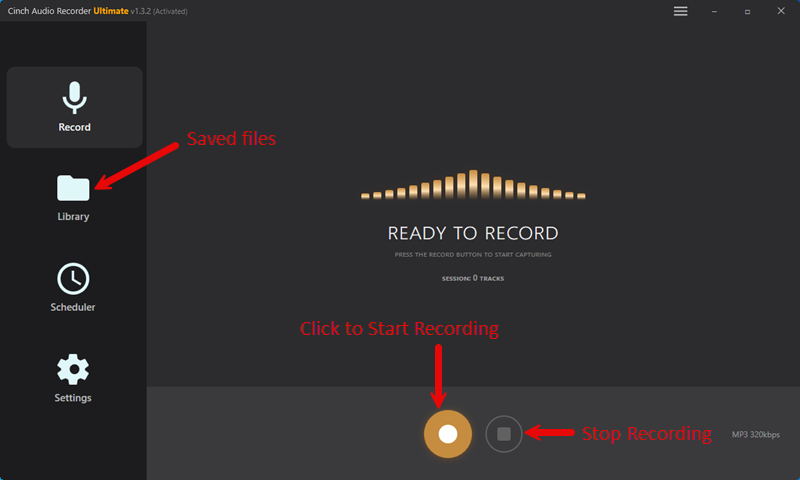
- Install Cinch – Run the installer, takes about 30 seconds
- Click Record – Cinch listens to system audio (you can mute your speakers)
- Play Tidal – Open Tidal and play your playlist
- Auto-split tracks – Cinch automatically separates songs and adds metadata
- Find files – Check Cinch’s Library tab, right-click to open file location
- Import to VDJ – Drag files from Cinch output folder to Virtual DJ
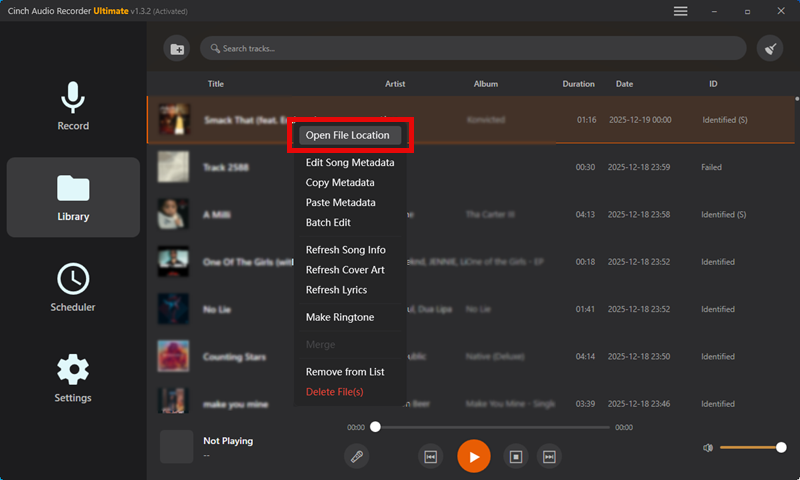
Recording happens at 1X speed (4-minute song = 4 minutes). I queue up playlists overnight.
Quick tips: Keep Tidal at 100% volume while recording. Record HiFi/HiRes tracks if you have that tier. Back up your files on an external drive (learned this after a hard drive crash). Organize by genre or BPM before importing to VDJ.
Troubleshooting Common Issues
Tidal won’t connect to VDJ: Check if your DJ Extension subscription is active (tidal.com > Account Settings). Verify login credentials. Restart both VDJ and Tidal. Clear VDJ’s cache folder: %AppData%\VirtualDJ\Cache (Windows) or ~/Library/Application Support/VirtualDJ/Cache (Mac).
Offline cache not working: Confirm you have HiFi Plus (not regular HiFi). Update VDJ to version 2023.10+. Check disk space. Try caching a single track before playlists.
Recording sounds quiet/distorted: Check Tidal’s audio quality (Settings > Streaming Quality > HiFi or Master). Keep Tidal volume at 100%. Disable system audio enhancements. Update Cinch to the latest version.
Tips for Optimizing Your Workflow
Library Organization: Create VDJ playlists by genre, energy level, and time period. Tag BPM and musical key—VDJ auto-tags, but double-check for harmonic mixing. Keep separate folders for core tracks vs streaming options. That last one’s a game-changer, honestly.
The Hybrid Approach: I stream Tidal for exploring new music, record my top 100-150 tracks with Cinch (songs I play every gig), and use offline cache for mid-priority tracks. This gives me reliability without taking forever to build a library. I keep about 200 recorded tracks as my emergency offline kit—covers 4 hours of DJing if internet fails.
Backup Strategy: Back up recorded files to an external drive monthly. I use a cheap 1TB SSD in my DJ bag. Remember: VDJ’s offline cache files are useless if your Tidal subscription lapses. Don’t treat cache as permanent backup.
Conclusion
Using Tidal on Virtual DJ in 2025 comes down to choosing the approach that matches your situation. The official online integration works great if you’ve got reliable internet at your venues and can absorb the $20/month cost without flinching. Offline cache helps when you need backup but you’re comfortable staying locked into VDJ-only playback.
But for DJs who want true flexibility—offline access, exported mixes, and freedom from permanent subscription dependency—recording with Cinch Audio Recorder bridges the gap between streaming convenience and actual music ownership.
My honest recommendation? Start with Tidal streaming for discovery and exploration. As you identify your core rotation tracks—the songs you play week after week—record those with Cinch for reliability. This hybrid approach gives you unlimited catalog access for finding new music, plus a rock-solid foundation of tracks you’ll always have access to, subscription or not.
Is it more work than pure streaming? Yeah, a bit. But the first time your venue’s internet dies 30 minutes into your set and you seamlessly switch to offline mode without missing a beat?
You’ll thank yourself.
What’s your Tidal + VDJ setup looking like? Are you streaming everything, caching, recording, or some combination? Drop a comment below and share your workflow—curious what’s working for other DJs out there.
FAQs
Q: Can I use Tidal on Virtual DJ without the DJ Extension? No. As of April 2024, Tidal requires the $9/month DJ Extension add-on. Without it, you’ll get an authentication error.
Q: Does Virtual DJ support Tidal offline mode? Yes, but only with HiFi Plus ($20/month). Files use VDJ’s proprietary .vdjcache format that only works inside VDJ. Cancel Tidal, and cache files become unreadable.
Q: Can I use my Tidal Family plan with Virtual DJ? No. DJ Extension only works with Individual plans ($37/month combined for both) or use audio recording like Cinch.
Q: Is recording Tidal music legal for DJ use? Recording streaming audio for personal use is a legal gray area similar to recording radio. Generally considered fair use for personal entertainment, but not for redistribution or commercial sale.
Q: What audio quality do I get when recording Tidal? Recording quality matches your subscription tier. HiFi = 16-bit/44.1kHz lossless (CD quality). HiRes = up to 24-bit/192kHz. Basic plans = 320kbps AAC. Cinch captures exactly what Tidal plays with no quality loss.