Quick Summary
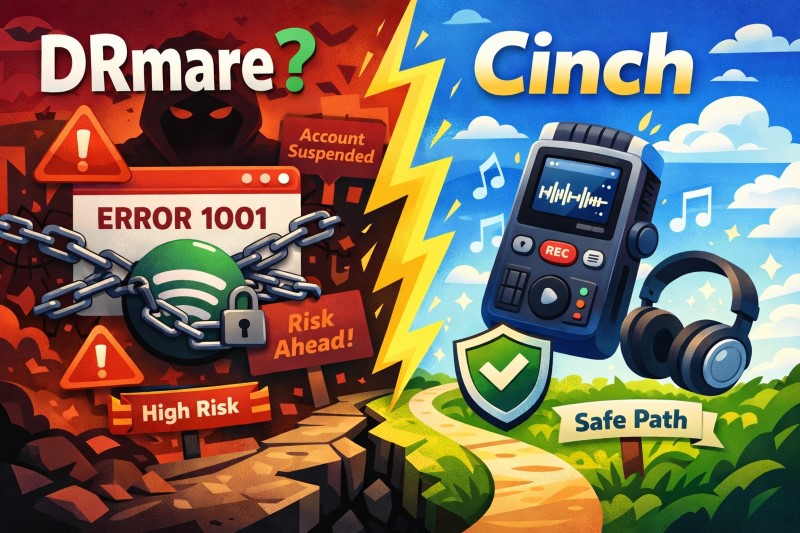
Is DRmare worth the account ban risk? We expose why DRmare keeps failing with Error 1001/1004, and why system audio recording is the only permanent fix.
You’re deciding whether DRmare is worth the account risk, or you’ve already seen Error 1001/1004 and want to know if Cinch is safer.
This review covers what most competitors skip: DRmare violates Spotify’s Terms of Use, depends on a breakable workflow, and carries real suspension risk. We also show why Cinch Audio Recorder’s recording-based method sidesteps those structural weaknesses without requiring your login. Read on to decide which path fits your risk tolerance and stability needs.
Quick Answer
If your main question is “Should I buy DRmare or look for a safer way out?”, the answer for most people is: skip DRmare unless you knowingly accept Terms-of-Use risk, patch-cycle instability, and cleanup work.
If you’ve read other DRmare reviews, you were probably fed a list of features, 15x speed claims, and a download link. They conveniently ignored the elephant in the room: account safety. Let’s talk about the risks those affiliate sites won’t mention.
That last part matters most. Once you understand DRM-removal/decryption-style extraction vs system-audio recording, the choice gets much easier.
What DRmare Actually Is – And What Most Reviews Blur Out
DRmare is not malware, and that distinction matters. But it is also not just a neutral file converter. On its own official review page, DRmare sells itself as a way to convert Spotify music into MP3, FLAC, WAV, AIFF, M4A, and more, with fast batch conversion and preserved ID3 tags. On its current product page, it also promotes a built-in Spotify web player workflow.
That means the product’s real job is not “editing your music files.” Its job is turning Spotify streams into local files outside Spotify’s normal offline system. That is why this is a risk question first and a feature question second.
There is also a small but telling trust problem here: DRmare’s own pages do not always present the workflow the same way. Older support content still talks about reinstalling the Spotify desktop app, while newer pages push the built-in web player. That does not automatically make the tool bad, but it does show how quickly this category shifts and why old “still works great” reviews age badly.
One more correction that buyers deserve: “lossless” marketing needs context. Spotify is a streaming source, not a magic fountain of master files. Exporting a stream to FLAC or another high-quality container does not recreate information that was never in the source in the first place. So if a review makes DRmare sound like a path to true studio-grade recovery, that is marketing language, not a practical listening truth.
The Ban Risk Nobody Talks About
Here is the honest framing: DRmare clearly pushes past the use Spotify explicitly grants, but nobody credible can give you a verified ban rate. That means the violation side is clear, while the enforcement side is uncertain.
Spotify’s Terms of Use say your access is limited, non-exclusive, and revocable, and that Spotify may suspend or terminate access if it believes you breached the Terms. Spotify also makes clear that its software and content are licensed, not sold, and that use must stay within what the agreements expressly permit. That is a very different legal and platform posture from “download whatever you want to permanent local files with a third-party tool.”
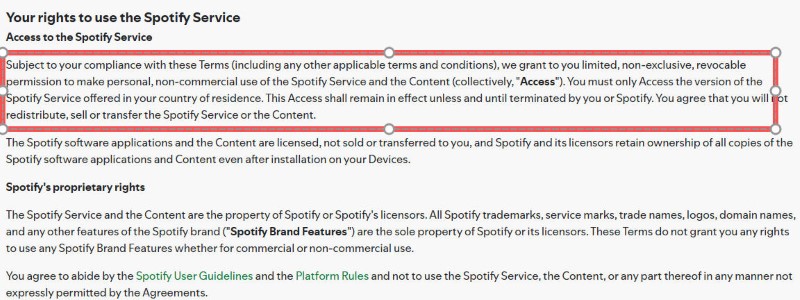
DRmare claims it is “100% safe” and for “personal use only.” Read that carefully. The installer may be clean and the company is not openly telling you to pirate for resale. That does not mean Spotify has blessed the workflow or that your account is insulated if Spotify decides your usage crossed the line.
The big thing other reviews skip is not a secret mass-ban database. It is the basic logic of the risk:
- Spotify controls the platform.
- DRmare depends on access Spotify can change or revoke.
- Your local music library is only worth the shortcut if the shortcut costs less than losing your Spotify account.
So the decision is pretty straightforward:
- If you have one Spotify account with years of playlists, likes, and listening history you cannot afford to lose, DRmare is the wrong default.
- If you use a secondary account and you already accept that this tool lives in a gray, breakable zone, the trade-off may be acceptable to you.
That is the conservative but honest line. Not “you will definitely get banned.” Not “nothing ever happens.” Just: the rule-breaking part is real, the enforcement rate is not public, and silence from other reviews is not evidence of safety.
Error 1001/1004, Broken Playlists, and the Real Stability Tax
If DRmare were merely risky but stable, some buyers would still take the bet. The bigger problem is that the category also has a stability tax.
DRmare’s own troubleshooting page for Spotify conversion errors acknowledges failure scenarios, and the public DRmare changelog shows repeated fixes for conversion problems and parsing failures in 2025. That is classic cat-and-mouse software behavior: things work, Spotify changes something, the converter breaks, then the vendor patches around it.
That is why Error 1001/1004 matters more than the actual number. The code itself is not the story. The story is that when a converter repeatedly needs rescue updates, you are not buying a stable archive workflow. You are subscribing to a maintenance relationship.
This is where the “5x speed” or “15x speed” pitch also needs to be turned upside down. Vendors frame faster-than-real-time batch conversion as pure upside. It is not. Even without direct Spotify enforcement logs, super-fast bulk extraction has one obvious property: it looks less like human listening and more like automation. That does not prove a ban. It does mean the speed claim adds zero safety and increases abnormality.
So if you are converting a 500-song playlist before your Premium plan ends, faster is not automatically smarter. It may be the point where the workflow becomes both more fragile and more conspicuous.
The other hidden cost is cleanup. DRmare promises ID3 retention, but users still report the same recurring problems that come with this category:
- tags that come through incomplete or wrong,
- playlists that fail midway,
- tracks that need to be rerun after Spotify-side changes,
- and batch jobs that leave you with partial results instead of a clean library.
That means the real price of DRmare is not just the checkout amount. It is the combination of:
- purchase price,
- time spent waiting for fixes,
- and library cleanup after the “fast” workflow stops being clean.
The Clone Empire: DRmare, ViWizard, TunesKit, and AudFree Are Mostly the Same Bet
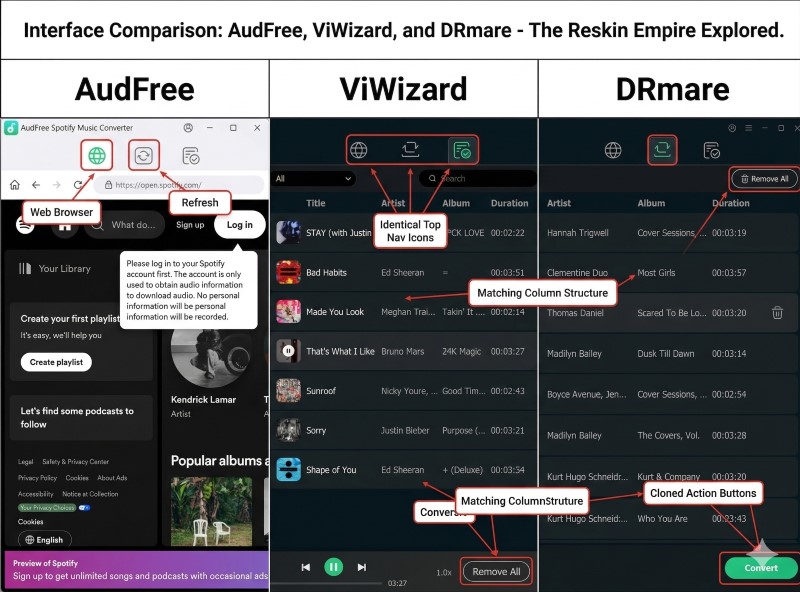
One reason buyers stay stuck is that the market looks more diverse than it really is.
Compare DRmare with the marketing used by ViWizard, TunesKit, and AudFree and the overlap is hard to miss: same promise of Spotify-to-MP3 or FLAC conversion, same batch-download pitch, same “keep original quality and ID3 tags” language, same 13x-15x speed claims, and very similar interface logic built around loading Spotify content and exporting it as local files.
Without direct corporate records, it would be too strong to claim a proven ownership relationship. But from a buyer’s point of view, the practical conclusion is still useful: these tools behave like one engine family wearing different skins.
Why that matters:
- switching from DRmare to a near-clone usually does not change the underlying risk model,
- you are still buying the same style of workaround,
- and when Spotify changes the rules of the game, another skin from the same playbook is rarely a true escape hatch.
So if you are thinking, “Maybe DRmare is bad, but ViWizard or TunesKit must be safer,” the better question is: safer by architecture, or just prettier by branding? In most cases, it looks like the second one.
API/Decryption-Style Extraction vs System Recording: This Is the Difference That Actually Matters
Most reviews compare output formats. The more useful comparison is method.
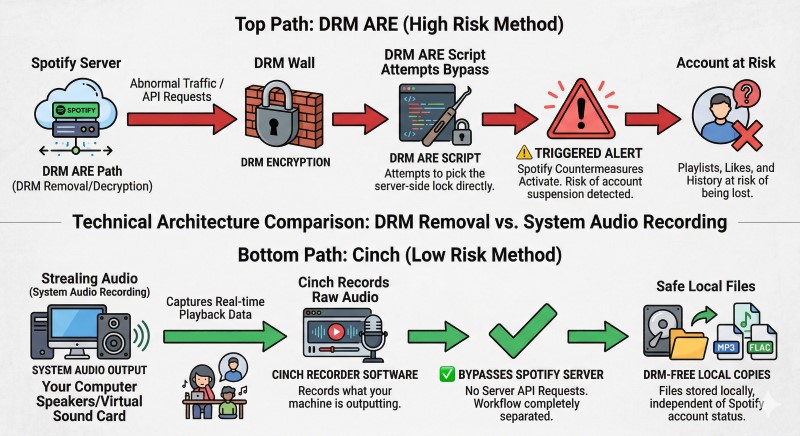
If a tool needs to sign into Spotify, interact with protected streams, or otherwise piggyback on Spotify’s internal delivery flow, it lives and dies by Spotify’s tolerance and by whatever technical changes Spotify makes next. If a tool simply records the audio your own computer is already playing, it is far less exposed to that arms race.
That is why Cinch changes the conversation.
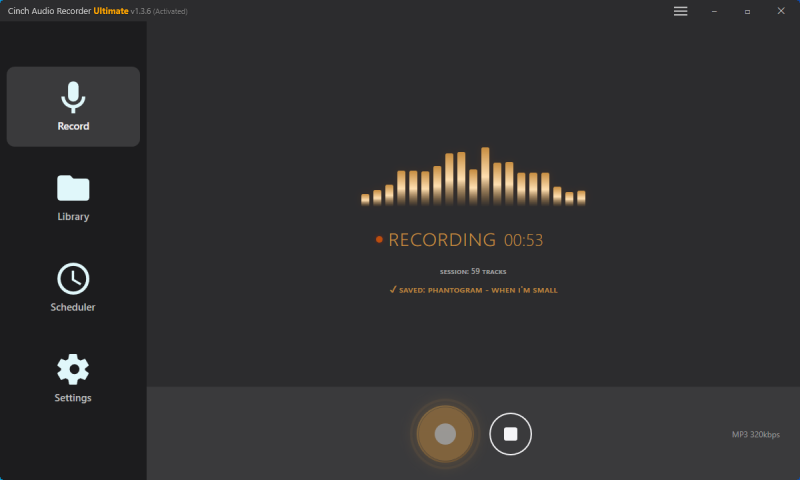
According to the Cinch Audio Recorder manual, Cinch records system audio output, can auto-identify tracks, and does not require your Spotify credentials. You play the music on your computer, and Cinch records what your machine is outputting.
Look, we’re not your lawyers. But technically speaking, intercepting raw audio data as it hits your sound card is a fundamentally different game than deploying scripts to bypass Spotify’s DRM encryption. One is recording your own speakers; the other is actively picking a digital lock.
Here is the practical difference:
| Question | DRmare | Cinch Audio Recorder |
|---|---|---|
| How it gets audio | Converts/extracts from Spotify-side access | Records audio already playing on your computer |
| Needs Spotify login inside the tool | Yes or tool-dependent Spotify-side access | No |
| Breaks when Spotify changes its protected workflow | Frequently enough that patch cycles are part of the story | Much less exposed; if audio plays, it can still be recorded |
| Speed | Faster than real time on paper | Real time |
| Main risk | ToS exposure, account risk, update breakage | Slower workflow, occasional recognition cleanup |
| Best for | Tinkerers who knowingly accept maintenance and risk | Users who want stable local files without gambling their main account |
That is the core of the recommendation. Cinch is not “better” because it has more features. It is better for most cautious buyers because it solves the right problem: how do I get local files without tying my entire workflow to the next Spotify counter-move?
Why Cinch Is the Better Exit for Most Burned DRmare Users
If free options were reliable, this would be the section where a free fix wins. In reality, free Spotify-to-local workflows usually cost you in another currency: maintenance, manual tagging, fragile scripts, or even more account exposure.
That is the point where Cinch becomes the sane fallback.
Its advantages are not flashy. They are operational:
- no account exposure,
- no dependency on DRmare-style rescue updates,
- works with any audio source your computer can play,
- and it can tag tracks, fetch cover art, and clean up your library after recording.
The free trial is enough to test whether the workflow fits you before buying, and at the time of review Cinch’s lifetime pricing sat well below DRmare’s higher lifetime tier. Prices can change, so verify the current checkout page before purchasing, but the bigger point is not the sticker. It is that a lower-maintenance architecture usually beats a faster but brittle one.
For context, DRmare’s official review page listed $14.95/month, $29.95/quarter, and $79.95/lifetime when checked for this article, while Cinch listed a $35.95 lifetime license and a 9-song free trial. Those numbers can move, but the comparison is still useful: DRmare asks for more money in exchange for a riskier, more fragile workflow.
Cinch is not perfect, and this is where a lot of product-led content gets lazy.
Where Cinch still asks you to compromise
- It is real-time, so you do not get instant 500-song exports. If you need to archive a large playlist quickly, this is the real bottleneck.
- Track recognition can fail on obscure, live, or badly matched recordings. You may need to rename files manually afterward.
- You still need a clean playback setup if you want a clean recording. System noise, notifications, or other audio will be captured too.
- If your goal is bit-perfect archival from a lossy service, neither route is ideal. Consider purchasing tracks directly from Bandcamp or other artist-supported platforms instead.
So the honest recommendation is not “Cinch is magic.” It is: Cinch trades speed for stability, and for most risk-aware buyers that is the right trade. If your priority is keeping your account safe and you can tolerate real-time recording, Cinch wins. If you need to export 500 songs before your Premium plan expires tomorrow, DRmare’s speed looks attractive—but remember that speed is the very thing that makes the workflow conspicuous.
Who Should Actually Buy DRmare – And Who Should Walk Away
This is where your specific situation matters more than generic feature comparisons.
DRmare might still make sense if…
- you are technically comfortable troubleshooting after service changes,
- you accept that the workflow may break and need patching,
- you care more about faster-than-real-time batch export than about account safety,
- and you are not staking your main Spotify life on it.
That is a narrow audience. It is basically the speed-first tinkerer with a high tolerance for churn.
DRmare is a bad buy if…
- you only have one Spotify account and years of saved music,
- you are already seeing Error 1001/1004 and hoping the next patch will magically make the category stable,
- you need to preserve large playlists without halfway failures,
- you want a one-time purchase that keeps working quietly,
- or you are exhausted by tools that promise “lossless” and deliver cleanup work.
If you already bought DRmare and it is failing, the smartest move is usually not to keep buying adjacent clones. Give the latest build one small-playlist retest after updating. If the same failures remain, treat that as a category signal, not just a one-off bad version.
Cinch is the better fit if…
- your first priority is keeping your Spotify account out of the blast radius,
- you want a workflow that survives service-side changes better,
- you can live with real-time recording,
- and you want a tool that also works beyond Spotify instead of being locked to one platform.
FAQ: The DRmare Questions Most Buyers Actually Mean
Is DRmare Music Converter safe to install?
Probably safe in the “not obviously malicious software” sense. Not safe in the “fully aligned with Spotify’s rules and risk-free for your account” sense.
Has anyone proved Spotify bans DRmare users at scale?
No credible public source gives a verified ban rate for DRmare. That is why the honest wording is “there is real risk, but no published enforcement percentage,” not “everyone gets banned” and not “nobody gets banned.”
What do Error 1001 and 1004 usually mean?
They usually point to conversion or parsing failures inside a workflow that depends on Spotify still behaving the way the converter expects. In plain English: the bridge between DRmare and Spotify stopped lining up cleanly. If you’re already seeing these errors, start by updating DRmare to the latest version, then update your Spotify desktop app. If the problem persists after restarting both, that’s a strong signal the current DRmare approach isn’t stable enough for your workflow.
Is 5x or 15x conversion speed actually a benefit?
It is only a benefit if you treat speed as the only metric. From a risk view, faster bulk extraction creates more abnormal behavior and adds zero safety. That makes it a marketing perk, not a trust perk.
Are DRmare, ViWizard, TunesKit, and AudFree meaningfully different?
They may differ in pricing, support polish, and branding tone, but they look much more like near-clones than truly separate approaches. If you want a different risk profile, switch method, not logo.
Does Cinch need my Spotify login?
No. Cinch records the audio playing on your computer, so it does not ask you to sign into Spotify inside the recorder itself.
Why did my DRmare Spotify converter stop working?
DRmare depends on Spotify’s internal APIs and DRM structure. When Spotify updates its app or changes how it delivers protected streams, DRmare’s extraction method breaks until the vendor releases a compatible patch. That is why the DRmare changelog shows repeated “fixed conversion failure” updates throughout 2025. You are not doing anything wrong—you are using a tool that lives in a permanent cat-and-mouse game with Spotify’s engineering team.
How to fix DRmare Error code 1004?
There is no permanent user-side fix. Error 1004 means DRmare cannot parse Spotify’s current delivery format. Your options are: (1) wait for DRmare to release an update that restores compatibility, or (2) switch to a recording-based workflow like Cinch that does not depend on Spotify’s internal structure. Recording tools bypass the arms race entirely—if audio plays on your computer, it can be captured.
Is there a DRmare alternative that doesn’t require a Spotify login?
Yes. Cinch Audio Recorder records system audio output without asking for your Spotify credentials. You play music in Spotify’s app or web player, and Cinch captures what your computer is outputting. No login, no API dependency, no patch-chasing. The trade-off is speed: Cinch records in real time, so a 4-minute song takes 4 minutes. But you gain stability and remove account exposure entirely.
Which Option Fits You
Your identity matters more than generic feature comparisons:
- Cautious converter: account safety first → skip DRmare, start with Cinch’s trial from its official site
- Former DRmare user: already burned by errors → stop bouncing between clone skins, switch to recording-based workflow
- Speed-first tinkerer: knowingly accept ToS risk and patch churn → DRmare may work, but acknowledge the risk
- Playlist preserver: saving years of history → Cinch removes the structural dependency on Spotify’s protected path
If you’re tired of babysitting software that breaks every time Spotify pushes an update, it’s time to step off the hamster wheel. Grab the free trial of Cinch. Hit play, let it record in the background without asking for your password, and see what actual stability feels like.