Quick Summary
Allavsoft handles YouTube, Spotify & 1000+ sites, but fails on Netflix, Disney+ & DRM platforms. Full pricing, alternatives & buy-or-skip breakdown inside.
Skip the affiliate fluff. Here is the unfiltered technical truth about what Allavsoft can actually download, where it completely fails, and whether that 2010-era UI is worth your $69.99.
Allavsoft markets itself as a desktop downloader for 1000+ websites. That claim is technically true—but it omits the detail most buyers care about: the tool cannot download from Netflix, Amazon Prime Video, Disney+, Hulu, or any DRM-protected streaming platform.
If you’re deciding between a $69.99 lifetime license or exploring alternatives like yt-dlp, 4K Video Downloader, StreamFab, or Cinch Audio Recorder, this review gives you the evidence you need.
Bottom line: Buy Allavsoft for simple copy-paste downloads from non-DRM sites. Skip it for streaming services, skip it if you want modern UX, and consider Cinch Audio Recorder instead if your real need is audio capture without handing over account credentials.
What Allavsoft Actually Does (and Doesn’t Do)
Allavsoft is an old-school desktop downloader and converter. Its official site claims support for 1000+ websites, including YouTube, Spotify, Vimeo, Facebook, SoundCloud, and Deezer, with exports to MP4, AVI, WMV, MOV plus MP3, WAV, FLAC, M4A, and other common formats.
What matters is that Allavsoft isn’t selling one killer feature—it’s selling convenience. Paste a URL, choose a format, download. If your scenario is “I need this tutorial playlist offline before my flight” or “I want local copies before my subscription ends,” that utility-first design still works.
But three limits get buried in marketing copy.
No browser extension. Allavsoft is a desktop app, not a browser-button workflow. If you like one-click capture inside Chrome or Firefox, that’s friction.
Quality ceiling is just that—a ceiling. Marketing talks about “up to 8K” on YouTube, but that only matters when the source actually offers 8K. If the upload is 1080p, there’s no magic upscale hiding inside.
Free trial is stingy. Official/community descriptions point to a trial capped at five videos or five-minute conversion windows, with frequent upgrade prompts. That’s enough to test whether the app launches, but not enough to settle nerves before buying lifetime.
What Allavsoft actually does well: give non-technical users a straightforward desktop way to grab media from non-DRM sources without touching the command line. What it doesn’t do: turn into a master key for every streaming platform.
The DRM Reality: Why Netflix, Prime Video, and Disney+ Are a Hard No
If you’re here asking “Can Allavsoft download Netflix?” the answer is no. Not “maybe after an update,” not “with a hidden setting,” not “if you buy lifetime.” Just no. Same for Amazon Prime Video, Disney+, Hulu, Max, and similar DRM-protected services. Allavsoft’s official positioning doesn’t list them, and competitors that do target OTT downloading treat that category as a different class of product.
This is where buyers feel burned. “1000+ sites” sounds huge, but the sites people are most willing to pay extra for are usually the hardest technically. Allavsoft lives on the regular downloader side of the fence, not the DRM-heavy streaming side.
That distinction isn’t nitpicking—it’s the entire buying decision.
If your primary goal is permanent offline copies from Netflix, Prime Video, Disney+, Hulu, or Max, skip Allavsoft and look at specialized OTT tools like StreamFab. Allavsoft isn’t built for that job.
A lot of lazy reviews fail readers here. They keep repeating the site count, then bury the non-support list near the bottom. That’s backwards. For many buyers, DRM support isn’t a minor footnote—it’s the first filter. If that filter fails, the rest of the review barely matters.
I’m also not going to sell you the fake-comfort line that these tools are “100% legal” or “100% safe.” The software itself is just a tool. Whether a specific use is acceptable depends on platform terms and local copyright rules, which vary by jurisdiction. If you’re shopping in this category, you need to separate “can the app technically do it?” from “should I do it?”
Spotify Downloads Explained: Metadata Matching, Not Magic
Spotify is where Allavsoft gets interesting—and where most reviews become way too vague.
According to Allavsoft’s own Spotify how-to guide, the workflow requires Spotify credentials (including free-account credentials), and the resulting files can preserve ID3 tags and album art. That sounds attractive if your goal isn’t “keep using Spotify offline inside Spotify,” but “end up with local MP3 or FLAC files that work in normal players.”

Think of it this way: Spotify is the menu—the catalog of what you want. YouTube (or similar open sources) is the kitchen—the actual audio supply. Allavsoft uses Spotify to figure out what you’re asking for, then grabs a matching version from somewhere else. You’re not getting Spotify’s actual encrypted streams—you’re getting regular audio files dressed up with Spotify metadata.
That distinction matters for three reasons.
Expectations. You’re not getting “real Spotify files” in the way many beginners imagine. You’re getting normal audio files shaped by a third-party workflow. Still useful, but a different promise.
Quality consistency. If the matched source isn’t the same upload or master you expected, the end result may differ. Read “preserves metadata” and “converts Spotify to MP3” as workflow conveniences, not proof of direct Spotify-native extraction. (Tested Downloading Spotify music “Treat your better” with bitrate 95kbps)
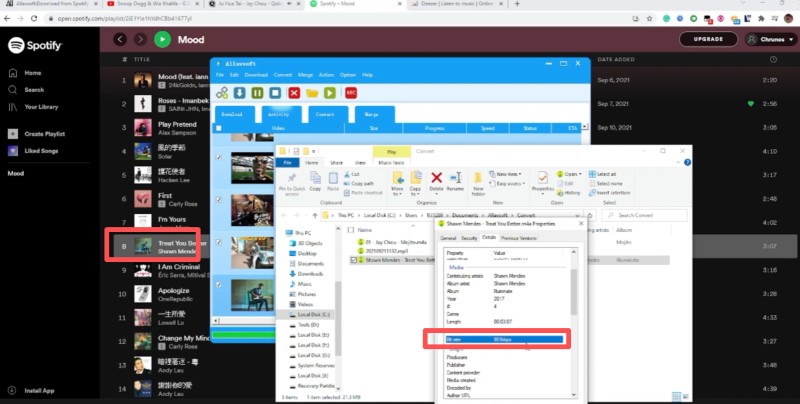
Trust. A tool asking for Spotify credentials is enough reason for privacy-aware users to walk away. Community reports show that Spotify login issues can happen after reinstallations or account-manager hiccups—exactly the kind of edge-case annoyance that never appears in marketing copy.
Allavsoft’s Spotify feature is best understood as a metadata-driven download workflow, likely matching tracks to YouTube or similar public sources. It’s not true DRM-free extraction of Spotify’s own offline files.
When Cinch Audio Recorder Makes More Sense
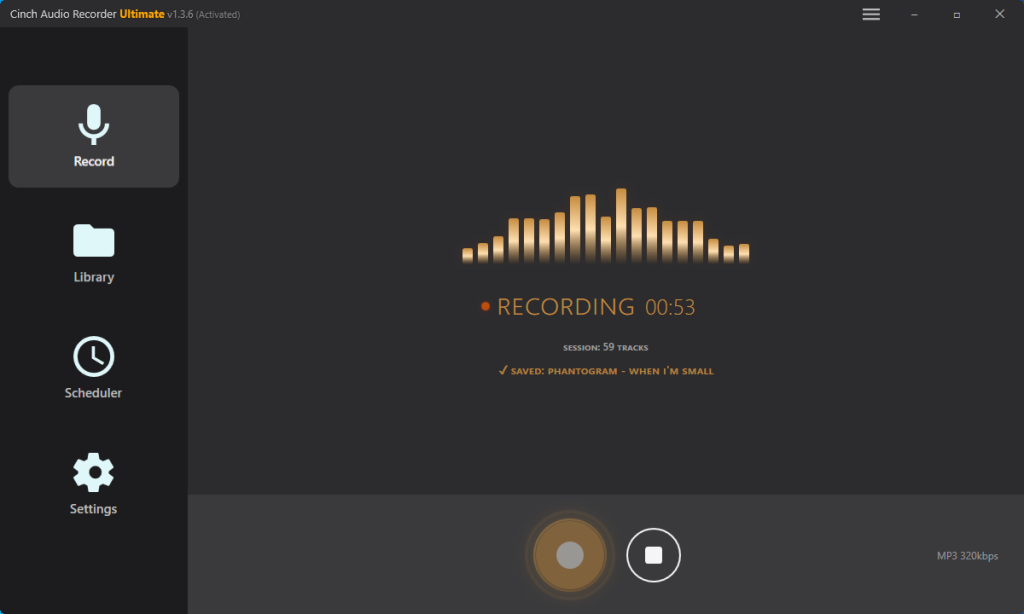
If your real need is audio only, and your biggest objection is “I don’t want to type my Spotify credentials into a downloader,” then a downloader might be the wrong category altogether.
In that case, Cinch Audio Recorder Ultimate is the more sensible fallback. It records system audio instead of logging into Spotify through a third-party app, which means the risk profile is different from link-based downloaders. It can also auto-identify tracks, add cover art and lyrics, and even import existing MP3, WAV, FLAC, and M4A files later for metadata cleanup.
For Apple users, Cinch Audio Recorder features a native Mac version, meaning you get high-fidelity system audio capture without wrestling with complex virtual audio drivers or outdated cross-platform wrappers. If you’ve been frustrated by Allavsoft’s aging interface on macOS, this is worth testing.
What Cinch saves you: account handoff. What it costs you: time. Because it records playback, the process happens in real time, and it doesn’t solve video downloading at all. So this isn’t a universal replacement for Allavsoft. It’s a better fit for the specific person who only needs music, wants a cleaner “what you hear is what you keep” workflow, and would rather avoid credential-based downloader tricks.
I wouldn’t pitch Cinch as a generic “alternative downloader.” It’s more like a practical escape hatch when Spotify-style downloading starts feeling too magical, too fragile, or too invasive. If that sounds like you, start with the free trial rather than assuming a link parser is your only option.
Safety, Privacy, and Where the Real Trust Question Sits
The lazy way to write about tools like Allavsoft is to argue about legality in giant abstract terms. The more useful way is to ask where the real trust decision sits for an ordinary buyer.
In Allavsoft’s case, the biggest practical trust question isn’t some dramatic “will this app destroy my computer?” claim. It’s whether you’re comfortable installing a third-party downloader and, for Spotify workflows, giving that app your login credentials at all. The official Spotify setup makes that credential step explicit.
Privacy-aware users should think about risk in layers. Downloading public web video from a desktop tool is one category of trust. Typing a streaming account into that same tool is a different category. If those feel equivalent to you, fine. If they don’t, that’s not paranoia—that’s a reasonable line to draw.
This is where alternatives become more than feature checklists. yt-dlp appeals to people who want more control and no hand-holding. Cinch appeals to people who want audio capture without putting platform credentials inside a downloader. Neither choice is universally better—they simply remove a different kind of trust burden.
If you decide to try Allavsoft, use the official download page, not random mirrors or cracked bundles. That doesn’t eliminate every risk in the universe, but it eliminates the dumbest one.
The UI Looks Like 2010, But That Doesn’t Mean It’s Broken

Yes, Allavsoft looks dated. Multiple comparisons and community comments describe its interface as old-fashioned, especially next to more polished competitors like 4K Video Downloader Plus. If visual polish is part of how you judge software quality, Allavsoft won’t impress you.
But “dated” and “broken” aren’t the same thing.
Officially, Allavsoft still lists support stretching from Windows 2000 through Windows 11 and macOS 10.4 through macOS 14, with only 512MB of RAM and 30MB of disk space as minimum requirements. That doesn’t prove real-world performance, but it strongly suggests the program is built like a lightweight utility rather than a heavy modern media suite. In other words, the ugly interface and the low-overhead design are probably part of the same DNA.
This is why some long-time users still describe it as reliable, fast, and “not clunky” even while admitting it looks behind the times. The workflow isn’t fancy, but for many people it’s easy enough: paste link, choose output, download, done. If you care more about finishing the task than admiring the dashboard, that might be perfectly acceptable.
There’s still a trade-off. A dated interface often signals slower product evolution. That doesn’t mean abandonment, but it can mean weaker onboarding, less visual feedback, and a more “toolbox” feel than newer competitors. If you download media daily and care about UX quality, the old-school design will wear on you faster than the marketing page admits.
Allavsoft’s interface is ugly but serviceable. If you want modern design, go elsewhere. If you want a lean desktop utility with low system demands, the dated UI is annoying but not automatically a dealbreaker.
What 313+ User Reviews Actually Tell You
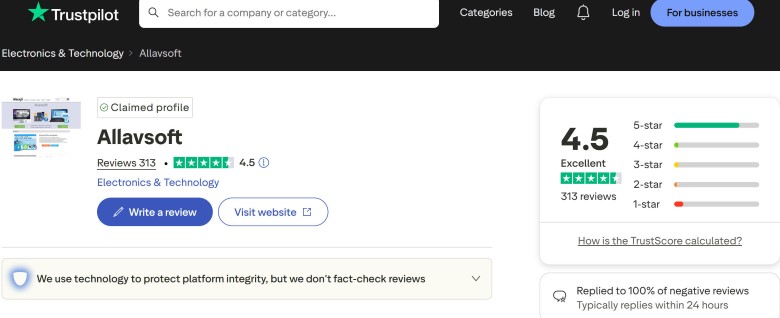
Overall: 4.5/5 from 313+ reviews on Trustpilot as of early 2026. That’s not proof of perfection, but it’s also not what abandoned junkware usually looks like.
The recurring positive themes are fairly consistent: people like the simple workflow, some long-time customers say the software has stayed useful for years, and customer support is often described as responsive, sometimes within about a day.
That support signal matters more than it sounds. Downloaders live in a messy environment. Sites change, links fail, playlists break, and logins stop behaving. In this category, fast support isn’t a nice bonus—it’s part of the product.
The negatives are also consistent, and you should take them seriously. Common complaints: temporary breakage after YouTube changes, occasional failed downloads, frustration with the limited free trial, and edge-case account/login issues like Spotify authentication trouble after reinstalling the app.
Other review ecosystems broadly support the same mixed picture. CNET user ratings sit in the middling-to-good range, and Slashdot comments include praise from more technical users. Neither changes the core story: Allavsoft is seen as workable and maintained, not magical and not bulletproof.
The community evidence doesn’t say “always works.” It says “often works, has a usable workflow, gets updates, and still breaks when big platforms change things.” That’s a believable profile.
The Cat-and-Mouse Game: YouTube Updates vs. Downloader Fixes
Downloader software breaks when platforms update. Allavsoft patches these issues, but there will be downtime. That’s the normal cat-and-mouse game for this category—not an Allavsoft-only flaw.
Think of it like a locksmith business. YouTube updates its “locks” periodically. Allavsoft is the locksmith who keeps designing new keys. Sometimes a new YouTube lock comes out and there’s a gap before the new key arrives. The real product isn’t just the app—it’s the vendor’s ability to keep fixing it after platforms change their defenses.
Community feedback around Allavsoft fits that exact pattern. Users have reported failures after YouTube updates, including cases where downloads stopped working until Allavsoft responded with troubleshooting steps or later patches. Some users encounter Allavsoft Error 403 messages when YouTube changes its token validation—these typically resolve within 24-48 hours after Allavsoft pushes a patch.
If you read “sometimes breaks after site updates” as evidence that the product is worthless, you’ll end up dismissing almost every tool in this category. If you read it as “there may be downtime, so I should judge the company on update speed and support quality,” you’re using the right lens.
That’s also why former users of dead tools like KeepVid should be careful with nostalgia. The question isn’t whether Allavsoft works today. The question is whether you’re comfortable buying into an ongoing maintenance race. Some long-term users say yes; recent complaints show the pain is still real when platforms move the goalposts.
This is where the lifetime license becomes philosophical, not just financial. A lifetime license isn’t a promise that every future site battle will be won. It’s a bet that Allavsoft will keep patching fast enough for your needs over the years. If your use case is basic YouTube archiving and occasional music downloading, that bet might be reasonable. If your use case depends on never missing a beat when YouTube changes something, the promise is much shakier.
Pricing Breakdown: When Each Tier Actually Makes Sense
As of 2026-04-02, Allavsoft’s official pricing page lists three tiers: $19.99 per month, $29.99 per year, and $69.99 for a lifetime license. Third-party review sites sometimes show different numbers, so don’t trust an affiliate roundup blindly—check the official site before buying.
The monthly plan only makes sense for short, intense use. If you have one project—grab a batch of courses, playlists, or reference videos in the next few weeks—monthly is fine. Anything longer than that, and the yearly plan becomes the rational comparison point.
Against the yearly price, the lifetime license breaks even in a little over two years. That sounds good on paper, but only if two conditions are true. First, Allavsoft actually works well for your target sites right now. Second, you accept that downloader software is only as durable as its future updates.
The free trial doesn’t solve this cleanly because it’s so limited. If your workflow is simple, the trial can answer “Does the app basically function on my machine?” It’s much worse at answering “Will this remain worth it six months from now?”
My pricing take: Monthly is for one-off extraction jobs. Yearly is the safest paid test if you expect regular use but don’t trust the maintenance story yet. Lifetime only makes sense if you already know your needs are non-DRM, boring, and repeatable.
What you shouldn’t do is buy lifetime because you hope Allavsoft might “eventually” support Netflix or Disney+. That’s fantasy shopping, not a value calculation.
Allavsoft vs. the Alternatives That Actually Matter
Most alternative sections are useless because they dump five names without telling you what decision each tool changes. Here’s the shorter, more honest version.
| Tool | Best for | What it saves you | What it costs you |
|---|---|---|---|
| Allavsoft | Non-technical users who want a GUI for non-DRM YouTube/Spotify-style downloads | Saves you from command-line complexity; broad format support; simple desktop workflow | Dated UI, no browser extension, occasional breakage after site updates |
| yt-dlp | Power users comfortable with command-line tools | Saves you money; gives deep control and active community maintenance | Costs you time, learning curve, and zero beginner friendliness |
| 4K Video Downloader Plus | Users who want a more modern, polished interface | Saves you UI frustration and feels more current in daily use | Costs you some of Allavsoft’s old-school simplicity and may not be the best fit if your only priority is “paste link and go” across many sites |
| StreamFab | Users whose real goal is OTT content like Netflix or Prime Video | Saves you from buying the wrong class of tool for DRM-heavy platforms | Costs more, lives in a more sensitive technical/legal gray area, and solves a narrower but harder problem |
| Cinch Audio Recorder | Users who only need audio and don’t want to hand over streaming credentials | Saves you account-login risk; records whatever your system can play; adds automatic metadata, cover art, and lyrics; can also clean up existing audio files later | Real-time recording takes longer, and it’s not a video downloader |
Pick yt-dlp if you’re technical and hate paying for what a free tool can already do. Community consensus is pretty clear here: for power users, yt-dlp is the more flexible and often more actively maintained option.
Pick 4K Video Downloader Plus if Allavsoft’s interface makes you feel like you’re using software from another decade. The workflow category is similar, but the presentation is cleaner.
Pick StreamFab if your purchase decision starts with Netflix, Prime Video, or Disney+. Don’t waste your time trying to force Allavsoft into a job it doesn’t claim to do.
Pick Cinch Audio Recorder if music is the only target and your biggest hesitation with Allavsoft is the Spotify login requirement. Cinch’s “record system audio, then identify and tag it” approach is slower, but it’s often mentally cleaner because it doesn’t depend on platform credentials inside the app.
And pick Allavsoft if you’re the beginner who just wants a desktop downloader for regular sites, doesn’t care about pretty UI, and wants something simpler than command-line tooling. That’s still the lane where it makes sense.
Which Option Fits You
Here’s the blunt version.
Buy Allavsoft if: You mainly download from non-DRM platforms like YouTube, Vimeo, Facebook, or similar mainstream sites. You want a GUI, not a command line, and a plain desktop utility is good enough. You can live with an outdated interface if the workflow is simple and support is reasonably responsive. Your Spotify goal is “give me local tagged audio files,” not “extract Spotify’s native encrypted offline files.” For the casual media saver and some content archivers, this is still a sensible purchase. The strongest case is simple, repeatable downloading from non-DRM sources where convenience matters more than modern UX.
Start with monthly or yearly if: You’re budget-conscious and unsure whether your exact sites still work today. You’ve been burned before by tools that stopped working after platform updates. You want to test the maintenance story before committing to lifetime. For the budget-conscious reader, the smart move isn’t blind lifetime optimism. It’s paying only enough to verify that Allavsoft still fits your current workflow.
Skip Allavsoft if: You need Netflix, Prime Video, Disney+, Hulu, or Max downloads. This is the clearest hard skip. You’re comfortable with command-line tools and want the most capable free option. yt-dlp makes more sense. You care a lot about design polish and modern UX. A cleaner GUI option like 4K Video Downloader Plus will likely feel better day to day. You’re highly privacy-sensitive and don’t want to give a third-party app your Spotify credentials. For the privacy-aware reader, Allavsoft’s Spotify workflow is probably the dealbreaker. For the former premium user who wants “something that never breaks,” I’d also set expectations lower: no downloader in this class gets permanent immunity from YouTube’s updates.
Choose Cinch Audio Recorder instead if: Your use case is audio only. You want to record what plays on your computer rather than rely on account-linked downloader logic. You like the idea of automatic metadata, cover art, lyrics, and later cleanup of existing local audio files in the same tool. You can accept real-time recording as the trade-off for a more stable, no-credentials workflow. This is the cleanest fallback for people who arrived here thinking they needed a downloader, but really just needed dependable audio capture without account handoff.
Allavsoft remains a practical choice for one specific job: straightforward, GUI-based downloading from non-DRM platforms where convenience outweighs interface aesthetics. If that matches your workflow, the lifetime license at $69.99 may justify itself over 2+ years of regular use—provided you accept that downloader tools live in a maintenance race with platform updates.
Frequently Asked Questions
Can Allavsoft download from Netflix or Amazon Prime?
No. Allavsoft does not support Widevine DRM decryption. It is designed for open-web platforms like YouTube and Vimeo, not premium OTT streaming services. If your primary goal is downloading from Netflix, Amazon Prime Video, Disney+, Hulu, or Max, you need specialized tools like StreamFab that target DRM-protected content.
Is Allavsoft legal and safe to use?
The software itself is a safe, virus-free network tool when downloaded from the official website. However, downloading copyrighted material violates the Terms of Service of most platforms. Always use it strictly for personal archiving of fair-use content, and review applicable copyright laws in your jurisdiction. The biggest practical trust question isn’t malware—it’s whether you’re comfortable giving a third-party app your Spotify credentials.
Does Allavsoft actually download 320kbps from Spotify?
Not directly. Allavsoft uses your Spotify link to identify the song metadata, then typically matches and downloads the closest available audio track from YouTube or other public sources. The quality depends on that matched source, not Spotify’s servers. You get MP3 or FLAC files with ID3 tags and album art, but these are not true Spotify offline files. If you’re searching for an Allavsoft Spotify alternative that doesn’t require credential handoff, consider Cinch Audio Recorder, which records system audio instead.
How does Allavsoft compare to 4K Video Downloader?
When comparing Allavsoft vs 4K Video Downloader, the main difference is interface quality. 4K Video Downloader Plus offers a more modern, polished UI, while Allavsoft feels dated but functional. Both handle YouTube and similar non-DRM sites competently. If visual polish matters to you, go with 4K. If you prioritize a lean utility over aesthetics, Allavsoft works.
Next steps: Start with the free trial to verify Allavsoft still works on your target sites. For DRM-heavy needs, research StreamFab instead. For audio-only workflows without credential handoff, Cinch Audio Recorder offers a different approach. Current pricing and platform support should be confirmed on allavsoft.com before any purchase.