Quick Summary
Want Deezer to MP3 that work outside the app? This guide explains why most downloaders fail, risk your account, or deliver fake quality—and what actually works.
You searched “deezer to mp3” because you want your music as actual files—not trapped in an app that stops working if you cancel your subscription. Maybe your subscription is ending soon. Maybe you want your playlists on an old MP3 player or in your car. Whatever the reason, you’ve probably noticed the free downloaders don’t work right. The files sound wrong, have weird metadata, or claim to be “FLAC” quality but are suspiciously small.
Most of those free tools aren’t even downloading from Deezer. The method that actually works: record your system audio while Deezer plays. Cinch Audio Recorder captures what you hear, tags the files automatically, and never asks for your Deezer password. You’re not “downloading”—you’re recording. That distinction keeps your account safe.
This guide walks you through why the free options fail, what risks they hide, and exactly how to record your Deezer library step-by-step.
What You’ll Need (Checklist)
Before starting, make sure you have:
- A Windows PC (Cinch is Windows-only)
- Active Deezer subscription (Premium gives you FLAC quality at no extra cost)
- 15-30 minutes for initial setup
- The music you want to record ready in a playlist
The “Download” That Isn’t: What Deezer Actually Gives You
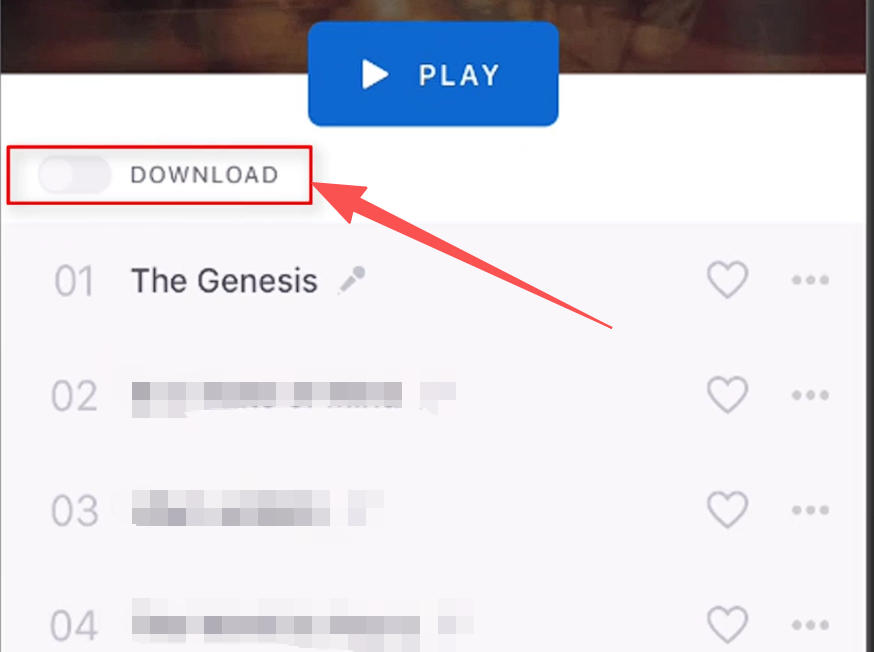
Deezer’s download feature isn’t what you think. When you tap “Download” in the Deezer app, you’re not getting an MP3 you can move to your car stereo or USB drive. You’re getting a DRM-encrypted file that only plays inside the Deezer app—and stops working if your subscription ends.
The catch:
- The files live in Deezer’s hidden app storage, not your Downloads folder
- They expire when your subscription lapses
- You can’t transfer them to devices without the Deezer app
- You can’t burn them to CD or play them in iTunes/VLC
This isn’t hidden. Deezer’s support docs explain that offline downloads are “available for listening within the Deezer app“—not permanent purchases. If you want music that survives a subscription gap or works on non-Deezer devices, the official download feature won’t help.
The ARL Token Problem: Why “Free” Downloaders Are Risky
You’ve probably seen tools like Deemix that claim to download Deezer tracks for free. Here’s what most guides don’t explain clearly: these tools work by extracting an ARL token from your browser—a session cookie that grants complete access to your Deezer account.
Your ARL token is essentially the master key to your account. When you paste it into a third-party downloader, you’re handing that tool the ability to act as you. It can download your library, access your playlists, and make authenticated requests as if it were you. This is why it’s risky.
Why Reddit Users Are Waking Up to Banned Accounts
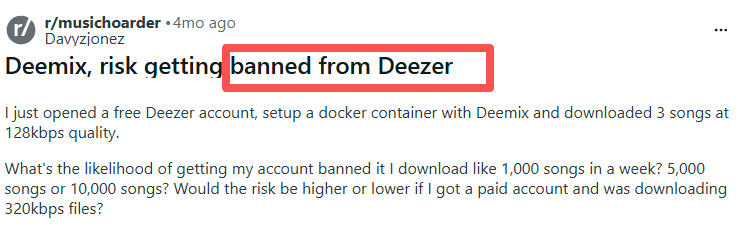
Account suspension. Deezer’s Terms of Service explicitly prohibit third-party API access. Users on Reddit’s r/musichoarder community report account flags and suspensions after using ARL-based tools, particularly when downloading hundreds or thousands of tracks quickly. The exact threshold isn’t documented, but the pattern is clear: the more you download, the higher the risk.
Tool instability. Deemix—the most popular ARL-based tool—hasn’t been reliably maintained since 2022. GitHub issues show recurring problems: login failures, token expiration, downloads stuck at 0%. When Deezer updates their API, these tools break—and no one’s fixing them.
Privacy exposure. Your ARL token contains your session credentials. When you paste it into third-party tools—especially web-based ones—you’re sending your account access to unknown servers.
Constant maintenance. ARL tokens expire every 3-6 months and break immediately if you change your password. Users report having to re-extract tokens constantly, digging into browser developer tools each time.
The 2026 Reality
Deezer has invested heavily in anti-piracy. Their AI fraud detection tool, announced in early 2026, identifies abnormal API usage—including bulk downloading. The risk has increased in the last year.
If you used Deemix before and it worked: That was 2022. The tool’s maintenance, Deezer’s detection, and their enforcement—all changed. What worked then is now a “works sometimes, might get flagged” solution.
Bottom line: ARL tools violate Deezer’s ToS, require ongoing token maintenance, carry account suspension risk, and depend on abandoned software. If you’re trying to protect a paid subscription, this approach is hard to recommend.
The YouTube Match Scam: Why Free Online Tools Fail
You’ve seen them: websites promising “Deezer/Spotify/Amazon to mp3 converter free.” You paste a Deezer link, click a button, get an MP3. Here’s what actually happens: most of these sites don’t access Deezer at all. They take the track name, search YouTube, and download the audio from there.
Why YouTube Sourcing Is a Problem
You don’t get Deezer quality. YouTube audio maxes out around 128-192kbps—well below Deezer Premium’s 320kbps. Even if the site labels the file “320kbps,” the source is YouTube’s compressed stream.
You get YouTube content artifacts. Users report MV dialogue, live performance noise, fan remixes, and wrong tracks. If a song has multiple versions on YouTube, the site picks one—not necessarily the right one.
You trust unknown servers. These sites require no login because they don’t need Deezer access. They’re YouTube rippers dressed as Deezer converters. Some use YouTube as a fallback; others are malware vectors.
How to Spot the YouTube Bait-and-Switch
If your downloaded file has any of these, it came from YouTube, not Deezer:
- Unexpected audio: Voiceovers, live crowd noise, engine sounds, intro speech
- Wrong version: Remix, acoustic, or live version when you wanted the studio track
- Suspicious file size: A 3-minute “320kbps MP3” that’s 3-5MB instead of 8-10MB
- Missing metadata: YouTube downloads often lack proper ID3 tags
Technical reality: YouTube’s audio maxes out at ~160kbps. No web tool can extract quality that doesn’t exist. When a site promises “320kbps FLAC from Deezer” without requiring login, they’re promising something their source can’t deliver.
The Fake FLAC Myth: Files That Waste Your Storage
Free downloaders often promise “FLAC quality” or “320kbps MP3.” What they actually deliver: upscaled files—low-quality audio stuffed into a high-quality container. The file looks impressive (30MB per song!) but sounds no better than a 3MB MP3.
How Upscaling Tricks You
Upscaling takes a 128kbps MP3 (from YouTube), converts it to FLAC format, and increases the file size by 10x. The FLAC container can hold lossless audio, but if you put compressed audio into it, you get compressed audio in a bigger file. No new audio information is created. The frequencies that were removed during the original MP3 encoding stay removed.
File size comparison:
- Original 128kbps MP3: ~3MB for a 3-minute song
- Upscaled “FLAC” from that MP3: ~30MB for the same song (same quality, bigger file)
- Actual lossless FLAC from CD: ~30-50MB for a 3-minute song (genuinely better quality)
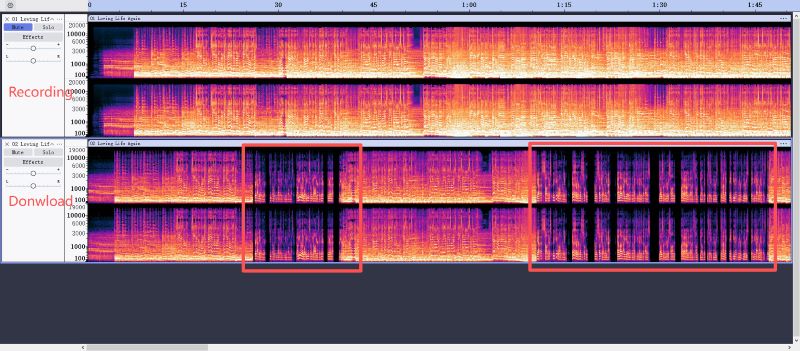
The upscaled FLAC and real FLAC have similar sizes but very different quality. The upscaled file cuts off around 16kHz (MP3 compression); the real FLAC extends past 20kHz.
How to Identify Upscaled “Lossless” Files
If you suspect a file is fake lossless:
- Fakin’ The Funk (Windows): Analyzes frequency spectrum and shows clear cutoff points
- Spek (cross-platform): Generates spectrograms that reveal compression artifacts
- Audacity frequency analysis: Manual but free—look for the sharp cutoff around 15-18kHz
A legitimate FLAC or high-bitrate MP3 shows smooth frequency distribution past 20kHz. An upscaled file shows a hard cliff where the original compression cut off frequencies.
Why This Matters for Deezer Downloaders
Free online tools promising FLAC output are almost certainly giving you upscaled YouTube audio. YouTube’s source doesn’t contain the frequencies FLAC preserves, so converting it to FLAC only makes the file bigger—not better.
Storage impact: Upscaled FLAC files waste 10x the disk space. If you archive 1000 songs this way, you’re spending 300GB on files that sound no better than a 30GB MP3 library.
Reality check: FLAC claims from free downloaders are meaningless without source verification. Since Deezer now includes HiFi (FLAC) quality in all Premium plans, web tools can’t deliver what you’re already paying for. The FLAC they promise is container deception, not genuine lossless audio.
Method Comparison: At a Glance
Before diving into the recording setup, here’s how the three approaches stack up:
| Feature | Free Online Converters | ARL Tools (Deemix) | Cinch Audio Recorder |
|---|---|---|---|
| Audio Source | YouTube (Max 128kbps) | Deezer API | Direct System Audio |
| Account Ban Risk | None (No login required) | High (Violates ToS) | None (Records locally) |
| True FLAC/320kbps | ❌ No (Upscaled fakes) | ✅ Yes | ✅ Yes (Matches output) |
| Stability | Websites frequently go down | Breaks when API updates | 100% Stable |
| Setup Complexity | Minimal | High (Token extraction) | Moderate |
| Speed | Fastest | Fast | Slow (1x real-time) |
The verdict: If account safety and genuine quality matter, system audio recording is the only method that delivers both.
How to Record Deezer with Cinch Audio Recorder
After reading about ARL account risks and YouTube quality scams, you’re probably looking for a method that works reliably without compromising your Deezer subscription. System audio recording is that method.
The key distinction: you’re not “downloading” from Deezer’s servers. You’re capturing the audio your computer plays. This doesn’t require authentication tokens. It doesn’t violate Deezer’s API terms. And it works whether Deezer updates their API or not—as long as you can play the music, you can record it.
Why Cinch Fits This Use Case
Cinch captures whatever plays through your system audio, automatically identifies songs using audio fingerprinting, and tags files with metadata (title, artist, album, cover art). It never asks for your Deezer login or ARL token. It just records what comes out of your speakers.
Step-by-Step Setup
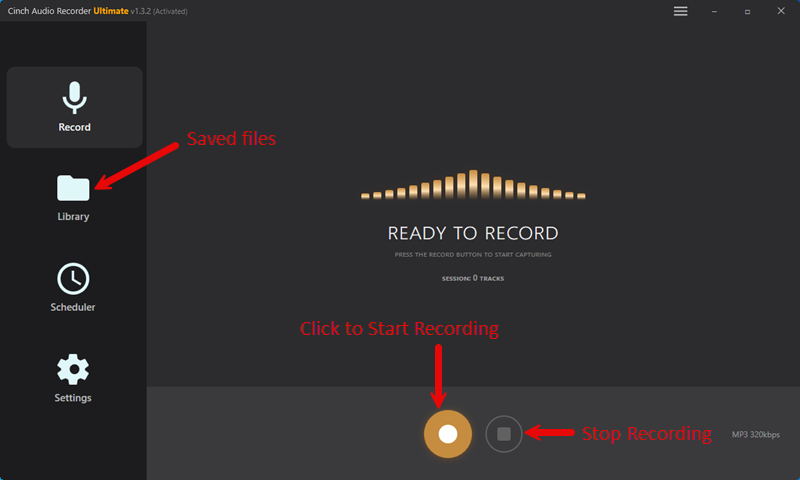
- Download Cinch Audio Recorder from cinchsolution.com. The trial records up to 9 songs; the full version removes this limit.
- Configure your Windows audio settings for best quality (optional):
- Right-click the speaker icon in your taskbar → “Open Sound Settings”
- Scroll to “Advanced sound options” → “App volume and device preferences”
- Find your output device, click “Device properties”
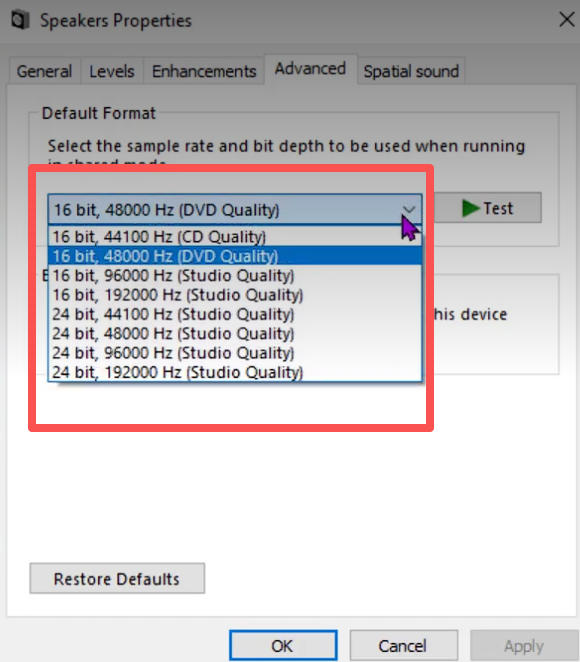
- Change the format to 24-bit, 48000 Hz (or the highest quality option available)
Pro tip: Always pick the highest sample rate in this dropdown. If you leave it at the default 16-bit/44.1kHz, you’re bottlenecking quality before Cinch even captures anything.
- Configure Cinch’s recording settings:
- Open Cinch → Settings
- Set output format: MP3 (320kbps) or FLAC, depending on your preference
Here’s why SMTC matters: instead of guessing song names from audio fingerprinting, SMTC reads the track info directly from Deezer’s player. Much more reliable—especially for obscure stuff that fingerprint databases don’t recognize.
- Start recording:
- Click the golden “Recording” button in Cinch’s Record tab
- Open Deezer in your browser or app and play your music
- Cinch automatically detects when audio starts and stops recording per track
Once the music plays, Cinch will immediately show a “Recording” status. You’ll see track names pop up in real-time as it detects each song.
- Check results in the Library tab:
- Recorded songs appear with metadata and cover art
- Failed recognitions show a red icon—right-click → “Re-Identify” or manually edit
You should see each track with title, artist, album, and a thumbnail. File size will be roughly 7-12MB for a 3-4 minute 320kbps MP3. If you see generic filenames like “Track 01,” the tagging failed—but you can always fix it manually.
Recording Output: The Trade-off
Recording quality depends on what your system plays. If Deezer streams 320kbps MP3 (Premium tier) and your Windows audio settings are configured properly, Cinch captures that quality. If you’re on Deezer Free with lower-quality streams, the recording reflects that.
Automatic tagging has limitations. Obscure tracks, live performances, and remixes sometimes fail fingerprint matching. You can manually edit metadata or batch-edit multiple files.
The trade-off: Recording is slower than downloading (you play the music in real-time) and requires setup. But it’s stable across Deezer API changes, doesn’t expose your account credentials, and preserves the quality your system outputs. For personal archival use, it’s the lowest-risk approach that works in 2026.
Quality Expectations: The Real Numbers
Recording captures exactly what your system plays. No more, no less. If Deezer streams 320kbps and your Windows audio settings are correct, Cinch captures that quality. The bottleneck isn’t Cinch—it’s your playback settings.
Here’s exactly what determines your recording quality and what can go wrong.
Quality Depends on Your Deezer Tier
- Deezer Free: ~128kbps streams. Recording captures that quality.
- Deezer Premium: Includes FLAC (lossless) quality—no separate HiFi tier needed anymore. Recording captures that if your system supports it.
Since Deezer now bundles HiFi quality into all Premium plans, you’re essentially wasting your subscription if you use YouTube-based downloaders that max out at 128kbps. Set your output device to 24-bit/48kHz (Step 2 above) to give Cinch the best possible input.
Common Issues (And How to Fix Them)
Picking up system sounds or notifications? Lower your “Silence Threshold” in Cinch settings, or mute non-music applications during recording sessions.
Missing metadata (generic filenames like “Track 01”)? The fingerprint match probably failed. You can manually edit or click “Re-Identify.” But here’s the better fix: if you’re recording from Deezer’s web player with SMTC enabled (see Step 3), track info comes directly from Deezer’s player—way more reliable than fingerprinting.
Songs splitting at the wrong spots? Adjust “Silence Duration” threshold. Songs with quiet intros sometimes get split mid-track; loud gaps between songs sometimes get merged. The default works for pop/rock, but classical and ambient need tuning.
Quality sounds worse than Deezer playback? Check your Windows audio format settings (Step 2). Disable any audio “enhancements” like bass boost or virtual surround—these alter the audio before Cinch captures it, and not in a good way.
Frequently Asked Questions
Is it legal to record Deezer to MP3?
Recording system audio for personal use is generally legal in most countries. You’re capturing unencrypted audio output—not circumventing DRM.
The distinction matters: when you use ARL-based tools like Deemix, you’re accessing Deezer’s API through authentication tokens, which violates their Terms of Service. Recording is different. You’re simply capturing what plays through your speakers, the same way you could record a radio broadcast.
A few caveats: laws vary by country (check yours), this applies to personal archival use only, and you should have a valid Deezer subscription to access the source audio. This isn’t legal advice—consult a professional if you’re unsure.
Why do my downloaded Deezer MP3s sound bad?
Most likely, you downloaded from a free online converter that sources from YouTube—not Deezer.
Here’s how to confirm: check the file size first. A 3-minute “320kbps” file that’s only 3-5MB came from YouTube (~128kbps actual quality). Listen for artifacts too—voiceovers, live audience noise, or wrong versions are dead giveaways. You can also use a spectrum analyzer like Fakin’ The Funk or Spek to see frequency cutoffs that reveal the true bitrate.
These sites can’t access Deezer’s servers without your login credentials. If you want genuine Deezer quality, you need either ARL-based tools (account risk) or system audio recording (no account risk, just slower).
Does Deezer ban accounts for downloading?
Yes, but it depends on the method.
| Method | Ban Risk | Why |
|---|---|---|
| Free online converters | None | They don’t access Deezer at all (YouTube sourcing) |
| ARL tools (Deemix) | High | Violates ToS; API usage is detectable |
| System audio recording | None | Deezer can’t detect local audio capture |
ARL tools are the problem. Deezer’s Terms of Service explicitly prohibit third-party API access. Their fraud detection system (enhanced with AI in 2026) identifies abnormal download patterns—particularly bulk downloading hundreds or thousands of tracks.
Reported patterns from Reddit users:
- Accounts flagged after downloading 1000+ tracks in short periods
- Temporary suspensions sometimes precede permanent bans
- No official documented threshold, but volume clearly matters
If you’ve already used ARL tools: Stop. Your account may already be flagged. Switch to recording for future downloads to minimize additional risk.
Can I get true FLAC quality from Deezer?
Yes—and since Deezer now includes HiFi (FLAC) quality in all Premium plans, you’re paying for it already.
What you need:
- Deezer Premium (FLAC is included—no separate tier)
- Windows audio settings at 24-bit/48kHz or higher
- A recording method that preserves quality (Cinch can capture FLAC output)
Free online converters can’t deliver FLAC because they source from YouTube (max ~160kbps). Converting 128kbps MP3 to FLAC only increases file size, not quality. “FLAC” files from these sites are upscaled fakes—check with spectrum analysis tools if you’re suspicious.
The honest truth: if you want to preserve Deezer’s FLAC quality offline, system audio recording with proper settings is your only reliable option. ARL tools can access FLAC streams too, but they carry account suspension risk.
How long does it take to record my Deezer library?
Recording runs at 1x real-time—a 3-minute song takes 3 minutes to record.
For a 500-song library, expect about 25-30 hours of recording time (you can let it run overnight). Setup takes 15-30 minutes initially.
The trade-off: recording is slower than ARL-based downloading (which can grab albums in minutes), but it’s the only method that’s stable, legal, and doesn’t risk your account.
Where to Start
Don’t wait until Deezer flags your account or your subscription expires. You can secure your library legally right now.
Download Cinch’s free trial from cinchsolution.com and record 3-4 tracks. Check the output quality and metadata accuracy. This takes about 15 minutes and costs nothing. If the workflow fits your needs, the full version removes the 9-song trial limit.
If the trial works for your library, the investment is worth it for the peace of mind. If not, you haven’t risked anything—not your money, not your Deezer account.
For personal archival, recording is the path that works without side effects.