Quick Summary
Convert Bilibili videos to MP3 with online tools, desktop software, or CLI—but each has trade-offs. Learn what works, quality limits, and regional restrictions.
Bilibili doesn’t offer native audio downloads, so extracting MP3 requires third-party tools—and the choice between online converters, desktop software, or command-line utilities depends on what you’re willing to trade: time, money, or complexity.
This guide helps you pick based on your actual needs, not marketing claims.
Quick Answer: Can You Convert Bilibili to MP3?
Yes, but with trade-offs.
You can extract MP3 audio from Bilibili videos using online converters, desktop software, or command-line tools. However, all methods have limitations:
- Free online converters work for occasional downloads but often degrade quality and have file size limits
- Desktop software is more reliable but typically requires payment for full features
- Command-line tools offer the most control but require technical setup
The audio quality you get depends on the source video—converting a low-bitrate upload to 320kbps MP3 doesn’t improve it.
Method 1: Online Converters (Free, Simple, Limited)
Online converters are the most accessible option—paste a URL, click a button, get your file. They’re ideal for one-off downloads when you don’t want to install software.
Prerequisite: Make sure the video plays in your browser first. If Bilibili shows a region restriction message, online converters won’t work either—you’ll need a VPN or different method.
Quick Start: Try These First
If you just want to download one song quickly:
- Go to BiliBili Video Downloader (Bilibili download tools can disappear anytime because of copyright issues. So you either have to keep Googling for new ones, or use a desktop app if you want something more reliable in the long run.)
- Copy the Bilibili video URL from your browser address bar (looks like
bilibili.com/video/BVxxxxx) - Paste it into the converter’s input field
- Select MP3 format, then click download
- Wait for processing (usually 30 seconds to 2 minutes depending on video length)
- Save the file when the download button appears
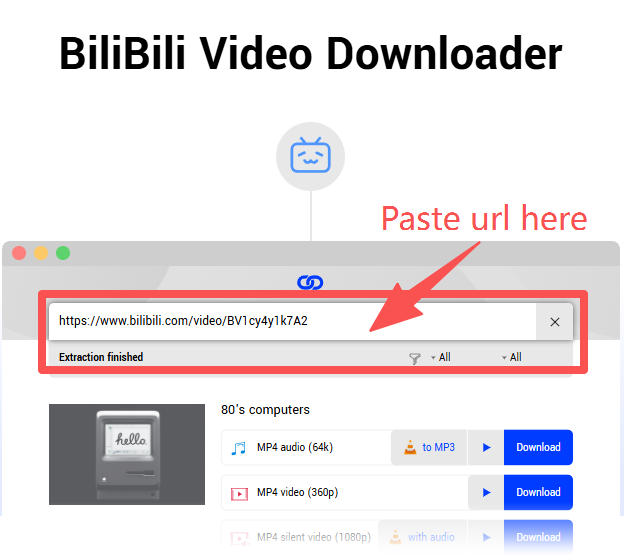
What you should see: A download button or “Save File” dialog. If you see redirect ads or “Your download is ready” popups, close them—they’re fake. The real download link is usually a direct button on the same page.
The Hidden Costs of “Free”
Online converters seem convenient, but the trade-offs add up quickly.
The biggest issue is quality. Most online tools use a two-step process: download the video first, then extract the audio. This double-handling introduces quality loss, especially if the intermediate video gets compressed. You might end up with a 128kbps file even when the tool claims 320kbps output.
File size and duration limits are another constraint—free services typically cap at 50-100MB or 15-30 minute videos. Lectures and longer podcasts often won’t work at all.
Then there’s the advertising ecosystem. Free tools monetize through aggressive pop-ups, redirects, and fake download buttons. It’s not just annoying; it’s a security risk when buttons lead to unrelated sites.
Your privacy also passes through third-party servers. Video URLs and potentially your IP address get processed externally. For anything sensitive, this matters.
Finally, these services disappear or break regularly. When Bilibili updates their video delivery system, free converters often stop working for days or weeks until someone updates them—if anyone does at all.
When Online Converters Make Sense
Despite the drawbacks, online converters are reasonable for:
- Occasional, single-file downloads
- Content where quality isn’t critical
- Users who can’t install software (work computers, shared devices)
If an online converter fails or produces poor quality, don’t waste time trying alternatives—move to a desktop solution.
Method 2: Desktop Software (More Reliable)
Desktop applications offer more stability and features than web-based tools. They’re the sweet spot for users who need reliability without command-line complexity.
What Desktop Tools Offer
Desktop Bilibili downloaders typically provide:
- Batch downloads for multiple files or playlists
- Quality selection with visible stream options
- Direct audio extraction without intermediate video compression
- Cookie support for accessing higher-quality streams
- Offline operation without relying on external servers
Choosing Desktop Software
Several tools support Bilibili downloads with MP3 output:
Free option: 4K Video Downloader (free version allows 25 downloads/day) – download from 4kdownload.com. It supports direct MP3 extraction without the two-step quality loss of online converters.
Paid options (offer free trials):
- Cinch StreamGrab – supports 1,000+ sites, offers 20 free downloads/day without purchase
- VideoProc Converter AI – dedicated Bilibili downloader with batch support
- Wondershare UniConverter – focuses on format conversion, supports many platforms
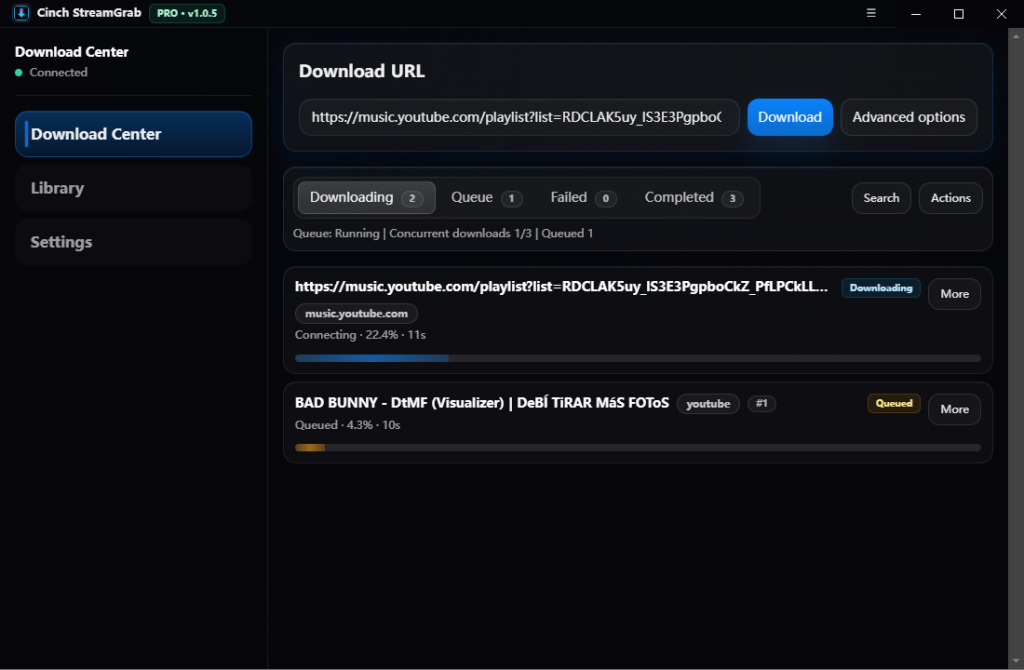
For Casual Users: Start with 4K Video Downloader’s free tier. It’s simpler than online converters and avoids the quality degradation. Only consider paid tools if you need batch downloads or hit the 25/day limit regularly.
The Cookie Requirement
Higher-quality downloads (1080p and above) typically require authentication. Most desktop tools support cookie import:
- Log into Bilibili in your browser
- Export cookies using a browser extension (cookies.txt format)
- Import the cookies file into your downloader
- You may need to refresh cookies every few weeks as they expire
This adds setup overhead but unlocks better quality and access to member-restricted content.
Cost vs. Value
Desktop tools range from free trials with limitations to $30-60 annual licenses. Consider:
- How often you’ll use the tool
- Whether batch downloads matter to you
- If you need maximum quality
- How much frustration with failed free tools is acceptable
A paid tool that works reliably may cost less in time than repeatedly debugging free alternatives.
Method 3: BBDown and yt-dlp (Advanced Users Only)
Command-line tools offer maximum control but require technical setup. Skip this section if you’re not comfortable with command-line interfaces.
BBDown is a Bilibili-specific open-source tool (13,000+ GitHub stars). It can access higher-quality streams through different API endpoints. Requires installing ffmpeg and managing cookies manually.
yt-dlp is a general-purpose downloader supporting hundreds of sites. It has ongoing Bilibili authentication issues as of 2025.
When to consider these: If you’re downloading 10+ videos per week, need batch automation, or require the absolute best quality. For occasional single downloads, Methods 1 or 2 are faster.
Critical Limitation: Regional Blocks and Member Content
Not all Bilibili audio can be downloaded with a simple URL paste. Two barriers trip up most users.
Region-Locked Content
Bilibili restricts certain content—particularly anime, dramas, and music—to specific regions, most commonly mainland China. If you see “仅限中国大陆” (Mainland China only) or similar messages when trying to play a video, online converters will fail too.
What works: Desktop software with VPN support, or CLI tools configured with a Chinese proxy. The VPN must stay active during both testing and downloading.
What doesn’t work: Online converters without VPN, or tools that don’t support proxy configuration.
Member-Only Content
Premium content requires authentication. This includes exclusive music releases, early-access episodes, and high-quality streams. Without a paid membership and proper cookie authentication, you’ll only get access to lower-quality or placeholder streams.
The practical reality: If a video requires you to log in and have a membership to watch, downloading its audio requires:
- An active Bilibili membership
- Cookie export from your logged-in browser
- A download tool that supports cookie import
Free online converters cannot bypass this. Desktop tools and CLI options can, but only with valid credentials.
Content That Simply Won’t Work
Some content cannot be downloaded regardless of method:
- Live streams (you’d need to record in real-time)
- Content already deleted by the uploader
- Private or unlisted videos without direct access
- DRM-protected premium content in some cases
Before spending time troubleshooting, verify the video plays normally in your browser first.
Quality Expectations
Understanding quality limitations prevents frustration and wasted effort.
Source Quality Is the Limit
The maximum audio quality you can extract is limited by what the uploader provided. Many Bilibili videos have audio tracks at 128kbps or lower—even music videos. Converting to 320kbps MP3 doesn’t add information; it just creates a larger file with the same effective quality.
What Different Methods Deliver
Online converters: Often compress during intermediate steps. A 192kbps source may become 128kbps after the video download and audio extraction process.
Desktop software: Better tools extract the audio stream directly without re-encoding. Quality should match the source.
CLI tools (BBDown/yt-dlp): Can list available streams before downloading. Use --list-formats in yt-dlp or check BBDown’s output to see actual audio quality options.
When Audio Extraction Makes Sense
MP3 extraction is worth doing when audio is the actual content—music, podcasts, lectures, ASMR, or background audio for studying. If the video part is just a static image or something you won’t miss, converting makes sense.
Skip it for tutorials with on-screen instructions, gaming videos, or anything where you’d lose information by dropping the visuals. The audio alone won’t be useful.
Realistic Quality Targets
For most Bilibili content, expect 128-192kbps effective audio quality regardless of what your tool claims. If you need higher quality, check whether the creator offers downloads elsewhere (Bandcamp, SoundCloud, official releases).
Common Download Failures and Fixes
Downloads fail for predictable reasons. Here’s what to check when things break.
The Download Won’t Start
First, verify the video plays in your browser—no VPN if you’re testing region-lock issues. If it plays fine, the problem is likely on the tool side.
Try a different downloader to isolate the issue. If two tools fail on the same video, the video itself may be private, unlisted, or using a URL format the tools don’t recognize.
If tools that worked before suddenly break, check their GitHub issues. Bilibili’s API changes frequently enough that downloaders need updates to keep up.
Quality Is Lower Than Expected
Start by checking whether you’re authenticated. Without cookies, most tools can only access lower-quality streams.
If cookies are in place, the source video might simply have poor audio—many Bilibili uploads are 128kbps or lower regardless of what the downloader reports. Use --list-formats in yt-dlp or check BBDown’s output to see what quality options actually exist.
Online converters are the worst offenders here; they often re-encode during extraction, introducing another round of quality loss. Desktop tools and CLI options that extract streams directly avoid this problem.
Downloads Stop Partway Through
Network interruptions are the obvious culprit, but Bilibili also throttles sustained downloads. A simple retry often works.
For BBDown specifically, there’s a known issue where downloads hang at 98% completion. The file might actually be complete—check its size against what you expected. If it’s stuck, try switching API modes: -app or -tv instead of the default sometimes resolves the problem.
Cookie Authentication Stops Working
Cookies expire. Re-export them from your browser and verify you’re still logged into Bilibili in that browser.
If fresh cookies don’t work, Bilibili may have changed their authentication format. Check your tool’s documentation or GitHub issues—this happens often enough that maintainers usually post updated instructions.
Error Messages About Region Locks
Content restricted to mainland China requires a VPN with a Chinese server. The VPN needs to stay active for both the download attempt and any preview streaming you do while testing.
Some region-locked content also requires account login—cookies alone won’t bypass the region check.
Which Method Should You Choose?
If you’re only downloading once in a while and don’t care about maximum quality:
- Start with an online converter (TubeRipper, SavePlays)
- If it fails or quality is poor → Try 4K Video Downloader (free version)
- If still failing → Check if video is region-locked or requires login
When online converters fail:
- Error or no download button: Video might be region-locked (try VPN) or require login (try desktop software)
- Download works but quality is bad: This is expected—online converters compress audio. Move to desktop software for better quality
- File won’t play: Try a different converter or check if your player supports MP3
For regular use (weekly downloads, batch processing, or best quality):
- Use desktop software (VideoProc, Cinch, or UniConverter) with free trials
- Only consider BBDown if you’re downloading 10+ files/week and are comfortable with technical setup
Before you start: Verify the video plays in your browser. If it’s region-locked, you’ll need a VPN. If it requires membership, you’ll need cookie authentication.
The trade-off is simple: free tools cost time and have lower quality; paid tools cost money but work reliably. Pick based on which resource you have more of.