Quick Summary
90% of free Bandcamp converters ruin your audio with fake 320kbps files. We tested the top 5 real methods, from bulk downloaders to Cinch Recorder.
Start with Bandcamp’s own download menu if you bought the music—it is the quality baseline most roundups barely distinguish from web scrapers and preview-rips. If you need stable capture instead, Cinch Audio Recorder records what actually plays, auto-tags tracks, and avoids brittle URL tricks.
Forget the “free 320kbps” marketing BS you see on page one of Google. We ranked these five methods based on what actually matters to audio gearheads: real fidelity, clean metadata, and not getting your IP soft-banned.
We wrote this for three specific types of people: music hoarders tired of Bandcamp’s clunky ZIP files, DJs whose Rekordbox libraries look like a messy spreadsheet, and nerds who want a download workflow that actually survives site updates. It does not help with piracy shortcuts—every method assumes purchased access or personal recording where your local rules permit it.
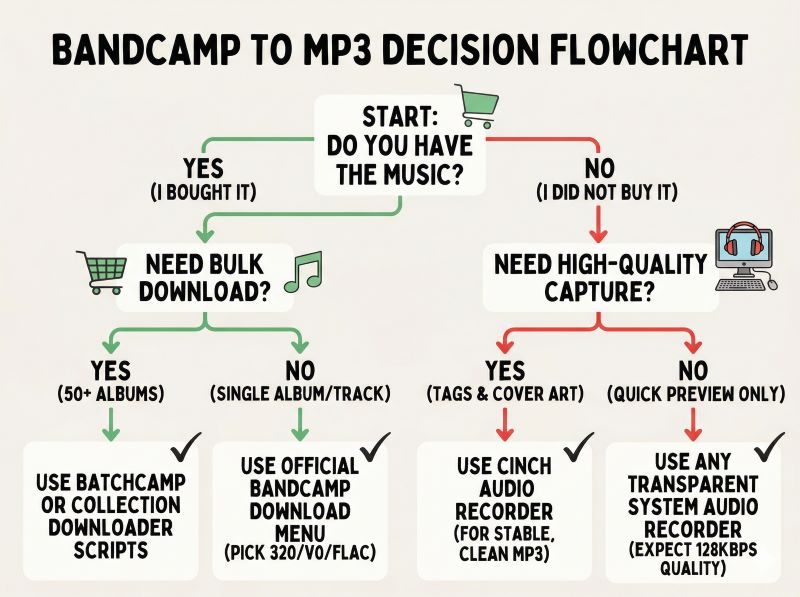
Decision Tree (30 seconds to pick your tool)
- Did you buy the music? → Yes → Need bulk download?
- Yes (50+ albums) → Use Batchcamp or bandcamp-collection-downloader → Done
- No → Use Bandcamp official download → Pick MP3 320 / V0 / FLAC → Done
- Did you buy the music? → No → Need high-quality capture?
- Yes → Use Cinch Audio Recorder → Auto-tag + cover art → Verify with Spek → Done
- No (just quick preview) → Use any transparent recorder → Expect preview quality only → Done
How We Tested
Let’s skip the fake “we tested this in our lab for 50 hours” nonsense. We ran each of these tools through the same gauntlet:
- Download or record 15+ Bandcamp tracks across different genres, including obscure releases where title matching usually breaks.
- Import every file into Spek to check the real frequency range, not just the bitrate label.
- Load the results into Rekordbox and iTunes to see which tools actually preserved album art, artist tags, and track titles without manual cleanup.
- Test bulk workflows with 50+ purchased albums to measure where the click tax actually bites.
This ranking is based on what survives a real DJ’s library, not just what has the prettiest marketing page.
Quick shortlist
| Option | Best for | What you really get | Biggest catch | My take |
|---|---|---|---|---|
| Official Bandcamp download | Purchased music, real quality, clean provenance | Genuine purchase files in MP3 V0, MP3 320, FLAC, AAC, Ogg, ALAC, WAV, or AIFF | Manual per-album workflow, ZIP extraction, no great bulk experience | Start here if you already paid |
| Cinch Audio Recorder | Stable capture plus auto-tagging for a usable MP3 library | System-audio recording, automatic track ID, cover art, lyrics, batch tag editing, no account login to a third-party downloader | Records what Bandcamp actually plays; preview audio stays preview quality | Best overall non-scraper option |
| Batchcamp / collection downloaders | Large purchased libraries | Bulk download automation for albums you already own | Extensions and scripts can break when Bandcamp changes things | Great time-saver for 50+ purchases |
| yt-dlp / bandsnatch | Advanced users who already live in the terminal | Flexible automation, but only if you manage cookies, breakage, and edge cases | Known Bandcamp limitations; purchased ZIP handling is awkward; easy to get only MP3-128 | Useful, not mainstream |
| Random online “Bandcamp to MP3 320” sites | Almost no one who cares about quality or metadata | Usually a preview-derived file with a nice-looking bitrate label | Fake 320 claims, poor provenance, weak metadata | Skip |
Official Bandcamp download is the quality baseline
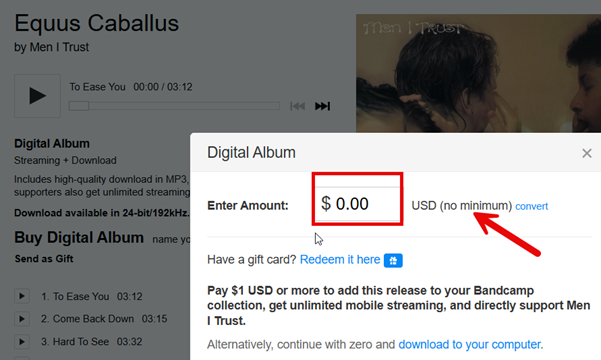
If you have already purchased the release, Bandcamp’s own download menu is the answer. Not “one answer among many.” The answer.
According to the Bandcamp Help Center download format page, purchased releases can be downloaded as MP3 V0, MP3 320, FLAC, AAC, Ogg Vorbis, ALAC, WAV, and AIFF. Bandcamp also says on its streaming quality page that free preview streams are MP3-128, while purchased items in the app can stream as MP3-V0 on Wi‑Fi. That one distinction explains most of the confusion in this whole category.
For buyers, the official route is best because it starts from the purchased source, not the preview stream. It is also the cleanest way to avoid provenance anxiety. If you are a DJ and you need something predictable for library software, official MP3 320 is the simplest choice. It embeds metadata reliably, shows proper album art in Rekordbox and Serato, and gives you one quality label you can trust without a verification ritual. If you are more storage-conscious and you understand that variable bitrate is not the same thing as “low quality,” official MP3 V0 is still a legitimate choice, not a compromised preview tier.
Workflow is where it bites, not quality. Bandcamp makes single purchases easy enough, but large collections get annoying fast: click album, choose format, download ZIP, extract, repeat. If you own 100 albums, the friction is not audio anymore. It is click tax. If a release is offered as name-your-price and the artist allows $0, that still counts as an official path and beats any converter.
Pick it first when: you bought the music, quality matters, or you need files you can trust without a verification ritual.
Skip it if: you are trying to save non-purchased preview audio, or your real problem is bulk automation rather than file quality.
Cinch Audio Recorder is the best overall non-scraper choice
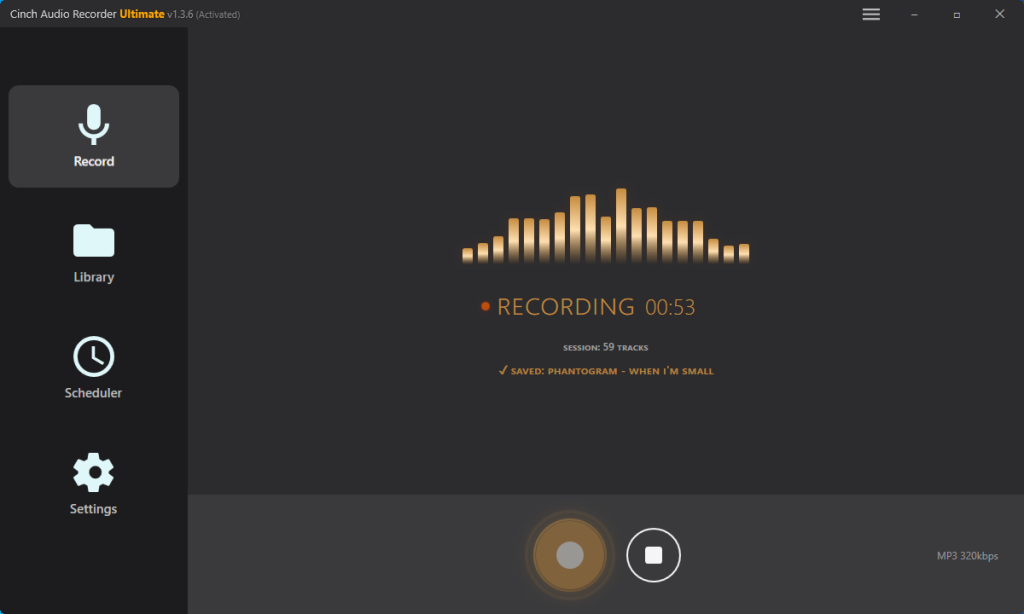
Cinch Audio Recorder is not a Bandcamp URL ripper. It is a desktop recorder for Windows and Mac that captures whatever your computer is already playing, then does the part most recorder apps leave on your lap: track identification, cover art, lyrics, and batch metadata cleanup. That is why it earns the “best overall” spot here for mainstream users who need a stable workflow, not a brittle workaround.
The real advantage is not magic quality recovery. It is stability and cleanup. Because Cinch records system audio, it does not depend on Bandcamp page structure, temporary media URLs, or cookie tricks. If the track can play through your speakers, Cinch can record it.
That also makes it a different legal conversation from scraping. In many places, recording audio you already have legal access to play is treated more like personal copying than access circumvention. But local rules still vary. The official user guide shows features that matter for music-library people, not just download-button people: automatic song identification, embedded cover art and lyrics, batch metadata editing, and a free trial that covers 9 songs.
That matters if your situation is half audio, half library management. A raw MP3 is not very helpful when Rekordbox shows blank art, iTunes sorts tracks wrong, or your tags are inconsistent across a set. Cinch is stronger than bare web grabbers because it helps you land on a usable file, not just any file. It also avoids the common “enter your music account into a third-party app” problem, because it records playback instead of asking for platform login details.
Let’s be real about Cinch’s main limitation: it’s a recorder, not a magician. If you feed it a heavily compressed 128kbps preview stream, you’re getting a 128kbps recording. Garbage in, garbage out. Rare or obscure releases can also need manual tag correction after identification.
Pick it first when: you want a stable way to capture playable audio without handing login details or cookies to another tool, and you care about tags, artwork, or library cleanup afterward.
Skip it if: you already bought the release and just want the original purchase file. Official Bandcamp is still cleaner for that.
Batchcamp and collection downloaders solve clicks, not quality
If you already paid for a lot of music, “best Bandcamp to MP3 tool” is often the wrong question. Your real bottleneck is usually: how do I stop clicking the same download flow 200 times?
That is where tools like Batchcamp and projects like bandcamp-collection-downloader become worth your attention. They are not better than the official download in quality. They are wrappers around the official access you already have. Their job is to save time, not invent a higher bitrate.
For DJs preparing a gig library, Batchcamp-style extensions solve the click bottleneck and still give you proper metadata: artist, album, track title, and cover art come through in MP3 format, which means you can drop the files directly into Rekordbox without manual retagging. For more technical collectors, scripts are more flexible and easier to integrate into a larger archival workflow.
The trade-off is maintenance. These tools live in the gap between what Bandcamp officially makes easy and what power users want. That means they can break when Bandcamp changes its site, API behavior, or login flow. They are also a poor fit if you only need one album today. A two-minute annoyance does not justify a whole extension or Python setup.
Pick it first when: you have dozens of purchased releases and the manual workflow is now the real bottleneck.
Skip it if: you only download occasionally, or you want a zero-maintenance setup.
yt-dlp and bandsnatch are for advanced users only
These tools belong to people who already live in CLI tools and accept maintenance as part of the workflow. There are two reasons advanced users still reach for tools like yt-dlp or bandsnatch: automation and control. If you already use the terminal, already understand cookies, and already accept that extraction rules can break, these tools can fit your setup.
I wouldn’t frame them as the mainstream choice for Bandcamp to MP3. The yt-dlp Bandcamp issue tracker makes the current limitation pretty clear: Bandcamp purchased content and ZIP-based album downloads are not a clean, first-class use case. Even with cookies, people regularly end up in weird territory where the tool sees the page but not the purchased asset flow they actually want. On top of that, community reports keep pointing out a practical gotcha: if you are not careful, you can still end up with MP3-128 output instead of the purchased file you thought you were automating.
bandsnatch and similar tools make more sense for collectors who already expect breakage and treat these projects as maintain-it-yourself utilities. That is a valid hobbyist choice. It is just not a good general-reader recommendation.
Pick it first when: you already live in CLI tools and want automation more than convenience.
Skip it if: you want a stable once-and-done workflow, or you do not want to troubleshoot cookie/session problems.
Why I would skip random online Bandcamp converters
Most “free Bandcamp to MP3 320” websites fail the trust test before you even get to the download button. They rarely explain whether they are recording audio, scraping temporary URLs, or just transcoding the preview stream. They almost never explain metadata behavior. And they love a 320kbps label because many readers treat that number as proof of quality.
The problem is simple: a 320kbps output file is not automatically a 320kbps source. If the site started from Bandcamp’s MP3-128 preview, all it did was wrap lower-quality audio in a bigger file. For a DJ, that is exactly the kind of file that sounds acceptable on earbuds and then falls apart on a loud system. For a collector, it is dead weight with fake confidence.
If you only want a throwaway copy of a preview for casual listening, even then I would rather use a transparent system-audio recorder than a mystery box website. At least you know what method was used.
Pick it first when: honestly, almost never.
Skip it if: quality, provenance, metadata, or long-term trust matters at all.
How to spot fake 320kbps files, and how V0 fits into the picture
For DJs preparing a club set, quality verification should happen before you import files into Rekordbox—not after you discover a track sounds thin on a loud system. Spectrum analysis is the fastest way to spot fake 320kbps files. V0 vs 320 is a different conversation.
If you want one skill that keeps you from being fooled by this whole market, learn basic spectrum checking.
Open the file in Spek or another spectrum analyzer. A preview-derived fake 320 usually shows a hard-looking frequency cutoff around 16kHz, which matches what the audio already lost when it came from a 128kbps-style source. Community analysis on HydrogenAudio’s fake 320 discussion keeps coming back to this pattern. A genuine 320kbps MP3 typically extends much closer to 20kHz.
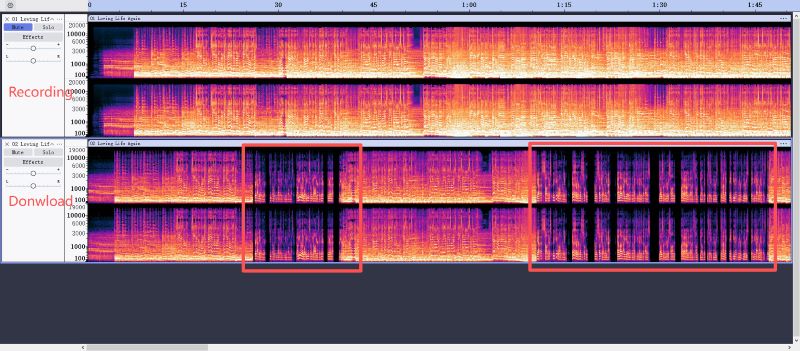
Still, the graph is a screening tool, not a forensic proof. Source, file history, and spectrum together tell the real story. If a file came from Bandcamp’s official purchase download, you usually do not need detective work. If it came from a random converter that promised “lossless 320,” you probably do.
The more interesting comparison is Bandcamp V0 vs 320, because that is where many buyers get stuck. In technical discussions like HydrogenAudio’s V0 vs 320 thread, V0 is not treated as fake or low-end. It is a high-quality variable bitrate preset that can allocate bits more flexibly than constant 320 in some passages. So the wrong fight is not “V0 is bad, 320 is good.” The wrong fight is “official V0 vs fake 320 from a preview rip.”
My practical read is simple:
- Choose official MP3 320 if you want the easiest label to recognize, predictable compatibility, and the least explanation when moving files between apps and DJ software.
- Choose official MP3 V0 if you are comfortable with VBR and want an efficient, still-legit MP3 option.
- Choose FLAC if this is archive material and you may convert later.
- Do not confuse any of those with a third-party file that merely says 320 in the filename.
Metadata and bulk reality for DJs, iTunes, and Rekordbox users
Metadata survival depends more on format choice than download tool. This is the part most downloader roundups barely touch: the file is only half the job. The other half is whether your library software can actually use it cleanly.
If you care about album art, artist fields, and stable sorting in iTunes, Music.app, Serato, or Rekordbox, MP3 and AAC are usually less dramatic than WAV. Community complaints about “Bandcamp lost my artwork” often turn out to be a format problem, not a Bandcamp problem: WAV is a weak choice when you expect embedded tags to survive every player and importer.
That leads to a more useful rule than “always download the highest quality”:
- For archive-first collectors, keep FLAC or WAV if you want, but make a tagged working library in MP3 or AAC.
- For DJs, official MP3 320 is usually the least annoying starting point if you want something that drops into library software without extra babysitting.
- For recorded audio, plan one cleanup step. This is where Cinch has a real advantage over bare recorders: it can auto-identify tracks, embed cover art and lyrics, and batch-edit metadata. You avoid ending up with a folder full of
track01_final_final.mp3files.
Bulk workflows matter here too. If you have 50+ purchased releases, a Batchcamp-style downloader solves the click problem. If your bigger friction is that your files land messy, Cinch solves a different problem: it cleans up the library side after capture. Those are not competing strengths. They fix different bottlenecks.
Which Tool Fits You
Most readers land in one of three patterns. If you already bought the music, use Bandcamp’s official download first—MP3 320 for DJ libraries, V0 if you accept variable bitrate, FLAC if you are archiving. If you need stable capture without handing login details to another tool, Cinch Audio Recorder is the broadest practical fit, but keep your expectations honest: preview audio stays preview quality. If you own a large collection and the real bottleneck is clicking, Batchcamp or a collection-downloader script solves the time problem.
For mixed situations—some purchases, some streams you can legally play, a library that still needs tags—Cinch handles both capture and cleanup. For simple situations, use the more specific tool instead.
One final rule before you pick: buying solves quality, recording solves stability, scripts solve scale. Everything else is mostly marketing noise. If you are still unsure, check the Quick shortlist table above or run a spectrum test on any file that claims 320kbps.
FAQ
Is it legal to convert Bandcamp streams to MP3?
It depends on what you are converting and where you live. Recording audio you already have legal access to play is often treated as personal use rather than access circumvention—but local copyright laws vary. What is clearly illegal in most jurisdictions is downloading content you never purchased for redistribution or resale. This article assumes you are either working with your own purchases or making personal recordings where your local rules allow it. If you are unsure, check your country’s copyright stance on format-shifting and personal archiving.
How do I download my entire Bandcamp collection at once?
Bandcamp does not offer one-click collection export, but you have two practical options:
- Browser extension route: Install Batchcamp (Chrome/Firefox), go to your Bandcamp collection page, and queue all albums for download in your preferred format. The extension automates the per-album click flow.
- Script route: Use
bandcamp-collection-downloaderorbandsnatchif you are comfortable with Python and CLI tools. These scripts log in as you, enumerate your collection, and download each release. They can break when Bandcamp changes its site structure, so test with a small batch first.
Both methods work only for albums you already purchased. If you need to capture non-purchased streams, Cinch Audio Recorder is the stable alternative—but remember, you are recording what Bandcamp actually plays.
Bandcamp FLAC vs MP3 V0: Which should DJs use?
Most DJs should stick with MP3 320 or MP3 V0 for working libraries. FLAC is ideal for archiving, but it is overkill for live sets and wastes storage on drives you will eventually replace. Here is the practical breakdown:
- FLAC: Best for long-term archive, future-proof, easy to transcode later. Downside: large files, slower library scans, not all DJ software loads it as smoothly as MP3.
- MP3 320 (CBR): Predictable quality, easy label to recognize, broad compatibility across Rekordbox, Serato, Traktor, and iTunes. The safest DJ choice.
- MP3 V0 (VBR): Slightly smaller files, high quality, but some DJs distrust the “variable” label even though V0 is not low-end. If you understand VBR and want efficiency, V0 is legit.
The wrong comparison is “FLAC vs MP3” in isolation. The real question is: does your source file actually match its label? A fake 320kbps MP3 from a preview rip will sound worse than a genuine V0 download, regardless of container. Always verify with Spek before trusting a file for a club set.